DBS
SECTION 400 (Version 3.0)
Programming Method
Issue 1 January 1990
2
-
3
Initial Set
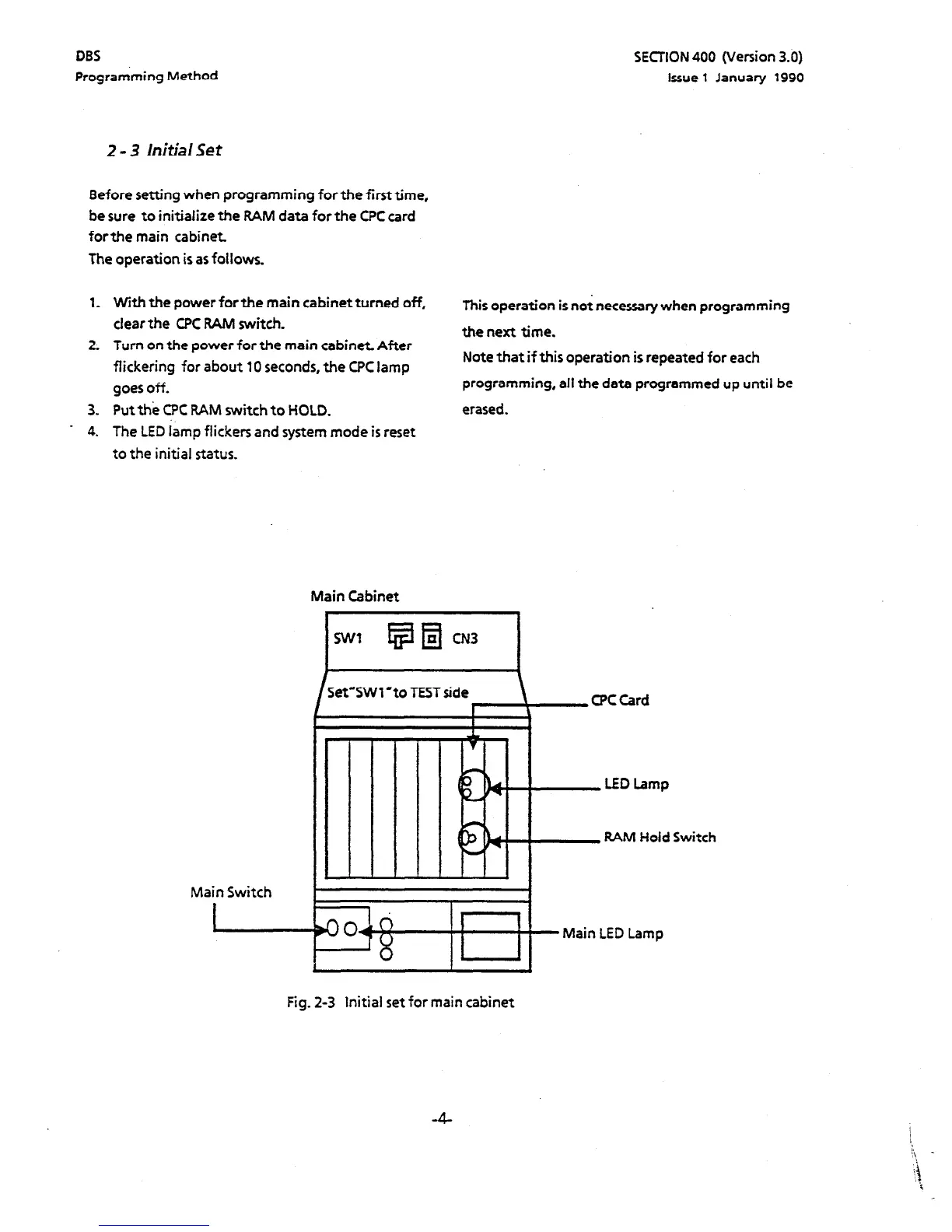
Before setting when programming for the first time,
be sure to initialize the RAM data for the CPC card
forthe main cabinet.
The operation is as follows.
1.
2:
3.
* 4.
With the power for the main cabinet turned off,
This operation is not necessary when programming
clear the CPC BAM switch.
the next time.
Turn on the power for the main cabinet After
flickering for about 10 seconds, the CFC lamp
goes off.
Put the CPC RAM switch to HOLD.
The LED lamp flickers and system mode is reset
to the initial status.
Note that if this operation is repeated for each
programming, all the data programmed up until be
erased.
Main Cabinet
I
SW1 i$ q
CN3
I
Set’SWl’to TEST side
!
CPC Card
\
RAM Hold Switch
Main Switch
I
Fig. 2-3 Initial set for main cabinet
-4-



 To Next Page