SECTION 400 (Version 3.0)
Issue 1 January 1990
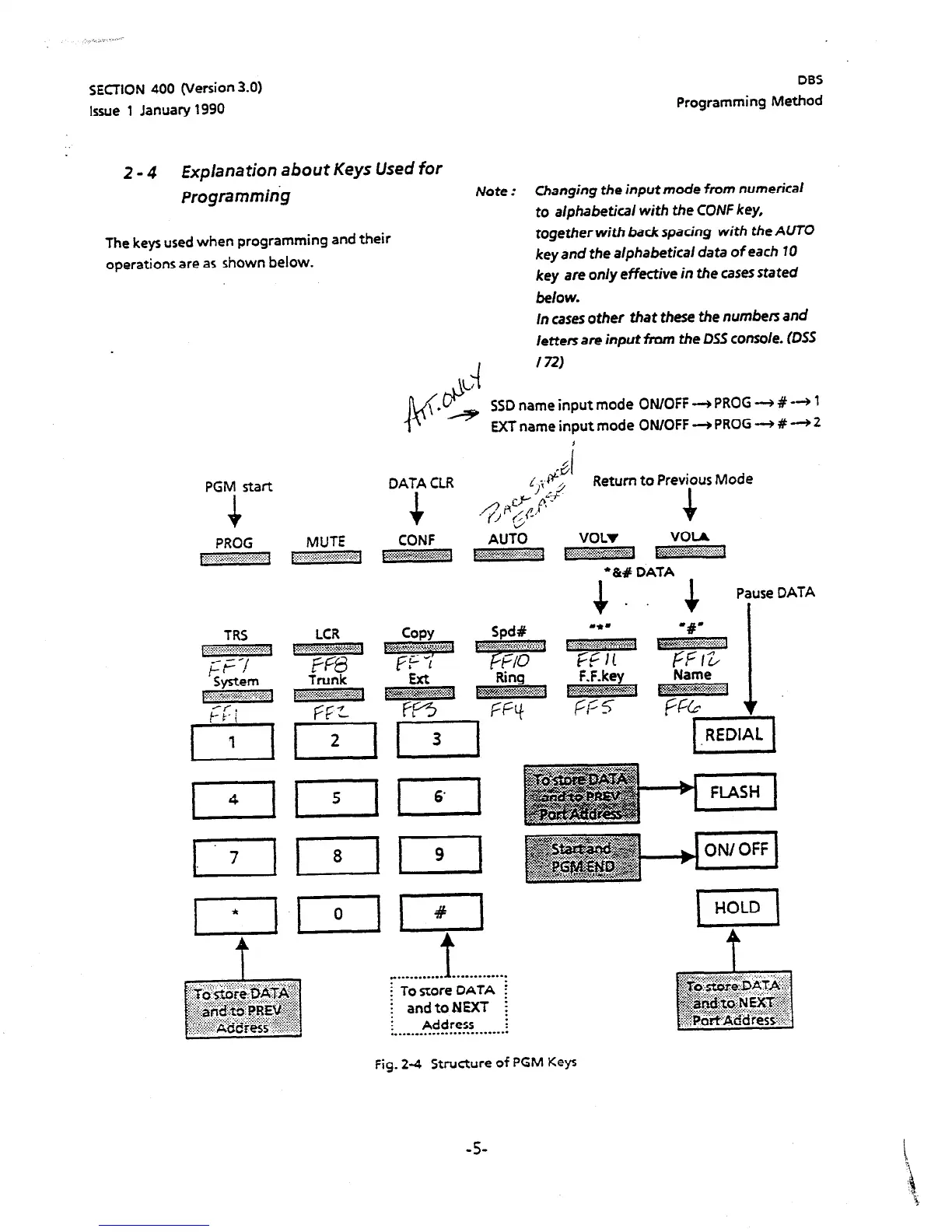
2 - 4 Explanation about Keys Used for
Programmihg
The keys used when programming and their
operations are as shown below.
II
PGM start
DATA CLR
+
DBS
Programming Method
Note :
Changing the input mode from
numerical
to alphabetical with the CONF key,
together with back spacing with the AUTO
key and the alphabeticai data of each 10
key are only effective in the cases stated
below.
In cases
other
that these the
numbers
and
letters are input from the DSS console. (DSS
-I
172)
L/ b
v
\ .
&
e SSD name input mode ON/OFF -+ PROG -+ # -3 1
EXT name input mode ON/OFF -+ PROG -+ # -+ 2
f
4
1
i!;ct;,
Return to Previpus Mode
PROG MUTE
CONF
VOLI VOIA
. . . . . ..‘.‘......) :.F..:.:.,.:
,....A . . . . . . . . :.:...~.:.::::::~::i::::. ..~::~~~~~~~~~;~~~~~~
l
‘&# DATA
. .
. . . . . . . . . . . .
1 . . ..-...-..-.
i To store DATA i
; and toNEXT ;
Address :
:...........--...-.-....--..
Pause DATA
1.
Fig. 2-4 Structure of PGM Keys
-5-





 To Next Page