DBS
FF-5 iF key function mode
SECTION 400 (Version 3.0)
Issue 1 January 1990
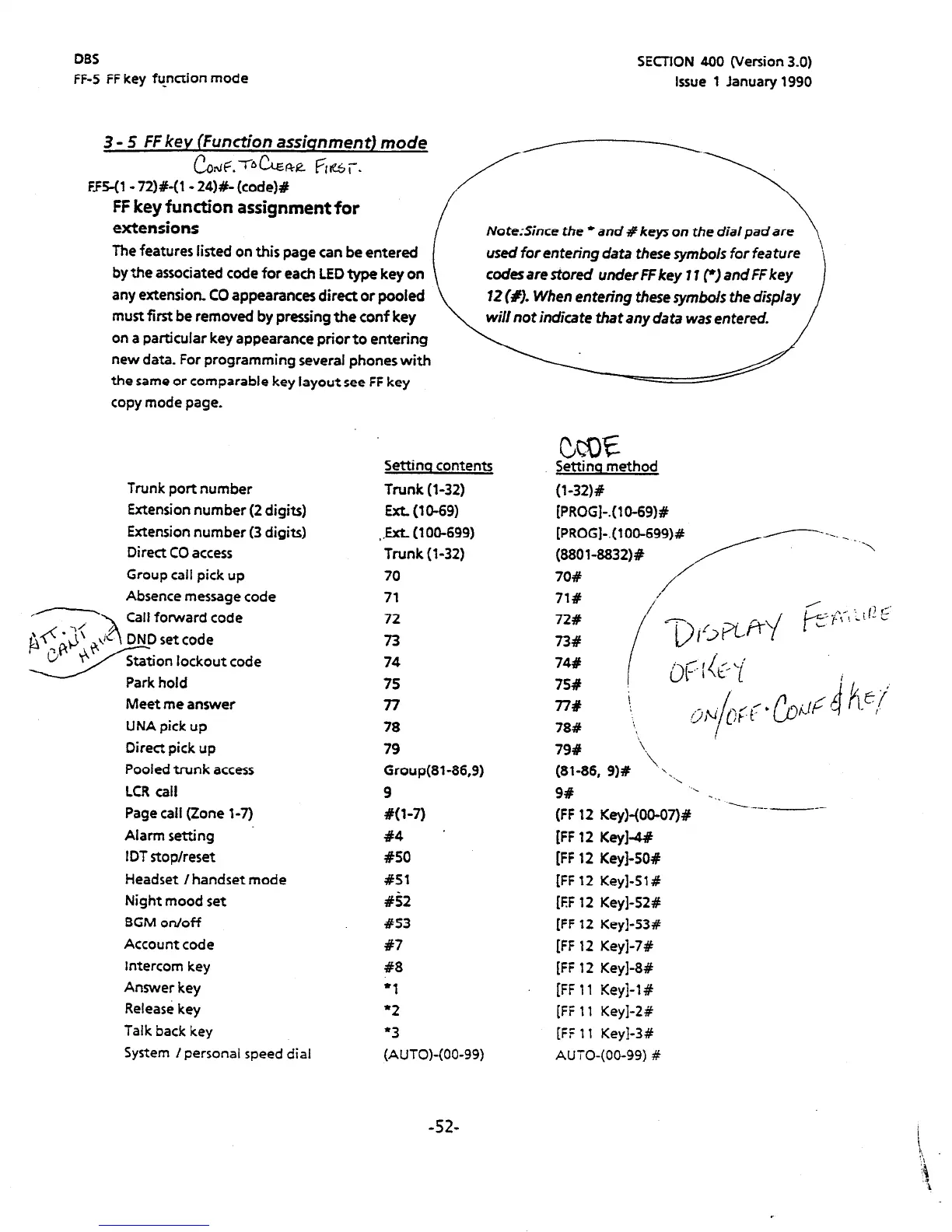
3 - 5 FF key (Function assiqnmenr) mode
&nlF.TbbRe fit&T.
F15-(1 - 72)P(l- 24)#- (code)#
FF key function assignment for
extensions
The features listed on this page can be entered
by the associated code
for each
LED type key
on
any extension. CO appearances direct or pooled
must first be removed by pressing the conf key
on a particular key appearance priorto entering
new data. For programming several phones with
the same or comparable key layout see FF key
copy mode page.
NorerSince
the
*
and
# keys on
the
dial pad are
used for entering data these symbols for feature
codes are tiered under FF key 11 r) and
FF key
12 (#). When entering these symbols the display
will nor indicate
that
any data was entered.
Trunk port number
Extension number (2 digits)
Extension number (3 digits)
Direct CO access
Group call pick up
Absence message code
Call forward code
code
Meet me answer
UNA pick up
Direct pick up
Pooled trunk access
LCR call
Page call (Zone l-7)
Alarm setting
IDT stop/reset
Headset /handset mode
Night mood set
BGM on/off
Account code
Intercom key
Answer key
Release key
Talk back key
System I personal speed dial
Settina contents
Trunk (l-32)
Ext. (10-69)
.ExL (100-699)
Trunk (l-32)
70
71
72
73
74
75
77
78
79
Group(81-86,9)
9
#(l-7)
#4
#SO
#51
#52
#53
87
#8
‘I
‘2
l
3
(AUTO)-(00-99)
Settino method
(1-32)#
[PROGI-.( lo-69)#
78# ‘-$
79#
‘\
\,
(81-86, 9)# ..,
9#
‘.
-._
(FF 12 Key)-(00-07)#
-----.--_ -_-
IFF 12 Key&W
[FF 12 Key]-50#
IFF 12 Key]-51 #
[EF 12 Key]-52#
[FF
12 Key]-53#
[FF 12 Key]-7#
[FF 12 Key]-8#
[FF 11 Key]-l#
[FF 11 Key]-2#
[iF
11 Key]-3#
AUTO-(00-99) #
-52-












 To Next Page