SECTION 400 (Version 3.0) DES
Issue 1 January 1990 FF-5 FF key function mode
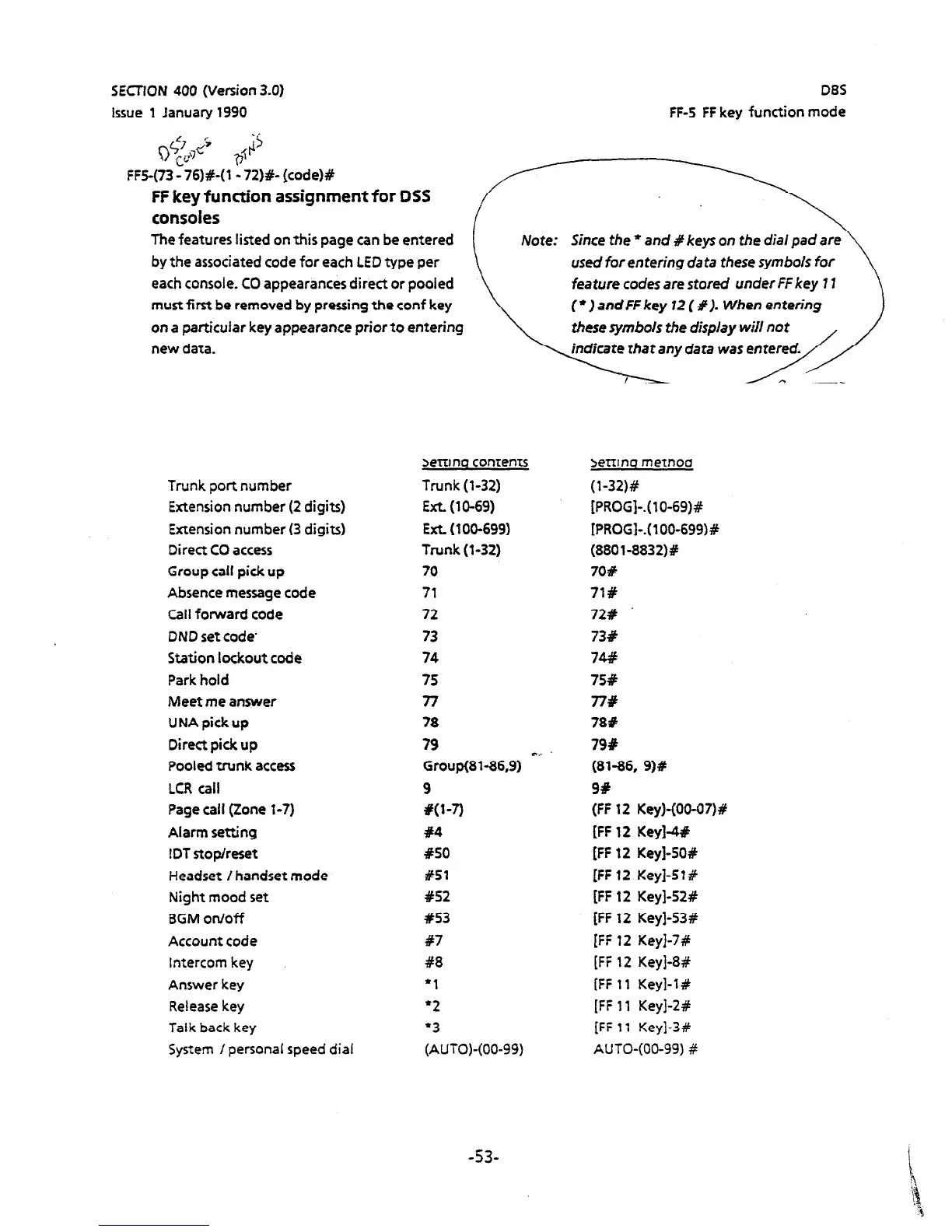
FF5-(73 - 76)#-(1 - 72)#- (code)#
FF key function assignment for DSS
consoles
The features listed on this page can be entered
by the associated code for each LED type per
each console. CO appearances direct or pooled
must first be removed by pressing the conf key
on
a particular key appearance prior to entering
Since
the *
and #keys on the dial pad are \
used for entering data
these
symbols for
feature codes are stored under FF key 1 I
(
l
) and FF key 72 ( % ). When entering
these symbols the display will not ,
new data.
Trunk port number
Extension number (2 digits)
Extension number (3 digits)
Direct CO access
Group call pick up
Absence message code
Call forward code
DND set code
Station lockout code
Park hold
Meet
me answer
UNA
pick up
Direct pick up
Pooled trunk access
LCR call
Page call (Zone l-7)
Alarm setting
!DT stop/reset
Headset ! handset mode
Night mood set
BGM on/off
Account code
Intercom key
Answer key
Release key
Talk back key
System /personal speed dial
indicate that any data was entered.
\7---rp
Settino contents
Trunk (l-32)
Ext. (10-69)
EXL (100-699)
Trunk (l-32)
70
71
72
73
74
75
77
78
79
Group(Sl-86.9) Cr
9
w-7)
#4
#SO
#Sl
#52
x53
87
C8
‘1
‘2
‘3
(AUTO)-(00-99)
Settino method
(l-32)#
[PROG]-.( lo-69)#
[PROGI-.( l OO-699)#
(8801-8832)#
708
71%
72#
73#
74#
75%
77#
78#
79#
(81-86, 9)#
9%
(FF 12 Key)-(00-07)#
[FF 12 Key]-4#
[FF 12 Key]-50#
[FF 12 Key]-5?#
[FF 12 Key]-52#
[FF 12 Key]-53#
[FF 12 Key]-7#
[FF 12 Key]-8#
[FF 11 Key]-1#
[FF 11 Key]-2#
[FF 17 Key]-3#
AUTO-(00-99) #
-53-












 To Next Page