33
4-3. Understanding Dual memory card slots
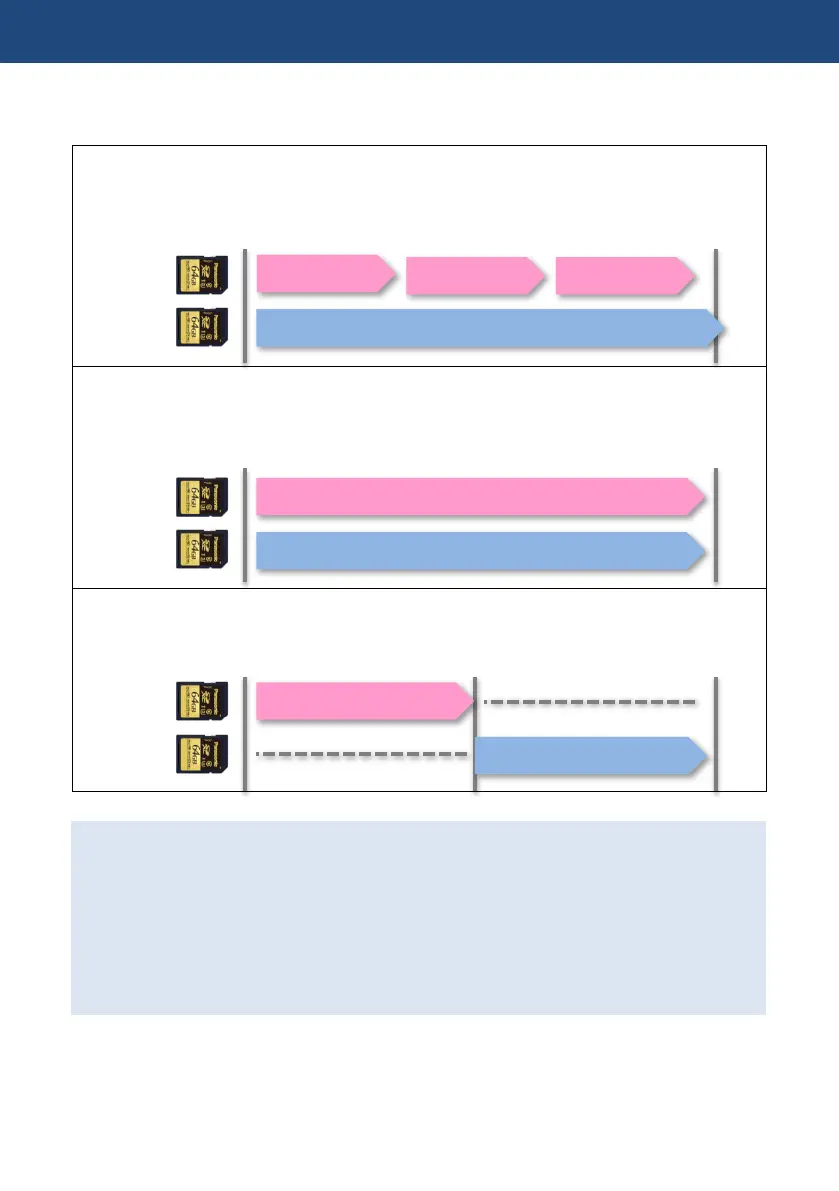
Various recording modes are available with dual SD memory card slots.
BACKGROUND
Perform continuous recording to one SD card, even though the other SD card can start and stop
recording as required.
This mode can be used with FHD 50M or AVCHD record format only.
SIMUL
Record the same content onto two SD cards simultaneously. Even if recording stops on one
card, recording on the other card continues.
This mode cannot be used if mounted SD card types (i.e. SDHC or SDXC) are different.
RELAY
Recording is taken over from one to another card (video and audio data are seamlessly record).
Suitable for long-time recordings
Using the Two-slot features
1. Set MENU > SYSTEM MODE > OUTPUT BITS: 4:2:2 (8bit).
2. MENU > RECORDING SETUP > 2SLOT FUNC: OFF / RELAY / SIMUL / BACKGROUND
NOTE: the two-slot features do not work under the following conditions.
- Variable frame rate record mode (VFR) is ON.
- Interval recording mode is ON.
- OUTPUT BITS setting is set “4:2:2(10bit)
4. Understanding advanced features













 To Next Page