57
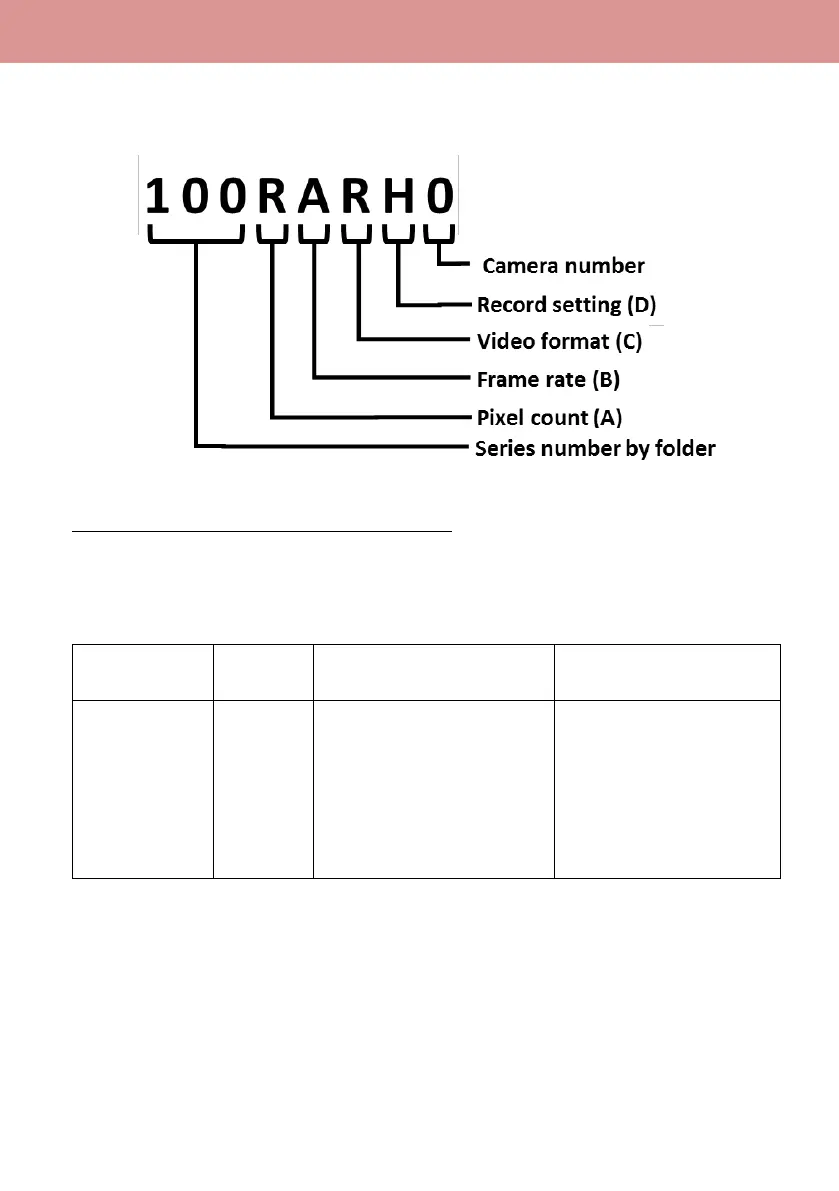
6-3. Folder name structure for MOV/MP4 folders
Following information determines the folder names that stores clips in MOV/MP4 formats.
Example: When a folder is named as “100RARH0”
The folder contains following video clips.
- Pixel count: “3840x2160”
- Frame rate: “59.94fps”
- Record format: MP4 LPCM progressive
Y: 1920 x 1080
R: 3840 x 2160
Q: 4096 x 2160
A: 59.94
B: 50
C: 29.97
D: 25
E: 24.00
F: 23.98
J: Interlace (MOV, LPCM)
K: Interlace (MP4, LPCM)
Q: Progressive (MOV, LPCM)
R: Progressive (MP4, LPCM)
X: Fast scan (MP4, LPCM)
Y: Fast scan (MOV, LPCM)
D: Sub recording at 50Mbps
E: Sub recording at 8Mbps
P: Main recording
H: Other than above
What is camera number?
This is to allow users to identify the camera by looking at recorded folders. Any number from 0 to 9
can be set with the following menu item.
MENU > SYSTEM MODE > CAMERA NUMBER SET: 0 to 9













 To Next Page