EYFR03 User Manual 6 of 110 v1.6.0
Quick Start 20 January 2020
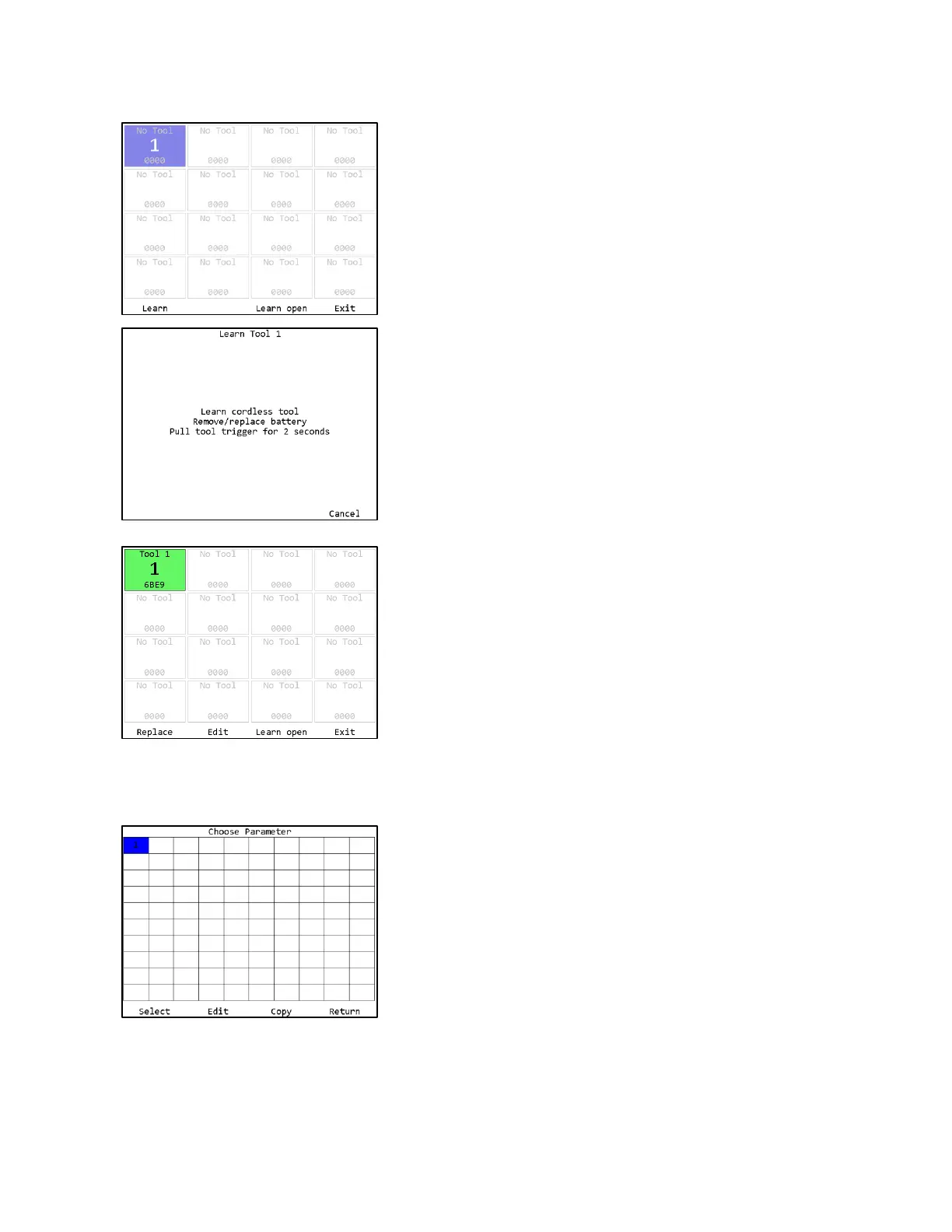
If the tool you are going to learn to the qualifier has
previously been used with another unit, make sure that
unit is off before continuing. Press the button beneath
Learn to begin the learn process.
Follow the directions on screen to learn the tool.
If you get a message “Cannot replace with a tool with
different type”, it means you are learning a 1-way tool
over top of a learned 2-way tool or vice-versa.
Once the tool is learned’ the slot turns green to confirm
successful, then it will turn blue.
The unit will return to the Tools screen with the just
learned tool now with a tool name of “Tool 1” instead of
“No Tool”.
Return to the menu by pressing ESC or the button below
Exit. Then press ENT to go to the Parameters screen.
To run a tool, you must activate a parameter that uses the tool. When learned, a tool is
automatically associated with the parameter of the same number. If you are following this guide
with a new unit, you should have just learned Tool 1, which can be run by Parameter 1.
Press the button below Select to select Parameter 1.







 To Next Page