Before Use
-12-
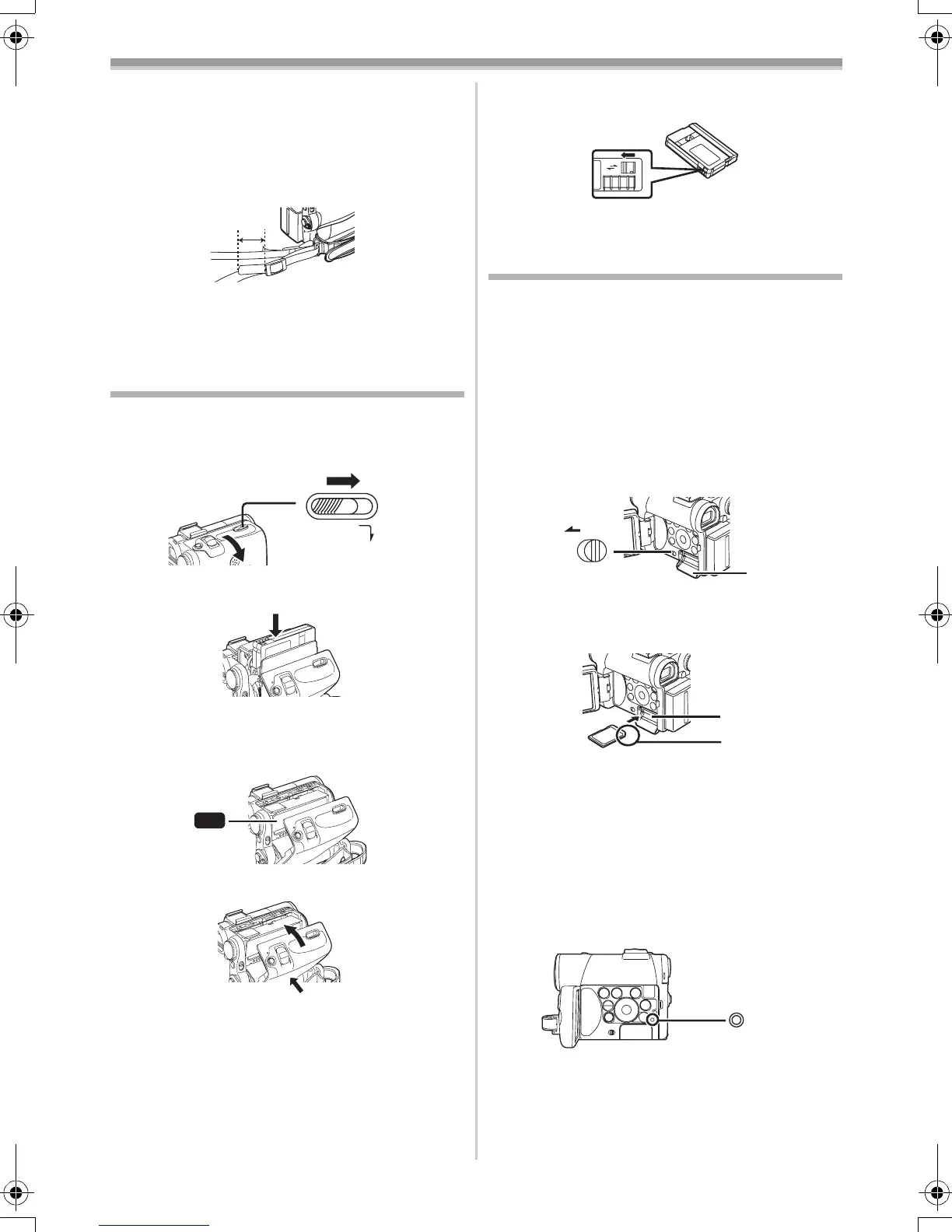
2 Fold the end of the Shoulder Strap, run it
through the Shoulder Strap Length
Adjuster, and pull it.
≥Pull it out more than 2 cm 1 from the
Shoulder Strap Length Adjuster so that it
cannot slip off.
≥Attach the other end of the Shoulder Strap to
the other Shoulder Strap Holder in the same
way.
Inserting a Cassette
1 Slide the [OPEN/EJECT] Lever (41) toward
the front and pull down to open the
Cassette Compartment Cover.
2 Insert a Cassette.
3 Close the Cassette Holder by pressing the
[PUSH] mark 1.
4 Close the Cassette Compartment Cover.
ª Accidental Erasure Prevention
Opening the accidental erasure prevention slider
1 on the cassette (by sliding it to the [SAVE]
arrow direction) prevents recording. To enable
recording, close the accidental erasure
OPEN /
EJECT
(41)
PUSH
1
prevention slider (by sliding it to the [REC] arrow
direction).
≥For other notes concerning this item, see
-48-.
Using a Card
A Card can be used to record pictures.
ª Caution before inserting/removing a
Card
Be sure to turn off the Movie Camera.
≥Otherwise, the Movie Camera may not function
properly or it may cause the loss of recorded
data in a Card.
ª Inserting a Card
1 Slide the [OPEN] Lever (3) to open the Card
Slot Cover
(5).
2 While holding the Memory Card with its cut
corner facing right 1, insert it into the Card
Slot
(4).
3 Close the Card Slot Cover (5) securely.
Removing the Card
Open the Card Slot Cover and press the centre of
the Card and then pull it straight out.
≥After removing the Card, close the Card Slot
Cover.
≥
The Movie Camera may be damaged if the Card is
forced out when the Card is fully inserted.
ª Card Access Lamp (17)
While the Movie Camera is accessing the Card
(reading, recording, playback or erasing), Card
Access Lamp lights up.
≥While Card Access Lamp is on, never attempt
to open the Card Slot Cover, to pull out the
Card, to turn off the Movie Camera, or to turn
the Mode Dial. Such actions will damage the
R E C
SAVE
1
OPEN
(3)
(5)
1
(4)
(17)
55B-ENG.book 12 ページ 2004年2月4日 水曜日 午前11時54分






 To Next Page