Editing Mode
-42-
5
To start Audio Dubbing, press the [;]
Button
(73) on the Remote Controller.
To Cancel Audio Dubbing
Press the [;] Button (73) on the Remote
Controller.
The Movie Camera is in the Still Playback Mode
again.
To Play Back the Sound Recorded by 12bit
Audio Dubbing
Set [TAPE PLAYBACK MENU] >> [PLAYBACK]
>> [12bit AUDIO] >> [ST2] or [MIX].
ST1: It plays back only the original sound.
ST2: It plays back only the sound added by Audio
Dubbing.
MIX: It plays back both the original sound and the
sound added by Audio Dubbing
simultaneously.
To Dub Audio While Listening to a
Pre-recorded Sound
When pausing the audio dubbing, set the
[12bit AUDIO] on the [PLAYBACK] Sub-Menu to
[ST2] and you can check the pre-recorded sound.
When a microphone is used for audio dubbing,
use headphones to listen to the pre-recorded
sound while dubbing the audio. (When using
headphones, set [AV JACK] on the [AV IN/OUT]
to [OUT/PHONES].) When the line input is used,
you can dub audio while listening to the
pre-recorded sound from the speaker.
(The [AV JACK] setting and the line input are on
NV-GS55 Model only.)
≥For other notes concerning this item, see
-53-.
Copying on an S-VHS (or a VHS)
Cassette
(Dubbing)
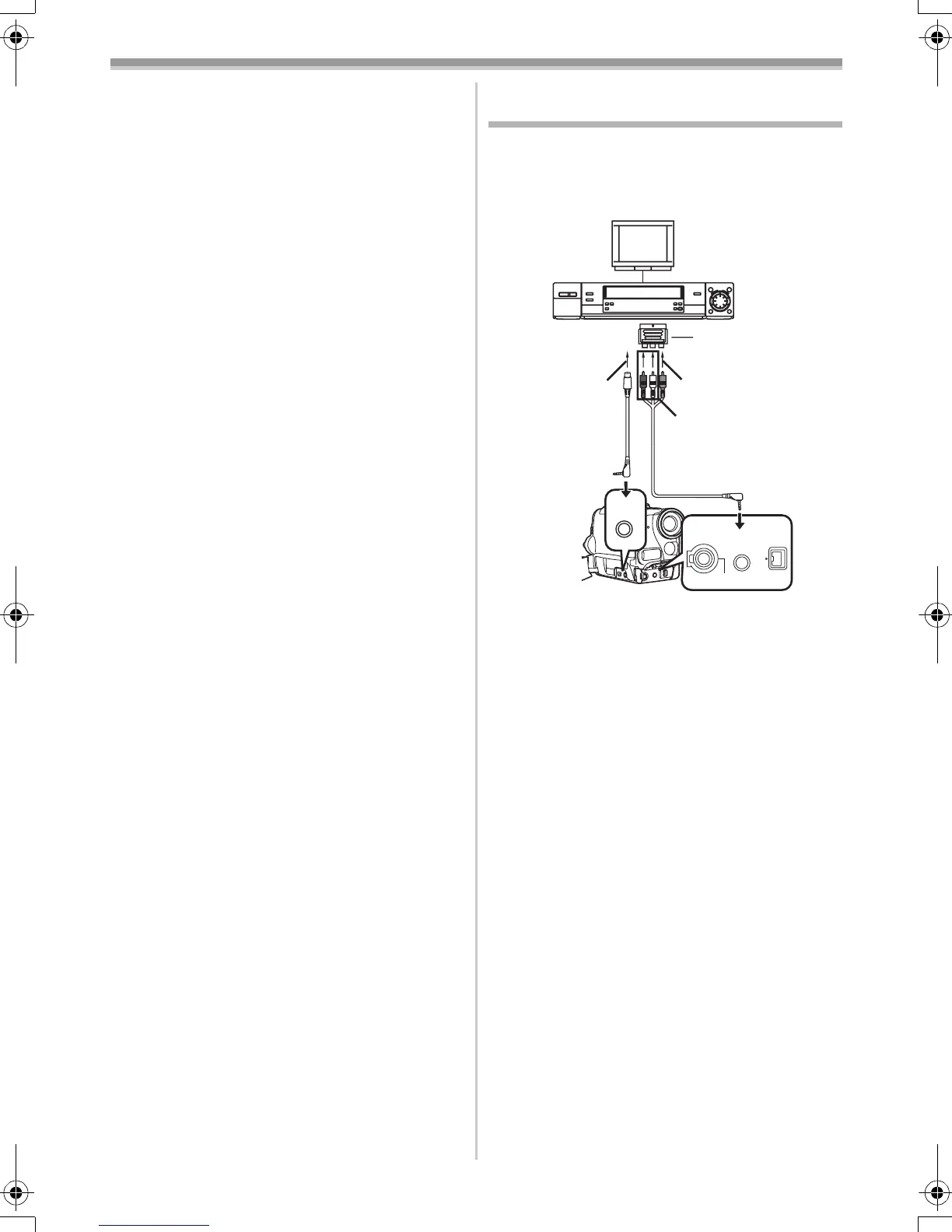
After connecting the Movie Camera and the
VCR as illustrated, start the following
procedures.
1 AV Cable
2 S-Video Cable
≥If your TV is not equipped with AV Input
Sockets, the 21-pin Adaptor (purchase
separately) is necessary. Consult your dealer.
≥Be sure to press the [OSD] Button (
-7-) on the
Remote Controller prior to copying so that no
indications are visible. Otherwise, the displayed
tape counter and function indications are also
copied.
Movie Camera:
1 Insert the recorded Cassette.
VCR:
2 Insert an unrecorded Cassette with an
erasure prevention tab.
≥If various setups (such as external input, tape
speed, etc.) are required, please refer to the
operating instructions of your VCR.
Movie Camera:
3 Press the [1] Button to start playback.
VCR:
4 Start recording.
5 Press the Pause or Stop Button to stop
recording.
Movie Camera:
6 Press the [∫] Button to stop playback.
21-pin Adaptor
1
2
[VIDEO IN]
[AUDIO IN]
[S-VIDEO IN]
S-VIDEO
IN/OUT
AV IN/OUT
PHONES
REMOTE/MIC
DV
(PLUG IN POWER)
55B-ENG.book 42 ページ 2004年2月4日 水曜日 午前11時54分




 To Next Page