Before Use
-7-
[TALK] Button is pressed, the built-in
microphone does not operate.
-21-
≥When connecting the pin plug of the Free
Style Remote Controller with Mic to this
socket, plug it in as far as it goes.
≥A compatible plug-in powered microphone
can be used.
≥The microphone may make noises
depending on the type of it. In this case, we
recommend using the battery for the Movie
Camera.
(35) Audio-Video Input/Output Socket
[AV IN/OUT] (Input function on NV-GS55
Model only)
-40-
Headphone Socket [PHONES]
≥Connecting an AV Cable to this socket
activates the Movie Camera’s built-in
speaker, but connecting a headphone, etc.
deactivates it.
≥When connecting the pin plug of the AV
Cable to this socket, plug it in as far as it
goes.
≥When using headphones, set [AV JACK] of
the [AV IN/OUT] (NV-GS55 only) or
[INITIAL] sub-menu to [OUT/PHONES]. If
you set [AV JACK] to [OUT], you may hear
noises on the right.
(36) DV Terminal [DV] (Input function on
NV-GS55 Model only)
-43-
≥Connect this to the digital video equipment.
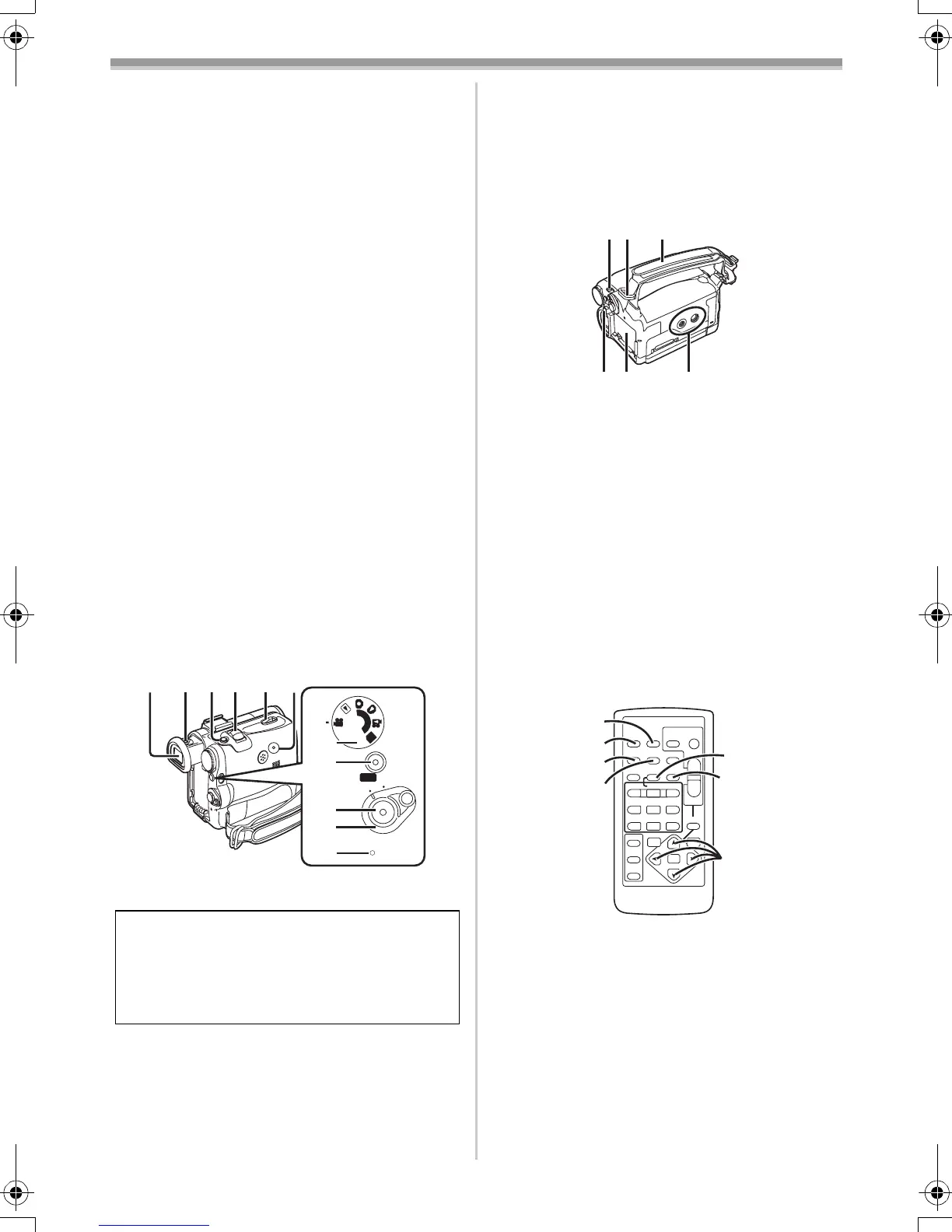
(37) Viewfinder -13-, -57-
(38)
Eyepiece Corrector Knob -13-
(39)
Photoshot Button [PHOTO SHOT] -21-, -41-
(40)
Zoom Lever [W/T] [`VOL/JOG_] -23-
(41)
Cassette Eject Lever [OPEN/EJECT] -12-
(42)
Reset Button [RESET] -48-
(43)
Mode Dial -13-
Due to limitations in LCD production
technology, there may be some tiny bright or
dark spots on the Viewfinder screen.
However, this is not a malfunction and does
not affect the recorded picture.
PC
S
D
START
ON
OFF
QUICK
(37)(38)(39)(40)(41)(42)
(43)
(44)
(45)
(46)
(47)
(44)
Quick Start Recording Button
[QUICK START]
-23-
Quick Start Recording Lamp -23-
(45)
Recording Start/Stop Button -20-, -22-
(46)
Power Switch [OFF/ON] -13-, -20-, -54-
(47)
Power Lamp -13-, -20-, -32-
(48)
Mode Selector Switch
[AUTO/MANUAL/FOCUS]
-20-, -27-
(49)
Shoulder Strap Holders -11-
(50)
Grip Belt (One-touch Free Style Grip Belt)
-10-
(51)
Battery Eject Button [PUSH BATT] -10-
(52)
Battery Holder
(53) Tripod Receptacle
≥Used for mounting the Movie Camera on an
optional tripod.
ª Remote Controller
Using the wireless Remote Controller that is
supplied with the Movie Camera, most of the
Movie Camera functions can be operated from a
distance.
(54) Date/Time Button [DATE/TIME] -47-
(55)
Indication Output Button [OSD] -40-
(56)
Display Button [DISPLAY] -47-
(57)
Reset Button [RESET] -60-
(58)
Recording Button [¥REC] (Available only
with NV-GS55)
-43-
(59)
Audio Dubbing Button [A.DUB] -41-
(60)
Cursor Buttons for Variable Speed
Search Function [π, ∫]
-33-
Direction Buttons for Playback Zoom
Function [π, ∑, ∏, ∫]
-34-
(48)(49)(50)
(51)(52)
(53)
ZOOM
INDEX INDEX
SELECT
STORE
STOP
KL
∫
OSD
DISPLAY
V
/REW
STILL ADV
OFF/ON
P. B. D I GI TA L
DATE/
TIME
RESET
TITLE
T
W
sVOL r
¥REC
MULTI/
P-IN-P
PHOTO
SHOT
START/
STOP
A.DUB
PLAY
PAU SE
FF/
W
STILL ADV
ENTER
61 5
;
ED
VAR .
SEARCH
MENU
P.B. ZOOM
(54)
(55)
(56)
(57)
(58)
(59)
(60)
55B-ENG.book 7 ページ 2004年2月4日 水曜日 午前11時54分






 To Next Page