Playback Mode
-40-
Playing Back on Your TV
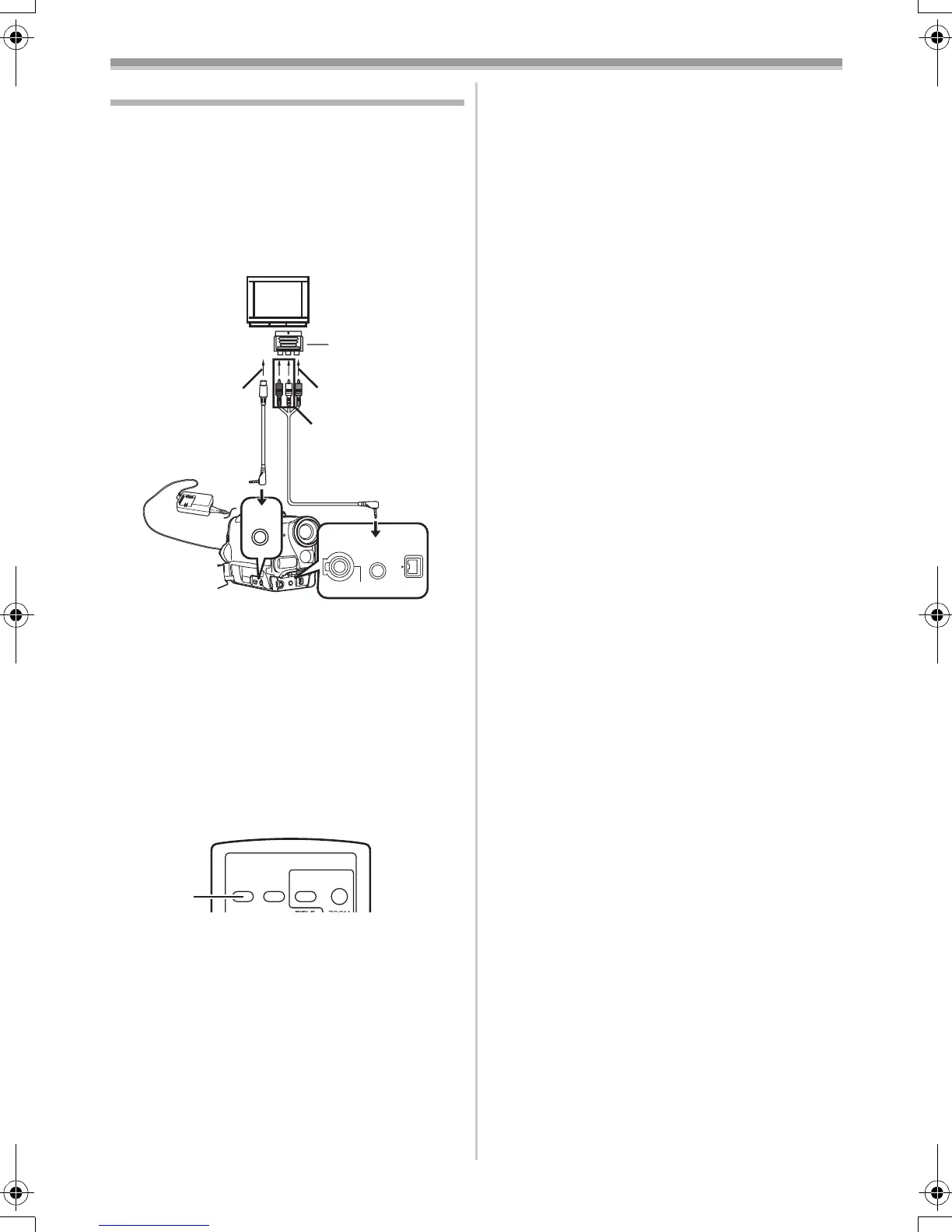
By connecting your Movie Camera with your TV,
the recorded scenes can be viewed on your TV
screen.
≥Before connecting them, turn off the power of
both the Movie Camera and TV.
1 Connect the [AV IN/OUT] Socket of the
Movie Camera and the Video and Audio
Input Sockets of the TV.
≥Connect to the TV with the AV Cable 1,
make a connection with the TV. If the TV has
an S-Video Socket, connect the S-Video
Cable 2, too.
≥When plugging the pin plug of the AV cable
into the [AV IN/OUT] Socket, plug it in as far
as it goes.
To Make the Indications Appear on the TV
Screen
Press the [OSD] Button (55) on the Remote
Controller.
≥If your TV is not equipped with AV Input
Sockets, the 21-pin Adaptor (purchase
separately) is necessary. Consult your dealer.
≥For other notes concerning this item, see
-53-.
21-pin Adaptor
1
2
[VIDEO IN]
[AUDIO IN]
[S-VIDEO IN]
S-VIDEO
IN/OUT
AV IN/OUT
PHONES
REMOTE/MIC
DV
(PLUG IN POWER)
OSD
DATE/
TIME
PHOTO
SHOT
START/
STOP
(55)
55B-ENG.book 40 ページ 2004年2月4日 水曜日 午前11時54分






 To Next Page