Editing Mode
-43-
Recording the Contents of Other
Equipment
(NV-GS55 only)
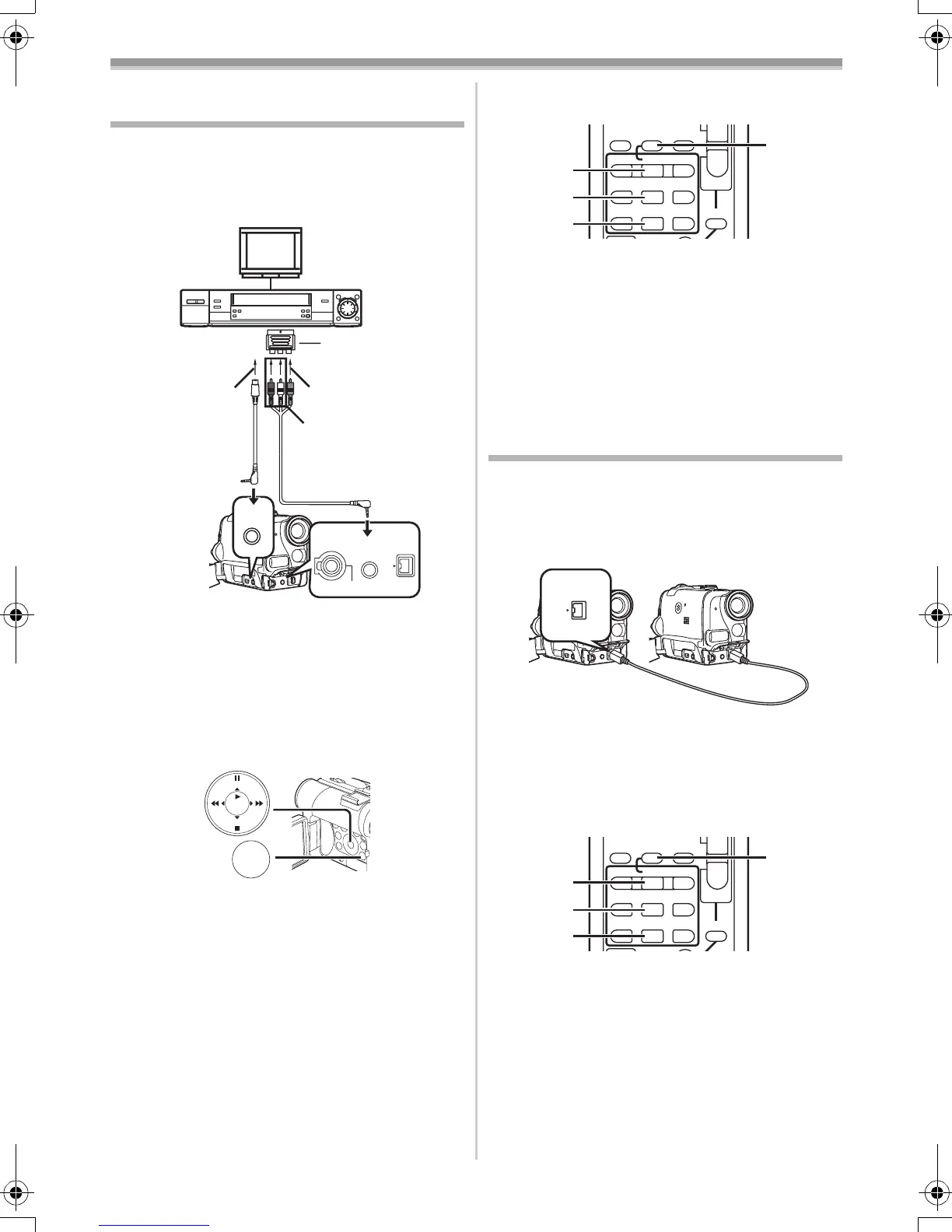
After connecting the Movie Camera and the
other equipment as illustrated, start the
following procedures.
1 AV Cable
2 S-Video Cable
≥If your TV is not equipped with AV Output
Sockets, the 21-pin Adaptor (purchase
separately) is necessary. Consult your dealer.
Movie Camera:
1 Set [TAPE PLAYBACK MENU] >>
[AV IN/OUT] >> [AV JACK] >> [IN/OUT].
2 Insert an unrecorded Cassette.
Other Equipment:
3 Insert a recorded Cassette and start
playback.
Movie Camera:
4 While pressing the [REC] Button (58), press
the [PLAY] Button
(76).
Or while pressing the [REC] Button
(10),
[VIDEO OUT]
[AUDIO OUT]
[S-VIDEO OUT]
21-pin Adaptor
1
2
S-VIDEO
IN/OUT
AV IN/OUT
PHONES
REMOTE/MIC
DV
(PLUG IN POWER)
MENU
STILL
ENTER
FADE
is
(18)
press the [BACK LIGHT] Button (11) on the
Movie Camera.
≥When recording on a card, press the
[PHOTO SHOT] Button or the Recording
Start/Stop Button.
5 Press the [;] Button (73) or [∫] Button (74)
to stop recording.
Other Equipment:
6 Press the Stop Button to stop playback.
≥For other notes concerning this item, see
-54-.
Using the DV Cable for Recording
(Digital Dubbing)
By connecting this Movie Camera to other digital
video equipment that has a DV Input/Output
Terminal with a DV Cable VW-CD1E (optional)
1, dubbing can be done in the digital format.
≥Only the NV-GS55 can be used as a Recorder.
Player/Recorder:
1 Insert the Cassette and set to Tape
Playback Mode.
Player:
2 Press the [1] Button (76) to start playback.
Recorder:
3 While pressing the [REC] Button (58), press
the [PLAY] Button
(76).
Or while pressing the [REC] Button
(10),
press the [BACK LIGHT] Button
(11) on the
Movie Camera.
≥Recording starts.
To Stop Dubbing
Press the [;] Button (73) or the [∫] Button (74).
≥For other notes concerning this item, see
-54-.
INDEX INDEXSTOP
KL
∫
V
/REW
STILL ADV
W
sVOL r
¥REC
MULTI/
P-IN-P
A.DUB
PLAY
PAUSE
FF/
W
STILL ADV
61 5
;
ED
P. B . Z O O M
(58)
(76)
(73)
(74)
1
DV
INDEX INDEXSTOP
KL
∫
V
/REW
STILL ADV
W
sVOL r
¥REC
MULTI/
P-IN-P
A.DUB
PLAY
PAUSE
FF/
W
STILL ADV
61 5
;
ED
P. B . Z O O M
(58)
(76)
(73)
(74)
55B-ENG.book 43 ページ 2004年2月4日 水曜日 午前11時54分






 To Next Page