Before Use
-13-
Card, and recorded data, and cause the Movie
Camera to malfunction.
Turning on the Movie Camera
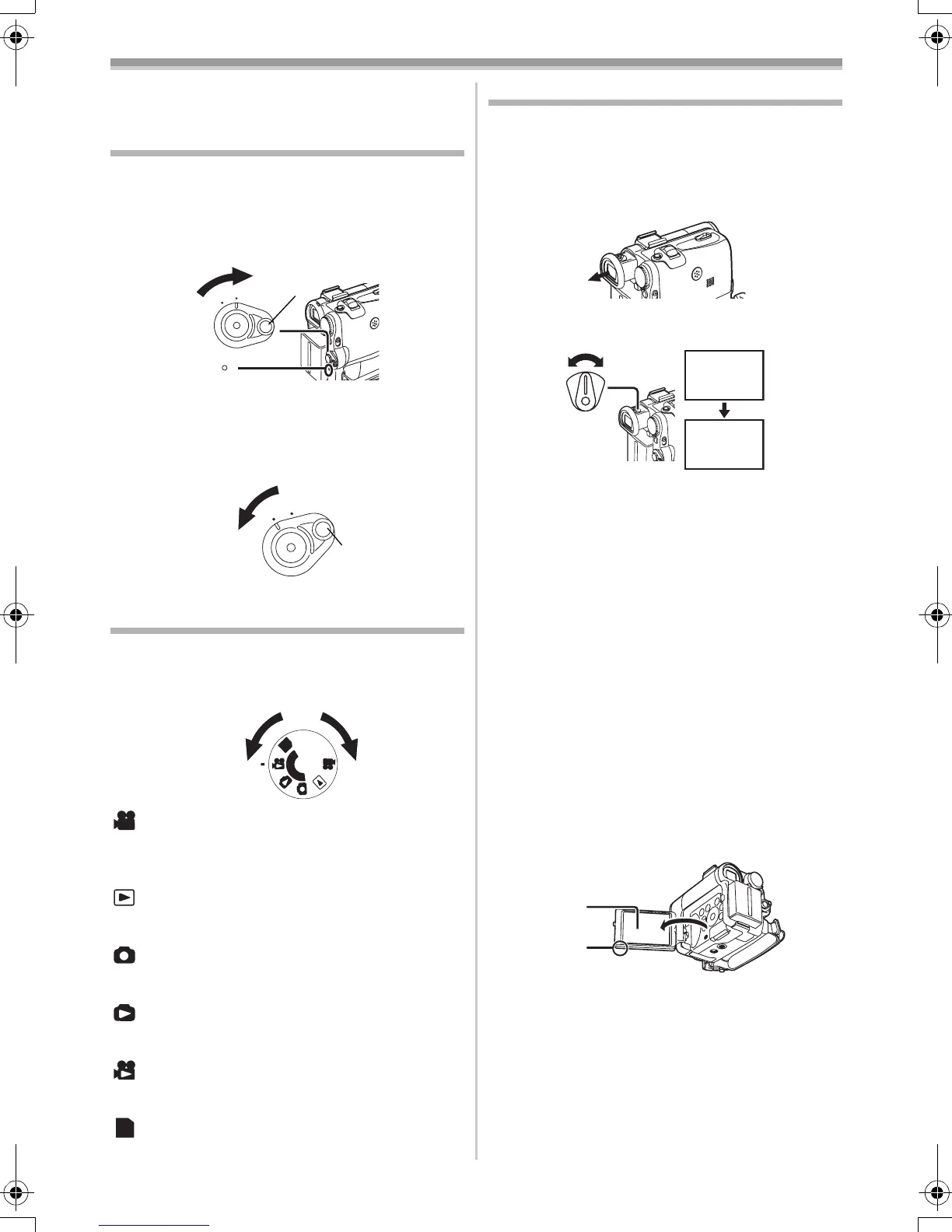
ª How to Turn on the Power
1 Set the [OFF/ON] Switch (46) to [ON] while
pressing the button 1.
≥The [POWER] Lamp
(47) lights up.
ª How to Turn off the Power
1
Set the [OFF/ON] Switch (46) to [OFF] while
pressing the button 1.
Selecting Modes
You can choose a desired mode by rotating the
Mode Dial.
1 Rotate the Mode Dial (43).
:Tape Recording Mode
Use this mode when recording pictures on a tape.
Also, you can record still pictures on the card
simultaneously during recording on a tape.
:Tape Playback Mode
Use this mode when playing back the recorded
scene on a tape.
:Card Recording Mode
Use this mode when recording still picture or
moving picture on a card.
:Picture Playback Mode
Use this mode when playing back the recorded
still picture on a card.
:MPEG4 Playback Mode
Use this mode when playing back the recorded
moving picture on a card.
:PC Mode
Use this mode when you want to connect the
Movie Camera to your Personal Computer.
ON
OFF
(46)
(47)
1
ON
OFF
(46)
1
P
C
S
D
(43)
PC
Using the Viewfinder/LCD Monitor
ª Using the Viewfinder
Before using the Viewfinder, adjust the field of
view so that the displays inside the Viewfinder
become clear and easy to read.
1 Pull the Viewfinder.
2 Adjust by turning the Eyepiece Corrector
Knob
(38).
To Use the Viewfinder at the Same Time as the
LCD Monitor
Set [LCD/EVF] >> [EVF ON/AUTO] >> [ON].
≥The Viewfinder does not turn off even if the LCD
Monitor is opened.
≥When you turn the Movie Camera off, this
setting is cancelled.
ª Using the LCD Monitor
With the LCD Monitor open, you can also record
the picture while watching it.
1 Put a finger on the [OPEN4] Knob (1) and
pull the LCD Monitor
(2) out in the direction
of the arrow.
≥The Viewfinder is deactivated.
≥The LCD Monitor can be opened a maximum
of 120o. If you open the LCD monitor by 120o,
it becomes convenient to operate menus or to
play back pictures.
2 Adjust the LCD Monitor angle according to
the desired recording angle.
≥The LCD Monitor can rotate a maximum of
180o 1 from the vertical position upwards
and a maximum of 90o 2 to the downward
direction. Forcefully rotating the LCD Monitor
12:30:45
15.10.2004
12:30:45
15.10.2004
12:30:45
15.10.2004
12:30:45
15.10.2004
(38)
(2)
(1)
55B-ENG.book 13 ページ 2004年2月4日 水曜日 午前11時54分






 To Next Page