Recording Mode
-27-
Recording in Special Situations
(Programme AE)
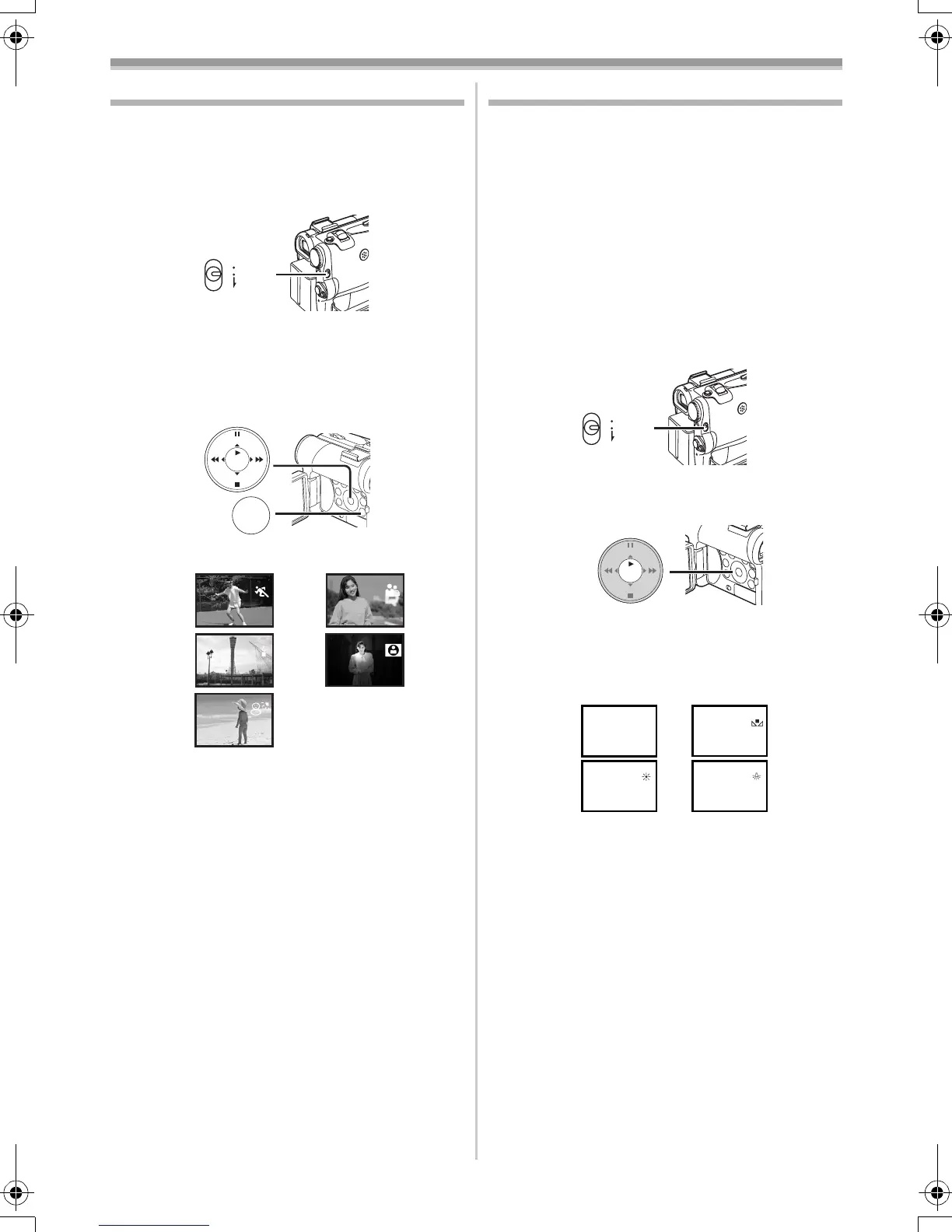
You can select optimal automatic exposure under
specific recording situations.
1 Set the [AUTO/MANUAL/FOCUS] Switch
(48) to [MANUAL].
≥The [MNL] Indication appears.
2 Set [TAPE RECORDING MENU] or
[CARD RECORDING MENU] >> [CAMERA]
>> [PROG.AE] >> a desired mode ([5],
[7], [4], [Ω] or [º]).
≥The Indication of the selected Mode appears.
1) [5] Sports Mode
≥For recording scenes involving quick
movements, such as sports scenes.
2) [7] Portrait Mode
≥For bringing up people clearly from the
background.
3) [4] Low Light Mode
≥For recording a dark scene brighter.
4) [Ω] Spotlight Mode
≥For recording a subject under a spotlight in
a party, theatre, etc.
5) [º] Surf & Snow Mode
≥For recording in a glaring surrounding, such
as ski slopes, beaches, etc.
To Cancel the Programme AE Function
Set the [PROG.AE] on the [CAMERA] Sub-menu
to [OFF]. Or, set the [AUTO/MANUAL/FOCUS]
Switch to [AUTO].
≥For other notes concerning this item, see
-51-.
AUTO
MANUAL
FOCUS
(48)
MENU
STILL
ENTER
FADE
is
(18)
1)
3)
2)
4)
5)
Recording in Natural Colours
(White Balance)
Depending on the scene or light condition, the
Automatic White Balance Adjustment Mode may
not be able to bring out natural colours. In this
case, the white balance can be adjusted
manually.
When the Movie Camera is turned on with the
Lens Cap on, the Automatic White Balance
Adjustment may not function properly. Please
turn on the Movie Camera after removing the
Lens Cap.
1 Set the [AUTO/MANUAL/FOCUS] Switch
(48) to [MANUAL].
≥The [MNL] Indication appears.
2 Press the [ENTER] Button (14).
≥The [AWB] Indication appears.
3 Press the [5] Button (13) or [6] Button
(16) to select a desired White Balance
Mode.
1) Automatic White Balance Adjustment [AWB]
2) The white balance setting that was previously
set manually [1]
3) Outdoor Mode [z]
4) Indoor Mode (recording under incandescent
lamp) [{]
To Resume Automatic Adjustment
Press the [5] Button (13) or [6] Button (16)
until the [AWB] Indication appears. Or, set the
[AUTO/MANUAL/FOCUS] Switch to [AUTO].
AUTO
MANUAL
FOCUS
(48)
STILL
ENTER
FADE
is
(14)
1
1
1
1AWB
1)
3)
2)
4)
55B-ENG.book 27 ページ 2004年2月4日 水曜日 午前11時54分






 To Next Page