Recording Mode
-30-
Digital Effect Functions
This Movie Camera is equipped with Digital Effect
Functions that add special effects to the scene.
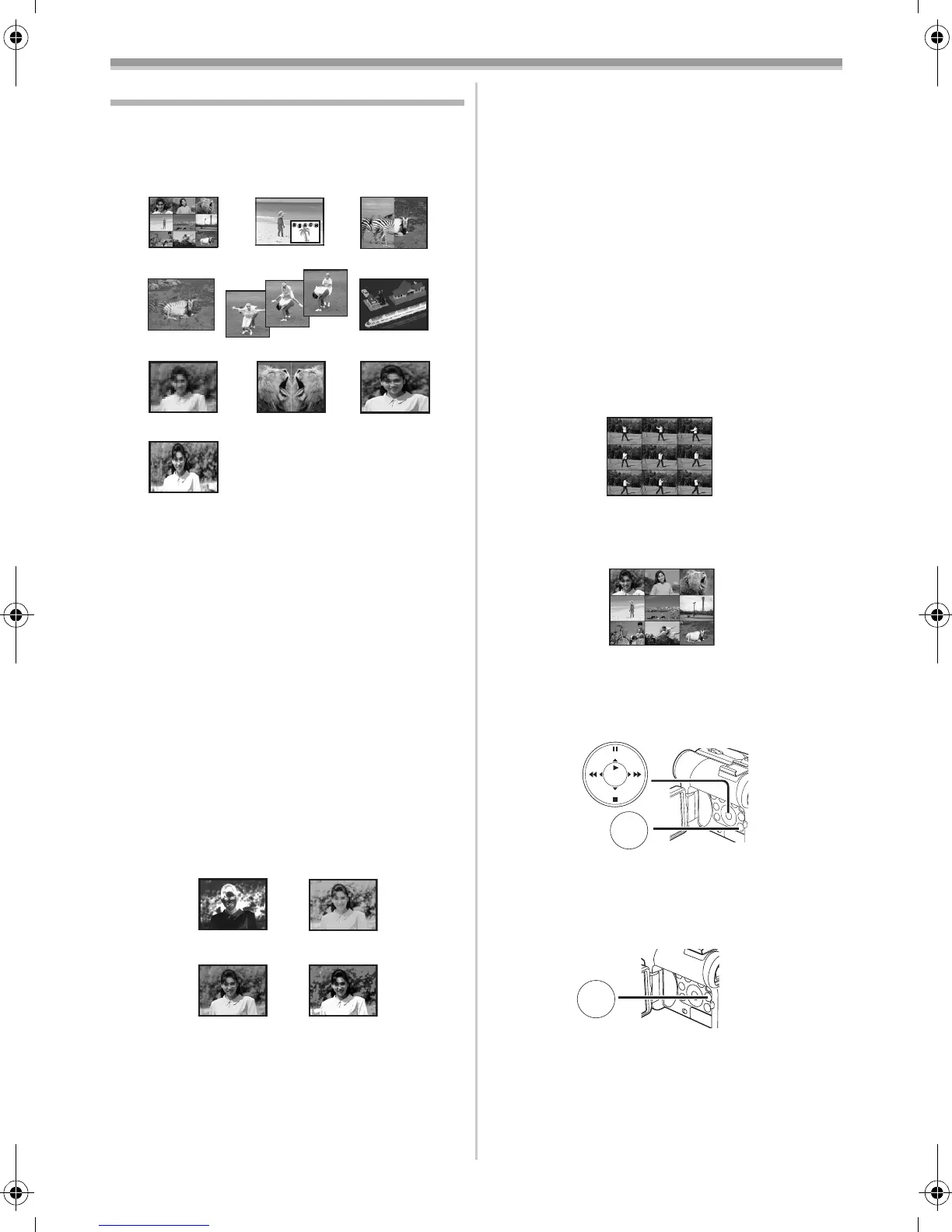
Digital Effects 1 [EFFECT1]
1) Multi Mode [MULTI]
2) Picture-In-Picture Mode [P-IN-P]
3) Wipe Mode [WIPE]
4) Mix Mode [MIX]
5) Strobe Mode [STROBE]
≥It records images with a stroboscopic effect.
6) Trailing Effect Mode [TRAIL]
≥It records images with a trailing effect.
7) Mosaic Mode [MOSAIC]
≥It produces a mosaic-like image.
8) Mirror Mode [MIRROR]
≥The right half of an image becomes a mirror
image of the left half.
9) Stretch Mode [STRETCH]
≥The Picture is expanded horizontally.
10) Slim Mode [SLIM]
≥The picture is expanded vertically.
Digital Effects 2 [EFFECT2]
11) Negative Mode [NEGA]
≥The colours of the recorded image are
inverted as seen in a negative.
12) Sepia Mode [SEPIA]
≥It records a scene with a brownish tint, like
the colour of old pictures.
13) Black & White Mode [B/W]
≥It records an image in black and white.
3) WIPE
4) MIX
5) STROBE 6) TRAIL
7) MOSAIC 8) MIRROR 9) STRETCH
1) MULTI 2) P-IN-P
10) SLIM
11) NEGA
12) SEPIA
13) B/W
14) SOLARI
14) Solarisation Mode [SOLARI]
≥It records an image with a painting-like
effect.
To Select a Desired Digital Effect
Set [TAPE RECORDING MENU] >> [DIGITAL]
>> [EFFECT1] or [EFFECT2] >> a desired Digital
Effect.
To Cancel the Digital Effect
Set [TAPE RECORDING MENU] >> [DIGITAL]
>> [EFFECT1] or [EFFECT2] >> [OFF].
≥If the Movie Camera is turned off, the
[EFFECT2] settings are cancelled.
≥For other notes concerning this item, see
-51-.
ª Multi-Picture Mode
Strobe Multi-Picture Mode:
You can capture and record 9 consecutive small
still pictures.
Manual Multi-Picture Mode:
You can manually capture and record 9 small still
pictures.
1 Set [TAPE RECORDING MENU] >>
[DIGITAL] >> [EFFECT1] >> [MULTI].
2 Set [TAPE RECORDING MENU] >>
[DIGITAL] >> [MULTI MODE] >> [STROBE]
or [MANUAL].
3 Press the [MULTI] Button (9).
≥If [MANUAL] is selected, press the [MULTI]
Button at each scene you want to capture.
Deleting All the Captured Multi-Pictures
While 9 multi-pictures are displayed, press the
[MULTI] Button.
≥If [MANUAL] has been selected, press the
[MULTI] Button after 9 pictures are displayed.
MENU
STILL
ENTER
FADE
is
(18)
MULTI/
P-IN-P
(9)
55B-ENG.book 30 ページ 2004年2月4日 水曜日 午前11時54分






 To Next Page