Recording Mode
-29-
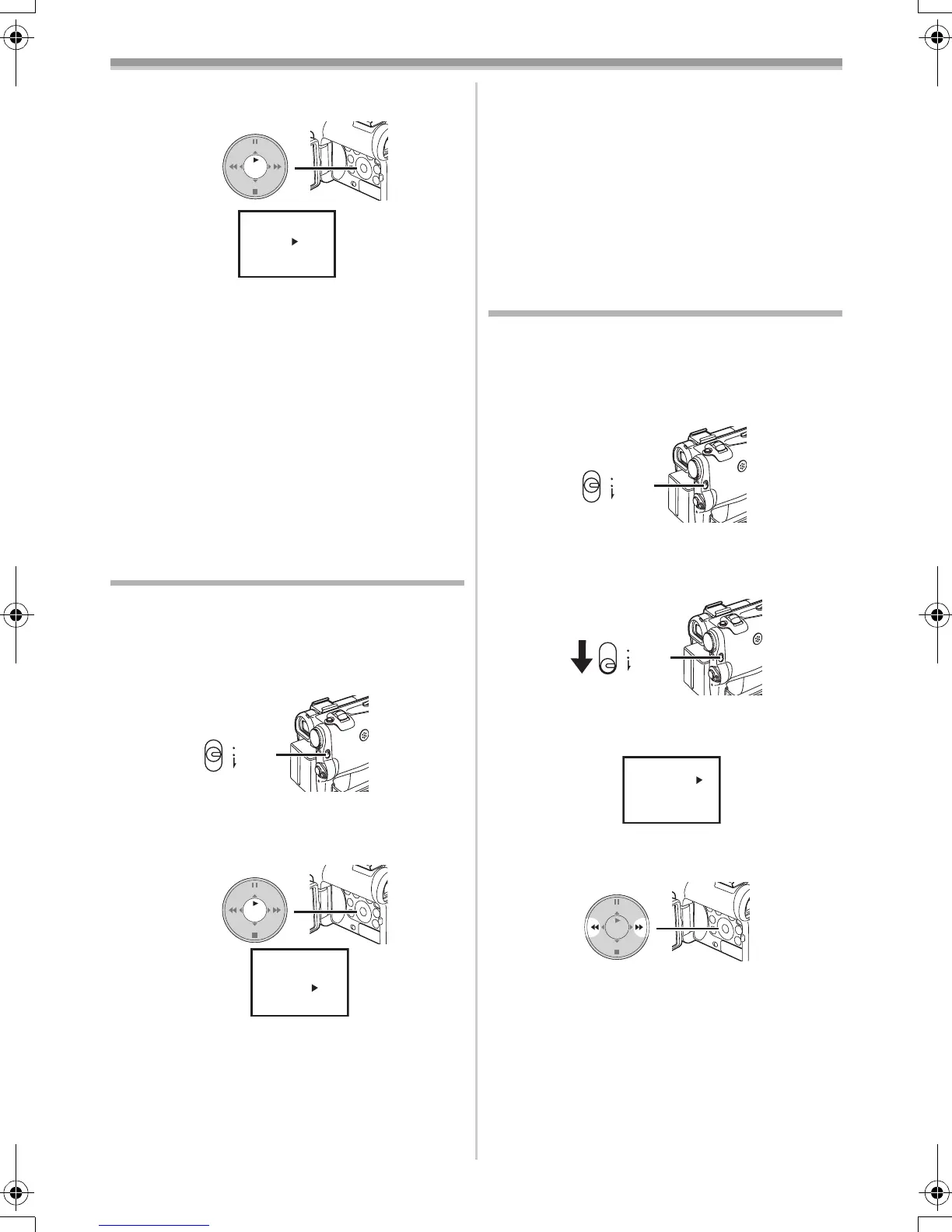
2
Press the [ENTER] Button (14) until the
Shutter Speed Indication appears.
3 Press the [5] Button (13) or [6] Button
(16) to adjust the shutter speed.
Range of Shutter Speed Adjustment
1/50–1/8000 s in Tape Recording Mode
1/50–1/500 s in Card Recording Mode
The standard shutter speed is 1/50 s.
Selecting a speed closer to [1/8000] causes the
shutter speed to be faster.
To Resume Automatic Adjustment
Set the [AUTO/MANUAL/FOCUS] Switch to
[AUTO].
≥For other notes concerning this item, see
-51-.
Manual Iris Adjustment
(F Number)
You can use this function when the screen is too
bright or too dark.
1 Set the [AUTO/MANUAL/FOCUS] Switch
(48) to [MANUAL].
≥The [MNL] Indication appears.
2 Press the [ENTER] Button (14) until the Iris
Indication appears.
3 Press the [5] Button (13) or [6] Button
(16) to adjust the iris.
Range of Iris Adjustment
CLOSE (Closed), F16, ..., F2.0,
OP (Opened)i0dB, ..., OPi18dB
When a value closer to [CLOSE] is selected, the
image becomes darker.
MNL
1/1000
STILL
ENTER
FADE
is
(14)
AUTO
MANUAL
FOCUS
(48)
MNL
1/50
F2.4
STILL
ENTER
FADE
is
(14)
When a value closer to [OPi18dB] is selected,
the image becomes brighter.
The value to which idB is attached indicates a
Gain-up value. If this value is too large, the quality
of the image deteriorates.
To Resume Automatic Adjustment
Set the [AUTO/MANUAL/FOCUS] Switch to
[AUTO].
≥For other notes concerning this item, see
-51-.
Manual Focus Adjustment
Focus can be adjusted manually for recording in
a situation where auto focus may not function
well.
1 Set the [AUTO/MANUAL/FOCUS] Switch
(48) to [MANUAL].
≥The [MNL] Indication appears.
2 Slide the [AUTO/MANUAL/FOCUS] Switch
(48) to [FOCUS].
≥The [1MF] Indication (Manual Focus Mode)
appears.
3 Press the [5] Button (13) or [6] Button
(16) to adjust the focus.
≥If you keep pressing the [5] Button or [6]
Button, the speed of adjusting becomes
faster.
To Resume Automatic Adjustment
Set the [AUTO/MANUAL/FOCUS] Switch to
[AUTO] or [FOCUS].
AUTO
MANUAL
FOCUS
(48)
AUTO
MANUAL
FOCUS
(48)
MF
MNL
STILL
ENTER
FADE
is
(16) (13)
55B-ENG.book 29 ページ 2004年2月4日 水曜日 午前11時54分






 To Next Page