Playback Mode
-32-
Playback Mode
Playing Back a Tape
The recorded scene can be played back
immediately after the recording.
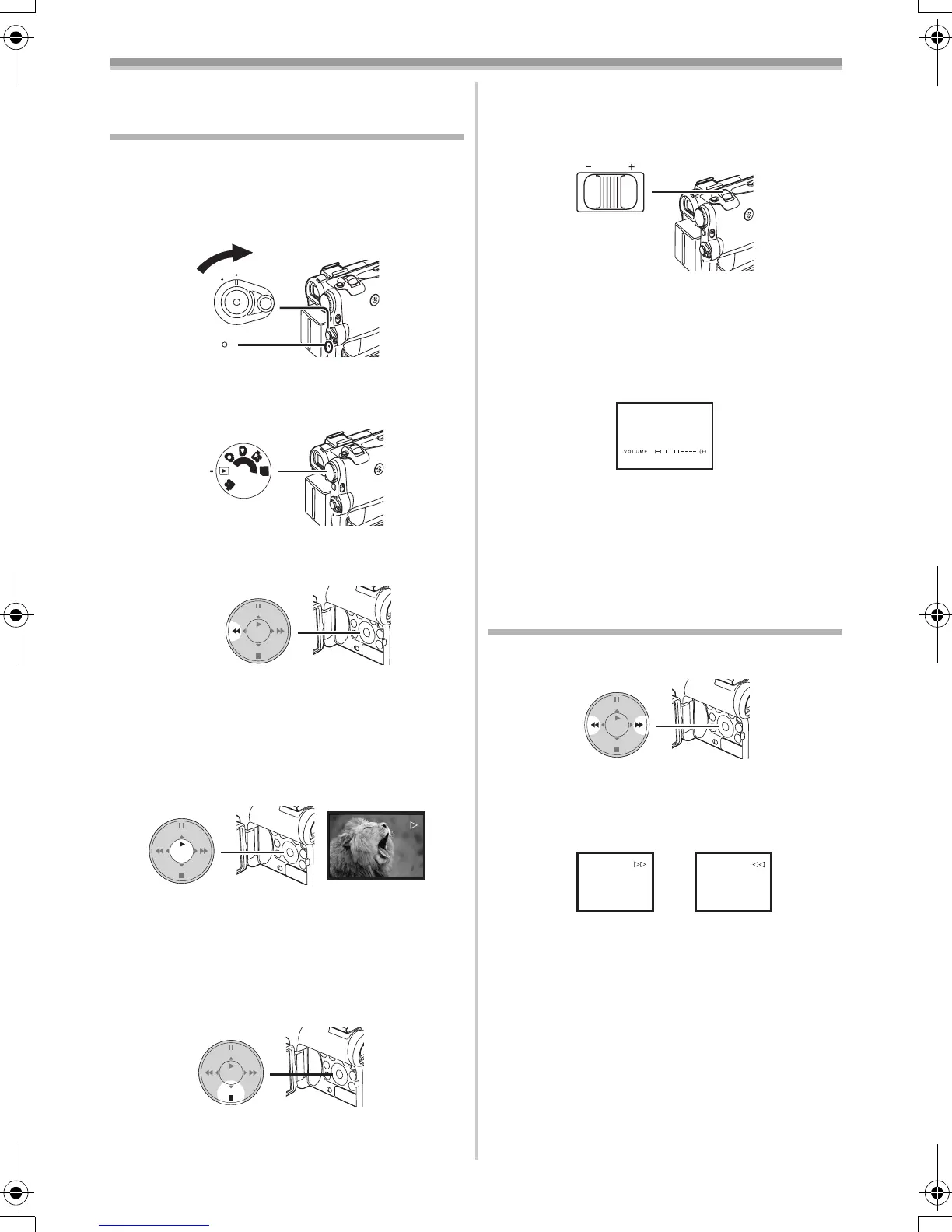
1 Set the [OFF/ON] Switch (46) to [ON].
≥The [POWER] Lamp
(47) lights up.
2 Set the Mode Dial (43) to Tape Playback
Mode.
3 Press the [6] Button (16) to rewind the
tape.
≥Rewind the tape to the point where you want
to start playback.
≥When the tape reaches the beginning,
rewinding stops automatically.
4 Press the [1] Button (14) to start playback.
≥The [!] Indication appears.
≥If a cassette recorded with a copyright
protection signal is played back, the picture is
distorted by mosaic-like patterns.
To Stop Playback
Press the [∫] Button (15).
ª Adjusting the Sound Volume
To adjust the volume, push the [W/T] Lever (40)
to display the [VOLUME] Indication. Push the
ON
OFF
(46)
(47)
PC
S
D
(43)
STILL
ENTER
FADE
is
(16)
STILL
ENTER
FADE
is
(14)
(15)
STILL
ENTER
FADE
is
[W/T] Lever towards [T] to increase the volume or
push the [W/T] Lever towards [W] to decrease the
volume. The [VOLUME] Indication goes off after
the adjustment is finished.
To adjust the volume with the Remote Controller,
press the [T] or [W] Button to display the
[VOLUME] Indication. Press the [T] Button to
increase the volume or press the [W] Button to
decrease the volume. The [VOLUME] Indication
goes off after the adjustment is finished.
≥The sound volume cannot be adjusted using the
Remote Controller in Playback Zoom Mode.
(
-34-)
≥For other notes concerning this item, see
-52-.
Finding a Scene You Want to Play
Back
ª Cue/Review Playback
If the [5] Button (13) or [6] Button (16) is
pressed during Playback, it turns to Cue Playback
A or Review Playback B.
≥If the Button is held continuously, it turns to Cue
Playback or Review Playback until you release
it.
ª Variable Speed Search Function
The speed of Cue Playback or Review Playback
can be varied.
1 During playback, press the [1] Button (14).
VOL/JOG
WT
(40)
STILL
ENTER
FADE
is
(16) (13)
A
B
55B-ENG.book 32 ページ 2004年2月4日 水曜日 午前11時54分







 To Next Page