Playback Mode
-38-
≥The selected title is marked with a frame.
5 Press the [ENTER] Button (14) or press the
[MULTI] Button
(9).
≥The selected title is displayed.
≥Recording and Photoshot Recording can be
made with pictures that have titles.
≥A title can be displayed also by pushing [TITLE]
Button on the Remote Controller.
To Clear the Title Display
Set [DIGITAL] >> [TITLE IN] >> [OFF].
Or press [TITLE] Button
(70) on the Remote
Controller.
≥For other notes concerning this item, see
-53-.
Writing Printing Data on a Card
(DPOF Setting)
DPOF Setting Printing data (DPOF Settings),
such as the number of images to be printed, can
be written to the Card. “DPOF” means Digital
Print Order Format.
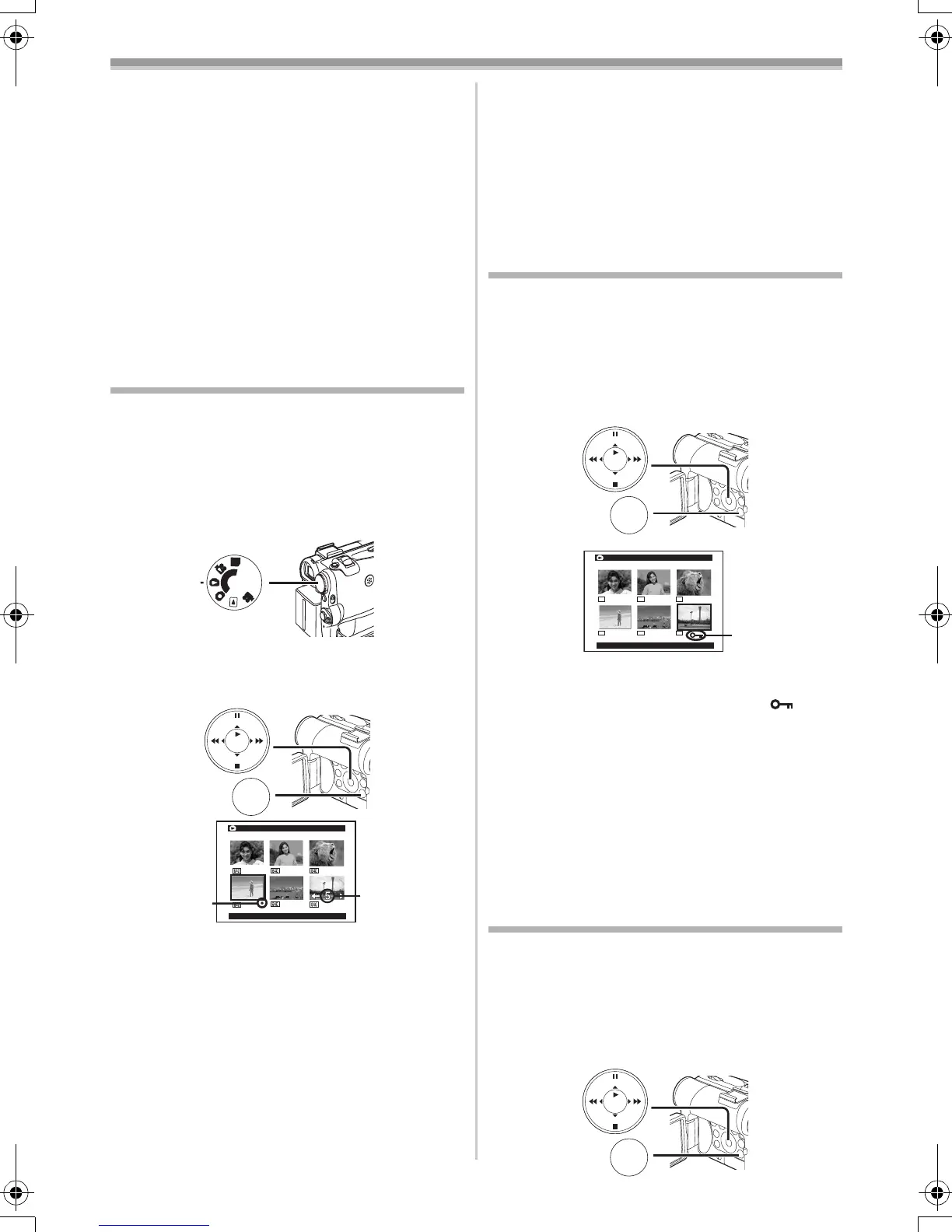
1 Set the Mode Dial (43) to Picture Playback
Mode.
2 Set [PICTURE PLAYBACK MENU] >>
[EDITING] >> [DPOF SET] >> [YES] >>
[VARIABLE].
≥When all images are not printed, select
[ALL 0].
3 Select a desired picture and press the
[ENTER] Button
(14).
≥The selected picture is marked with a frame.
≥The number of prints set by DPOF 1 is
displayed.
4 Press the [5] Button (13) or [6] Button
(16) to select the number of pictures to be
printed, and press the [ENTER] Button
(14).
≥[¥] Indication 2 is displayed in the picture
set. (
-47-)
P
C
S
D
(43)
DPOF SETTING
!:ENTER MENU:EXIT
2
1
MENU
STILL
ENTER
FADE
is
(18)
5 Repeat Steps 3 and 4 and press the [MENU]
Button
(18) when the setup is completed.
To Verify DPOF Setting
Select [VERIFY] in Step 2. The pictures for which
1 or more print is set in DPOF are played back
continuously.
≥For other notes concerning this item, see
-53-.
Protecting the Files on a Card
(Lock Setting)
Precious files recorded on a Card can be locked
to prevent accidental erasure. (Even if files are
locked, the files will be deleted if the Card is
formatted.)
1 Set [PICTURE/MPEG4 PLAYBACK MENU]
>> [EDITING] >> [FILE LOCK] >> [YES].
2 Select the file to be locked, and press the
[ENTER] Button
(14).
≥The selected file is locked and the [ ]
Indication 1 appears. Repeat this procedure
to lock 2 or more files.
≥Press the [ENTER] Button
(14) again to
cancel.
≥The SD Memory Card has a write protection
switch. (
-53-)
≥For other notes concerning this item, see
-53-.
Deleting the Files Recorded on a
Card
Using the Movie Camera, you can delete the files
recorded on a Card. After the file is deleted, it
cannot be restored.
To Select and Delete Files or Titles
1 Set [PICTURE/MPEG4 PLAYBACK MENU]
>> [DELETE] >> [FILE BY SEL] >> [YES].
MENU
STILL
ENTER
FADE
is
(18)
FILE LOCK
!:ENTER MENU:EXIT
640 640
640
640 640
640
1
MENU
STILL
ENTER
FADE
is
(18)
55B-ENG.book 38 ページ 2004年2月4日 水曜日 午前11時54分






 To Next Page