EasyManua.ls Logo

Panasonic NV-RX11A - Using the Main Menu.14; Using the Title Menu.14

Panasonic NV-RX11A
60 pages
Print Icon
To Next Page IconTo Next Page
To Previous Page IconTo Previous Page
Loading...
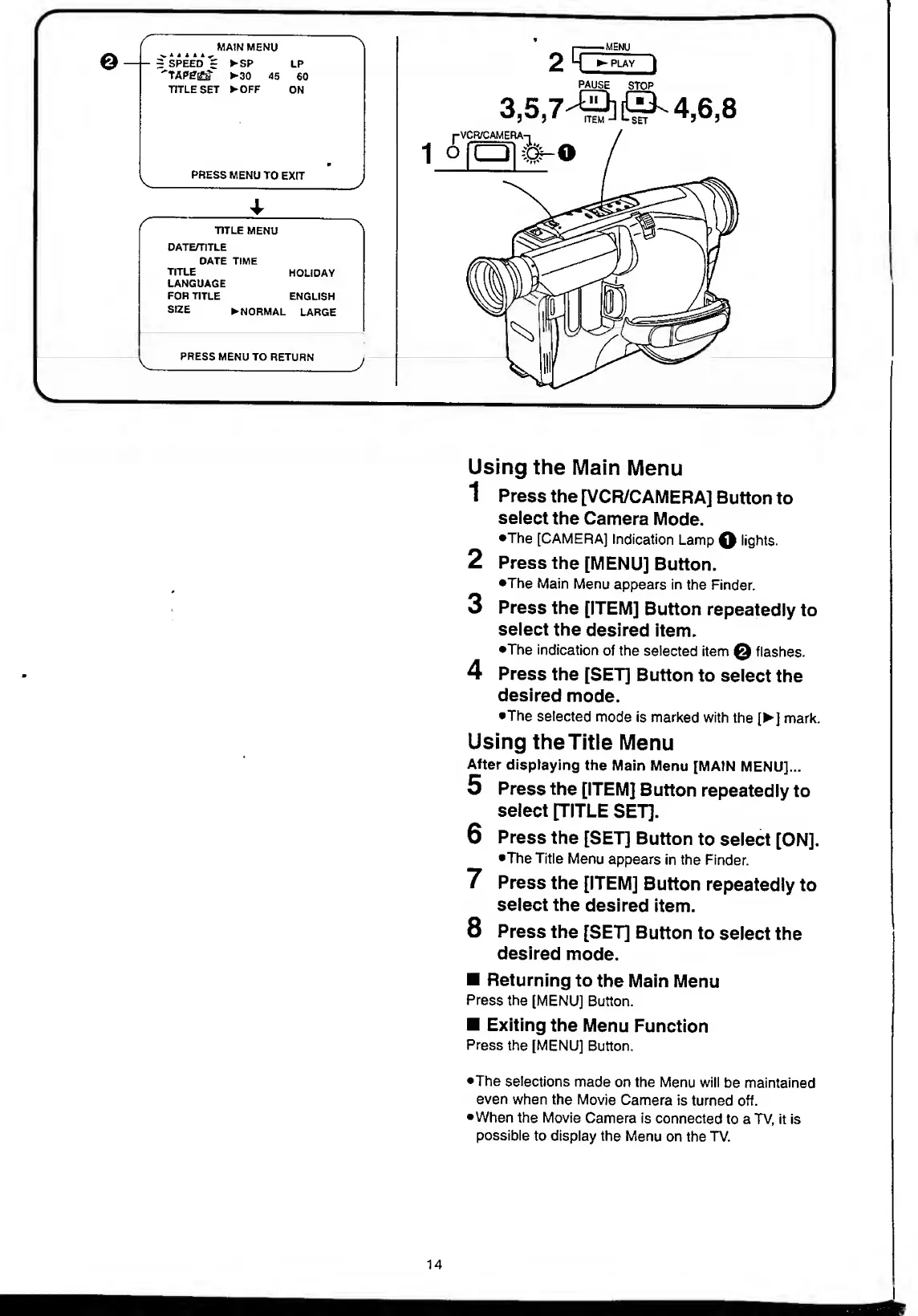
MAIN
MENU
v‘
<
>
>
if
~
SPEED
r
SP
LP
^30
45
60
TITLE
SET
OFF
ON
PRESS
MENU
TO
EXIT
TITLE
MENU
DATE/TITLE
OATE
TIME
TITLE
LANGUAGE
FOR
TITLE
HOLIDAY
ENGLISH
SIZE
N
ORMAL
LARGE
^
PRESS
MENU
TO
RETURN_
j
I
"MENU
2
HZ^-
piay
I
PAUSE
STOP
3,5,7^]^
4,6,8
Using
the
Main
Menu
1
Press
the
[VCR/CAMERA]
Button
to
select
the
Camera
Mode.
•The
[CAMERA]
Indication
Lamp
Q
tights.
2
Press
the
[MENU]
Button.
•The
Main
Menu
appears
in
the
Finder.
3
Press
the
[ITEM]
Button
repeatedly
to
select
the
desired
Item.
•The
indication
of
the
selected
item
@
flashes.
4
Press
the
[SET]
Button
to
select
the
desired
mode.
•The
selected
mode
is
marked
with
the
[
]
mark.
Using
the
Title
Menu
After
displaying
the
Main
Menu
[MAIN
MENU]...
5
Press
the
[ITEM]
Button
repeatedly
to
select
[TITLE
SET].
6
Press
the
[SET]
Button
to
select
[ON].
•The
Title
Menu
appears
in
the
Finder.
7
Press
the
[ITEM]
Button
repeatedly
to
select
the
desired
item.
8
Press
the
[SET]
Button
to
select
the
desired
mode.
Returning
to
the
Main
Menu
Press
the
[MENU]
Button.
Exiting
the
Menu
Function
Press
the
[MENU]
Button.
•The
selections
made
on
the
Menu
will
be
maintained
even
when
the
Movie
Camera
is
turned
off.
•When
the
Movie
Camera
is
connected
to
a
TV,
it
is
possible
to
display
the
Menu
on
the
TV.
14

Table of Contents