EasyManua.ls Logo

Panasonic NV-RX11A - Basic Operations; Recording in the Full Auto Mode.23

Panasonic NV-RX11A
60 pages
Print Icon
To Next Page IconTo Next Page
To Previous Page IconTo Previous Page
Loading...
r
RECORD
m>.
SP^
REC
—©
r-VCFUCAMERAn
'<S[g]#-o
Basic
Operations
Recording
in
the
Full
Auto
Mode
The
Full
Auto
Mode
adjusts
the
white
balance
and
focus
automatically.
However,
if
you
want,
you
can
also
adjust
either
one
or
both
of
them
manually
(-
37,
39).
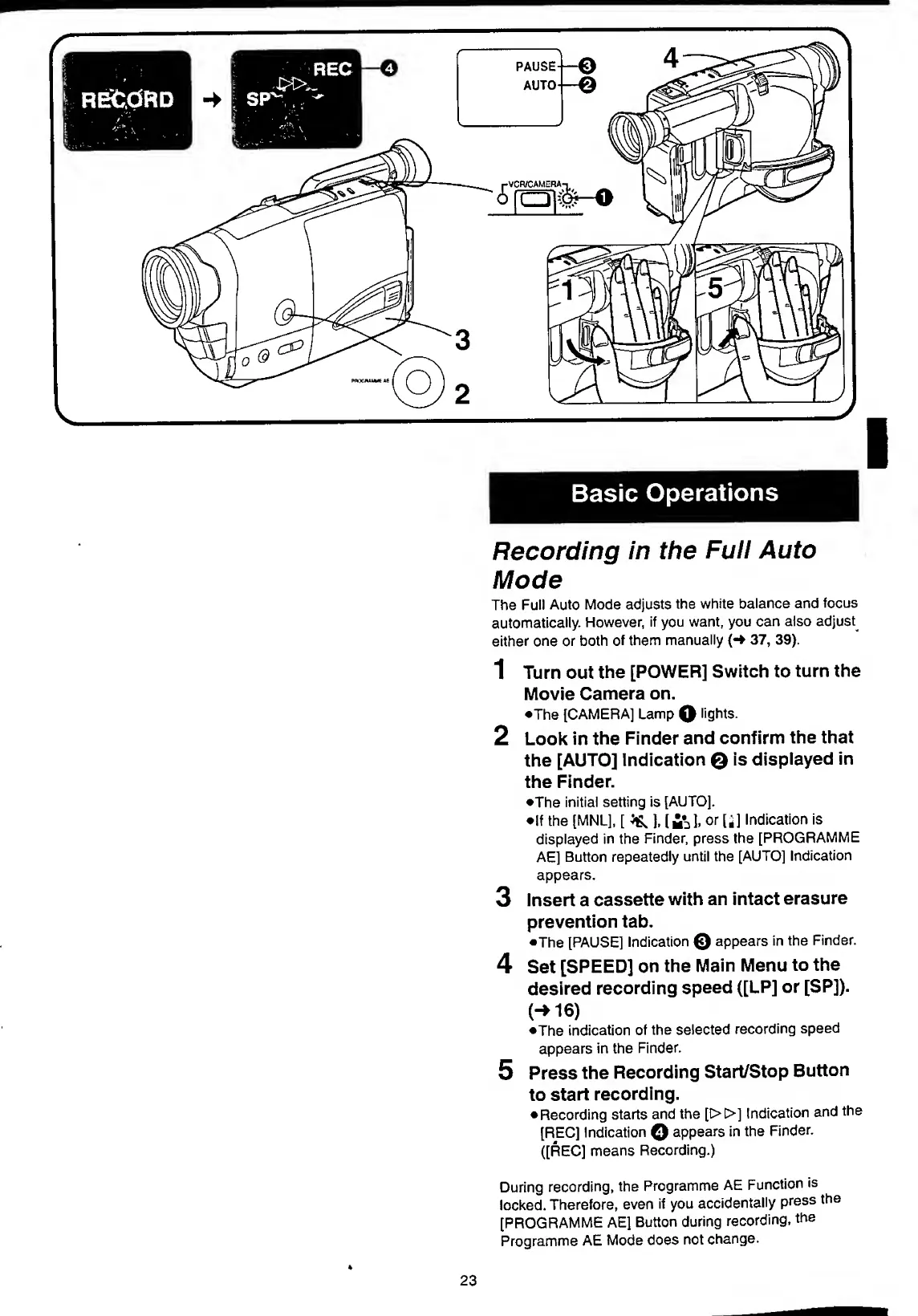
1
Turn
out
the
[POWER]
Switch
to
turn
the
Movie
Camera
on.
•The
[CAMERA]
Lamp
Q
lights.
2
Look
in
the
Finder
and
confirm
the
that
the
[AUTO]
Indication
Q
is
displayed
in
the
Finder.
•The
initial
setting
is
[AUTOj.
•If
the
[MNlj,
[
^
],
[fcl,
or
[*]
Indication
is
displayed
in
the
Finder,
press
the
[PROGRAMME
AE]
Button
repeatedly
until
the
[AUTO]
Indication
appears.
3
Insert
a
cassette
with
an
intact
erasure
prevention
tab.
•The
[PAUSE]
Indication
©
appears
in
the
Finder.
4
Set
[SPEED]
on
the
Main
Menu
to
the
desired
recording
speed
([LP]
or
[SP]).
(-
1
6
)
•The
indication
of
the
selected
recording
speed
appears
in
the
Finder.
5
Press
the
Recording
Start/Stop
Button
to
start
recording.
Recording
starts
and
the
[D>C>]
Indication
and
the
[REC]
Indication
Q
appears
in
the
Finder.
([REC]
means
Recording.)
During
recording,
the
Programme
AE
Function
is
locked.
Therefore,
even
if
you
accidentally
press
the
[PROGRAMME
AE]
Button
during
recording,
the
Programme
AE
Mode
does
not
change.
23

Table of Contents

Related product manuals