EasyManua.ls Logo

Panasonic NV-RX11A - After Use.34; Cleaning the Finder.34; Cleaning the Movie Camera Body.34; Cleaning the Lens.34

Panasonic NV-RX11A
60 pages
Print Icon
To Next Page IconTo Next Page
To Previous Page IconTo Previous Page
Loading...
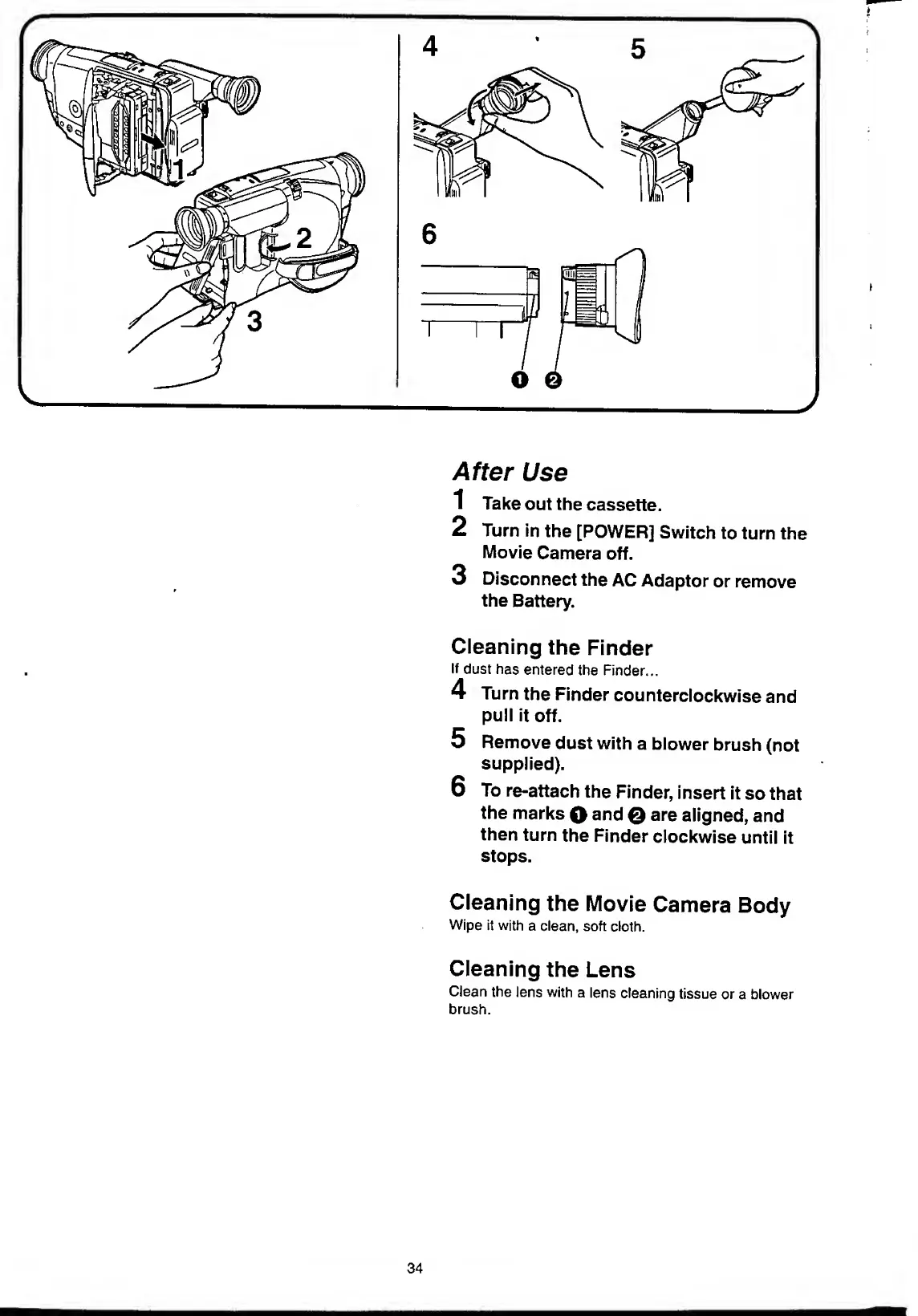
After
Use
1
Take
out
the
cassette.
2
Turn
in
the
[POWER]
Switch
to
turn
the
Movie
Camera
off.
3
Disconnect
the
AC
Adaptor
or
remove
the
Battery.
Cleaning
the
Finder
If
dust
has
entered
the
Finder...
4
Turn
the
Finder
counterclockwise
and
pull
it
off.
5
Remove
dust
with
a
blower
brush
(not
supplied).
6
To
re-attach
the
Finder,
insert
it
so
that
the
marks
Q
and
£)
are
aligned,
and
then
turn
the
Finder
clockwise
until
it
stops.
Cleaning
the
Movie
Camera
Body
Wipe
it
with
a
clean,
soft
cloth.
Cleaning
the
Lens
Clean
the
lens
with
a
lens
cleaning
tissue
or
a
blower
brush.
34

Table of Contents

Related product manuals