EasyManua.ls Logo

Panasonic NV-RX11A - Selecting the Recording Speed.16; Selecting the Correct Tape Length.16

Panasonic NV-RX11A
60 pages
Print Icon
To Next Page IconTo Next Page
To Previous Page IconTo Previous Page
Loading...
J
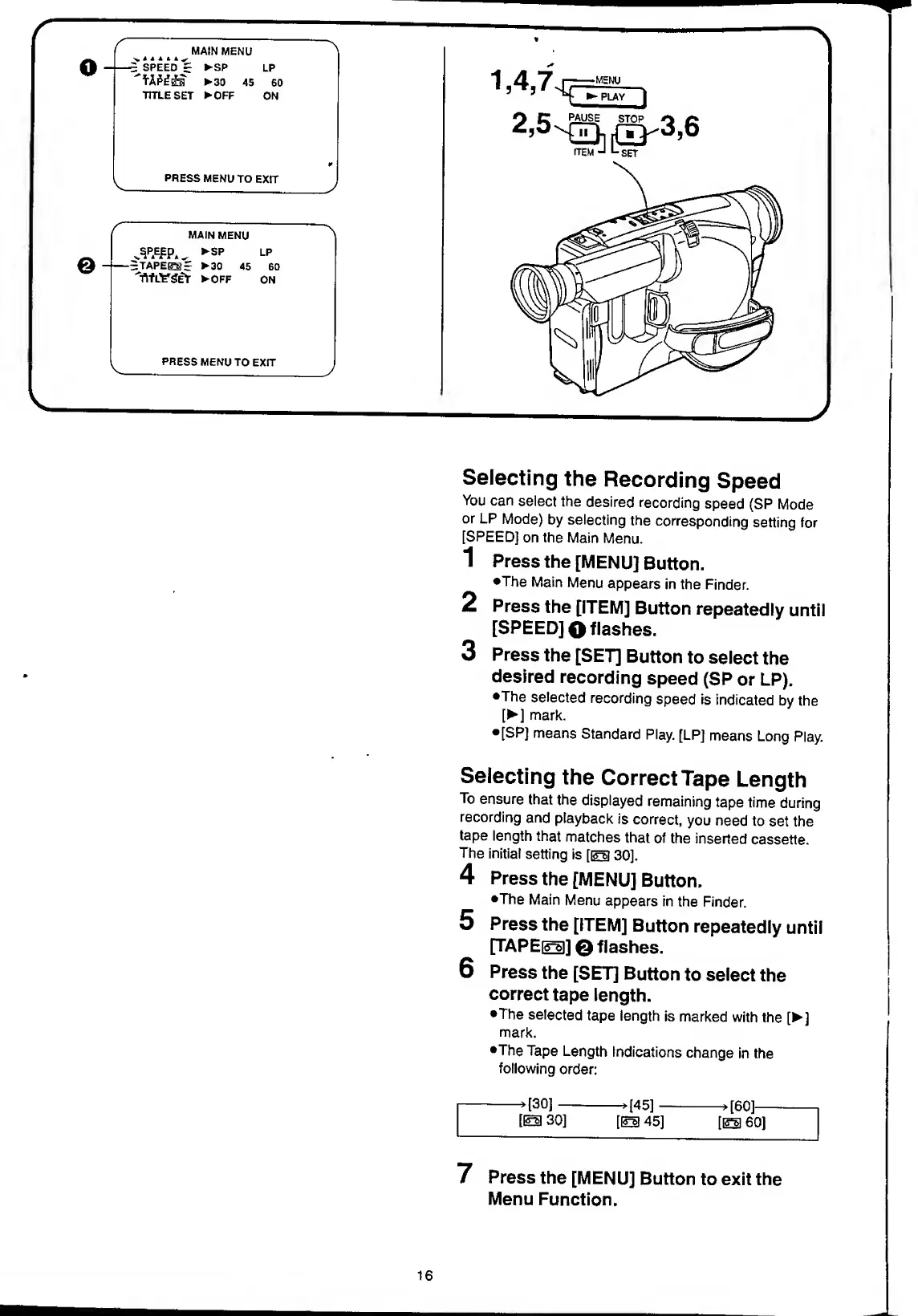
Selecting
the
Recording
Speed
You
can
select
the
desired
recording
speed
(SP
Mode
or
LP
Mode)
by
selecting
the
corresponding
setting
for
[SPEED]
on
the
Main
Menu.
1
Press
the
[MENU]
Button.
•The
Main
Menu
appears
in
the
Finder.
2
Press
the
[ITEM]
Button
repeatedly
until
[SPEED]
O
flashes.
3
Press
the
[SET]
Button
to
select
the
desired
recording
speed
(SP
or
LP).
•The
selected
recording
speed
is
indicated
by
the
[
]
mark.
•[SP]
means
Standard
Play.
[LP]
means
Long
Play.
Selecting
the
Correct
Tape
Length
To
ensure
that
the
displayed
remaining
tape
time
during
recording
and
playback
is
correct,
you
need
to
set
the
tape
length
that
matches
that
of
the
inserted
cassette.
The
initial
setting
is
[eb
30].
4
Press
the
[MENU]
Button.
•The
Main
Menu
appears
in
the
Finder.
5
Press
the
[ITEM]
Button
repeatedly
until
[TAPE[£|]]
0
flashes.
6
Press
the
[SET]
Button
to
select
the
correct
tape
length.
•The
selected
tape
length
is
marked
with
the
[
]
mark.
•The
Tape
Length
Indications
change
in
the
following
order:
-,[30]->[45]->[60]-
[m
30]
[EH
45]
[EB
60]
7
P
ress
the
[MENU]
Button
to
exit
the
Menu
Function.
16

Table of Contents