EasyManua.ls Logo

Panasonic NV-RX11A - Before Requesting Service.61

Panasonic NV-RX11A
60 pages
Print Icon
To Previous Page IconTo Previous Page
Loading...
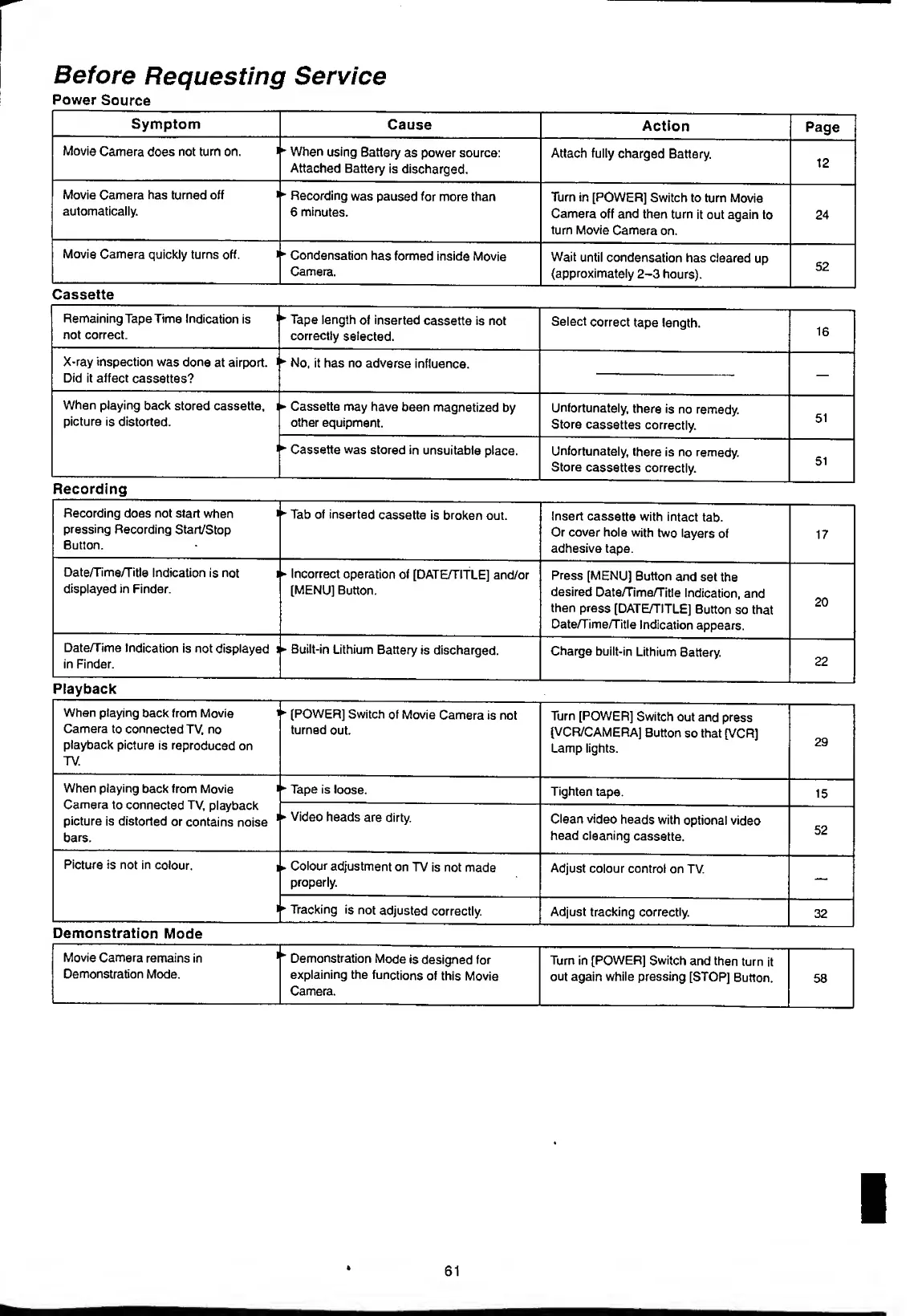
Before
Requesting
Service
Power
Source
Symptom
Cause
Action
Page
Movie
Camera
does
not
turn
on.
i
*
When
using
Battery
as
power
source:
Attached
Battery
is
discharged.
Attach
fully
charged
Battery.
12
Movie
Camera
has
turned
off
automatically.
*
Recording
was
paused
for
more
than
6
minutes.
Turn
in
[POWER]
Switch
to
turn
Movie
Camera
off
and
then
turn
it
out
again
to
turn
Movie
Camera
on.
24
Movie
Camera
quickly
turns
off.
1
Condensation
has
formed
inside
Movie
Camera.
Wait
until
condensation
has
cleared
up
(approximately
2-3
hours).
52
Cassette
Remaining
Tape
Time
Indication
is
i
not
correct.
*
Tape
length
of
inserted
cassette
is
not
correctly
selected.
Select
correct
tape
length.
16
X-ray
inspection
was
done
at
airport,
i
Did
it
affect
cassettes?
*
No,
it
has
no
adverse
influence.
When
playing
back
stored
cassette,
i
picture
is
distorted.
Cassette
may
have
been
magnetized
by
other
equipment.
Unfortunately,
there
is
no
remedy.
Store
cassettes
correctly.
51
*•
Cassette
was
stored
in
unsuitable
place.
Unfortunately,
there
is
no
remedy.
Store
cassettes
correctly.
51
Recording
Recording
does
not
start
when
pressing
Recording
Start/Stop
Button.
*
Tab
of
inserted
cassette
is
broken
out.
Insert
cassette
with
intact
tab.
Or
cover
hole
with
two
layers
of
adhesive
tape.
17
Date/Time/Title
Indication
is
not
i
displayed
in
Finder.
Incorrect
operation
of
[DATE/TITLE]
and/or
[MENU]
Button.
Press
[MENU]
Button
and
set
the
desired
Date/Time/Title
Indication,
and
then
press
[DATE/TITLE]
Button
so
that
Date/Time/Title
Indication
appears.
20
Date/Time
Indication
is
not
displayed
i
in
Finder.
Built-in
Lithium
Battery
is
discharged.
Charge
built-in
Lithium
Battery.
22
Playback
When
playing
back
from
Movie
i
Camera
to
connected
TV,
no
playback
picture
is
reproduced
on
TV.
*
[POWER]
Switch
of
Movie
Camera
is
not
turned
out.
Turn
[POWER]
Switch
out
and
press
[VCR/CAMERA]
Button
so
that
[VCR]
Lamp
lights.
29
When
playing
back
from
Movie
Camera
to
connected
TV,
playback
picture
is
distorted
or
contains
noise
1
bars.
*•
Tape
is
loose.
Tighten
tape.
15
Video
heads
are
dirty.
Clean
video
heads
with
optional
video
head
cleaning
cassette.
52
Picture
is
not
in
colour.
i
i
»
Colour
adjustment
on
TV
is
not
made
properly.
Adjust
colour
control
on
TV.
Tracking
is
not
adjusted
correctly.
Adjust
tracking
correctly.
32
Demonstration
Mode
Movie
Camera
remains
in
i
Demonstration
Mode
is
designed
for
Turn
in
[POWER]
Switch
and
then
turn
it
Demonstration
Mode.
explaining
the
functions
of
this
Movie
Camera.
out
again
while
pressing
[STOP]
Button.
58
61

Table of Contents