EasyManua.ls Logo

Panasonic PV-A206 - Set the Daylight Saving Time

Panasonic PV-A206
40 pages
Print Icon
To Next Page IconTo Next Page
To Previous Page IconTo Previous Page
Loading...
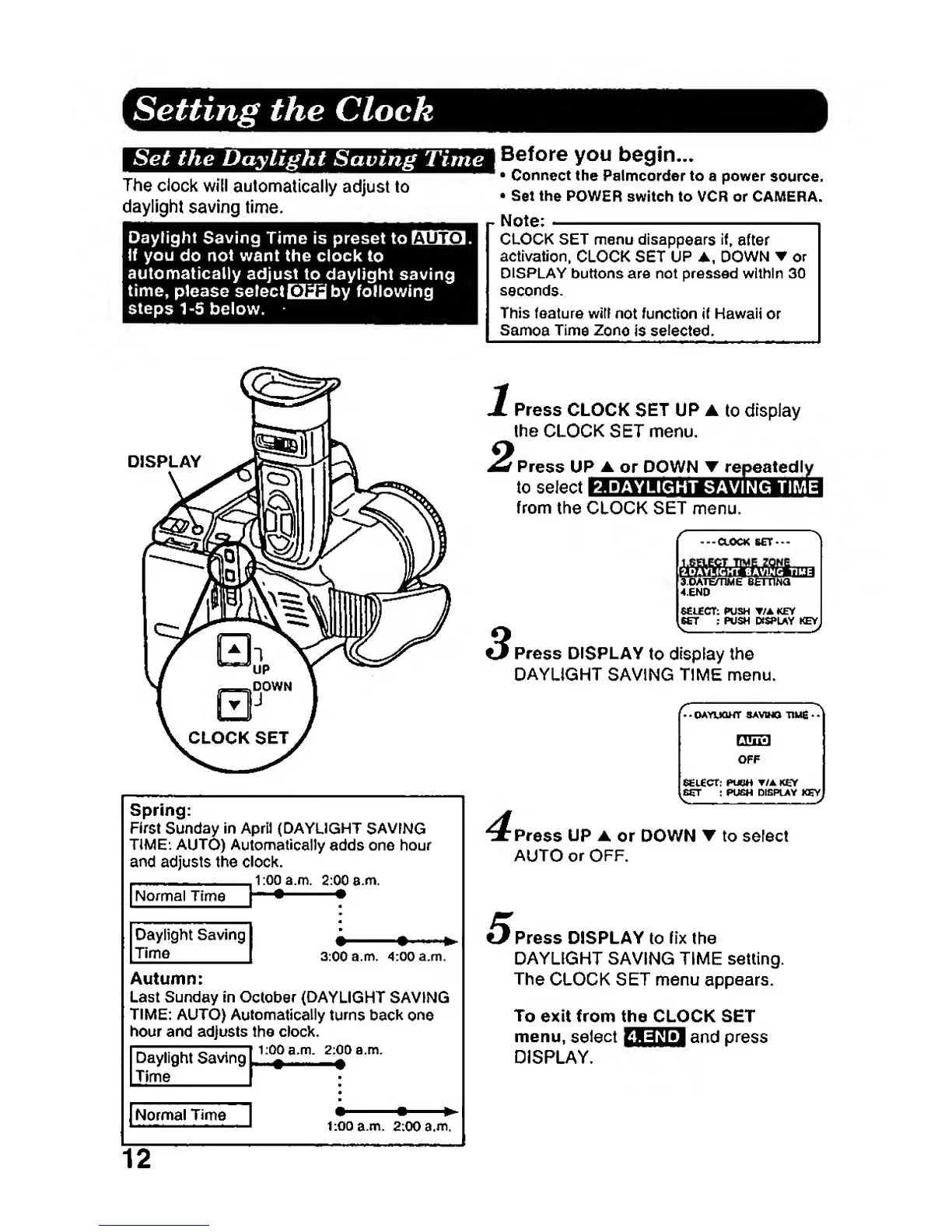
Setting the Clock
Set the Daylight
Saving Time
The
clock will
automatically
adjust
to
daylight
saving time.
Daylight
Saving
Time is preset
toLliUfJ.
If you
do
not
want the clock
to
automatically
adjust
to daylight saving
time,
please
selectOili&l
by following
steps
1-5
below.
I
Before you
begin...
Connect
ttie Palmcorder to a power
source.
Set the
POWER
switch to VCR or CAMERA.
Note;
CLOCK SET
menu
disappears
if,
after
activation.
CLOCK SET
UP
A.
DOWN or
DISPLAY
buttons are not pressed within 30
seconds.
This feature witt
not function
if
Hawaii
or
Samoa
Time
Zone
Is
selected.
DISPLAY
Spring:
First
Sunday
in April (DAYLIGHT
SAVING
TIME:
AUTO) Automatically
adds one
hour
and
adjusts the clock.
innam
2:00
a.m.
[Normal Time
|
"
*
^
Daylight Saving
Time
[
3:00
a.m.
4:00a.m.
Autumn:
Last Sunday in
October
(DAYLIGHT
SAVING
TIME: AUTO)
Automatically
turns
bacic one
hour and adjusts the
clock.
Daylight Saving'
Time
[Normal Time
|
1:00
a.m.
2:00
a.m.
12
Press CLOCK
SET UP
to
display
the
CLOCK
SET menu.
f
Press
UP
A
or DOWN
T
repeatedly
to select
I
from
the
CLOCK SET menu.
2.DAYLIGHT
SAVING TIME
-CLOCK SET-
s.oATEmME etrnwa
4.END
SCUECT:
PUSH
T/A KEY
^
:
POSH
PSPUff
KEY
^
^
Press DISPLAY
to
display
the
DAYLiGHT
SAVING TIME menu.
•CMYUQHT
SAVWa TIMS
SEiCOt;
PUSH /AKCr
:86T
;
PUSH
DI8PUY
KSY
4
Press UP
A or DOWN to select
AUTO or OFF.
Press DISPLAY to
fix
the
DAYLIGHT SAVING TIME setting.
The
CLOCK SET
menu
appears.
To
exit from the CLOCK SET
menu,
select
BB^tf'l
^^^d
press
DISPLAY.