EasyManua.ls Logo

Panasonic PV-A206 - Playback Using the Playpak

Panasonic PV-A206
40 pages
Print Icon
To Next Page IconTo Next Page
To Previous Page IconTo Previous Page
Loading...
Playback
your
Recordings
Playback
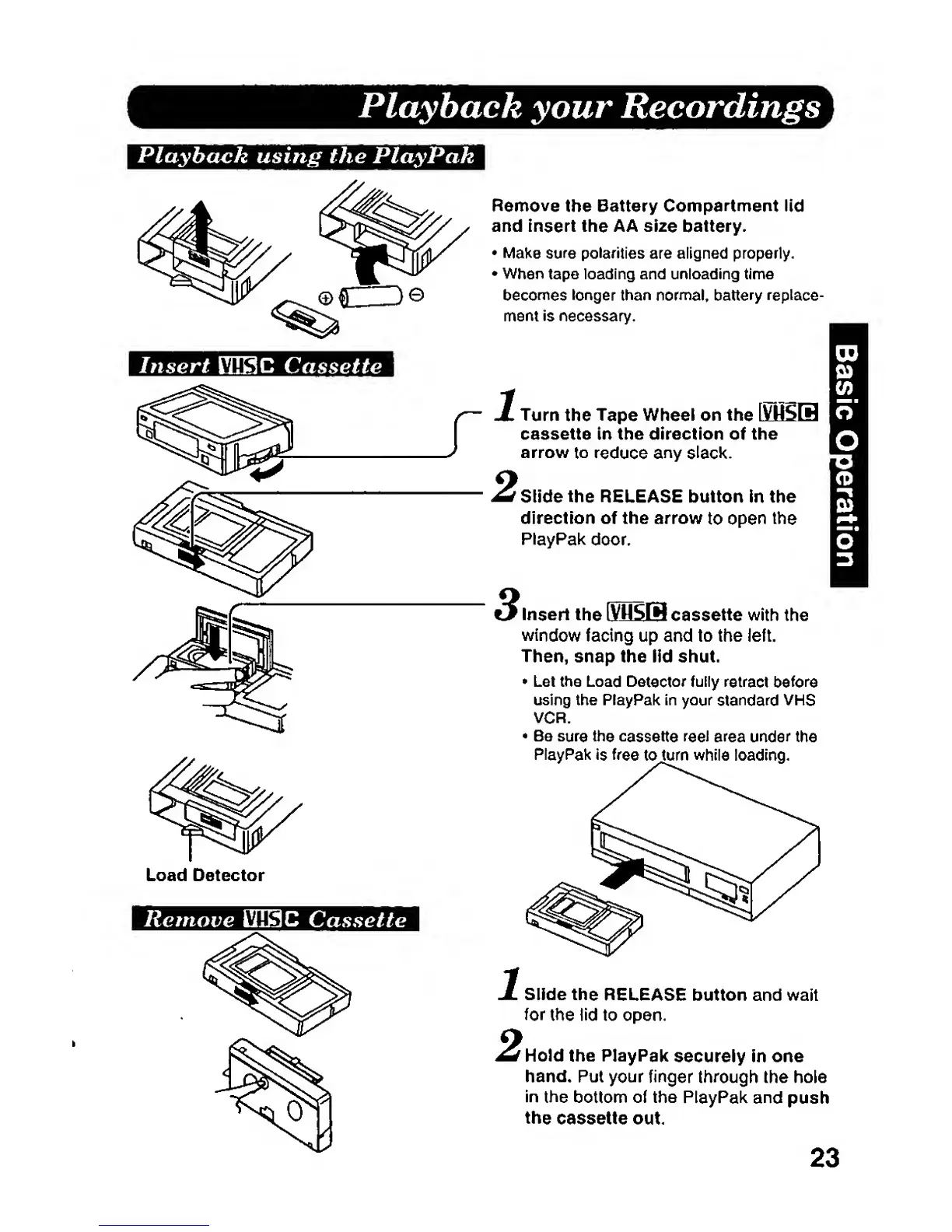
using the PlayPak
Insert
VSSC Cassette
Load Detector
Remove VllSC
Cassette
Remove
the Battery
Compartment
Hd
and
insert the
AA size
battery.
Make
sure polarities
are aligned properly.
When
tape loading and unioading
time
becomes longer
than
normal, battery
replace-
ment is necessary.
Turn
the
Tape Wheel
on
the
\^6SSE
cassette in the direction
of
the
arrow
to
reduce
any
slack.
Slide
the
RELEASE button in the
direction of the arrow
to
open
the
PlayPak
door.
insert
the
IVHSW
cassette with the
window
facing up and to the left.
Then, snap the iid shut.
Let the Load
Detector
fully
retract
before
using the PlayPak In
your
standard
VHS
VCR.
Be
sura the
cassette
reel
area under
the
PlayPak is free
tojum while loading.
Slide
the
RELEASE button and wait
for
the iid
to open.
f
Hold
the PlayPak
securely in one
hand. Put
your finger
through
the hole
in
the
bottom of the PlayPak
and
push
the
cassette
out.
23