Supplying
Power
AC
Adaptor
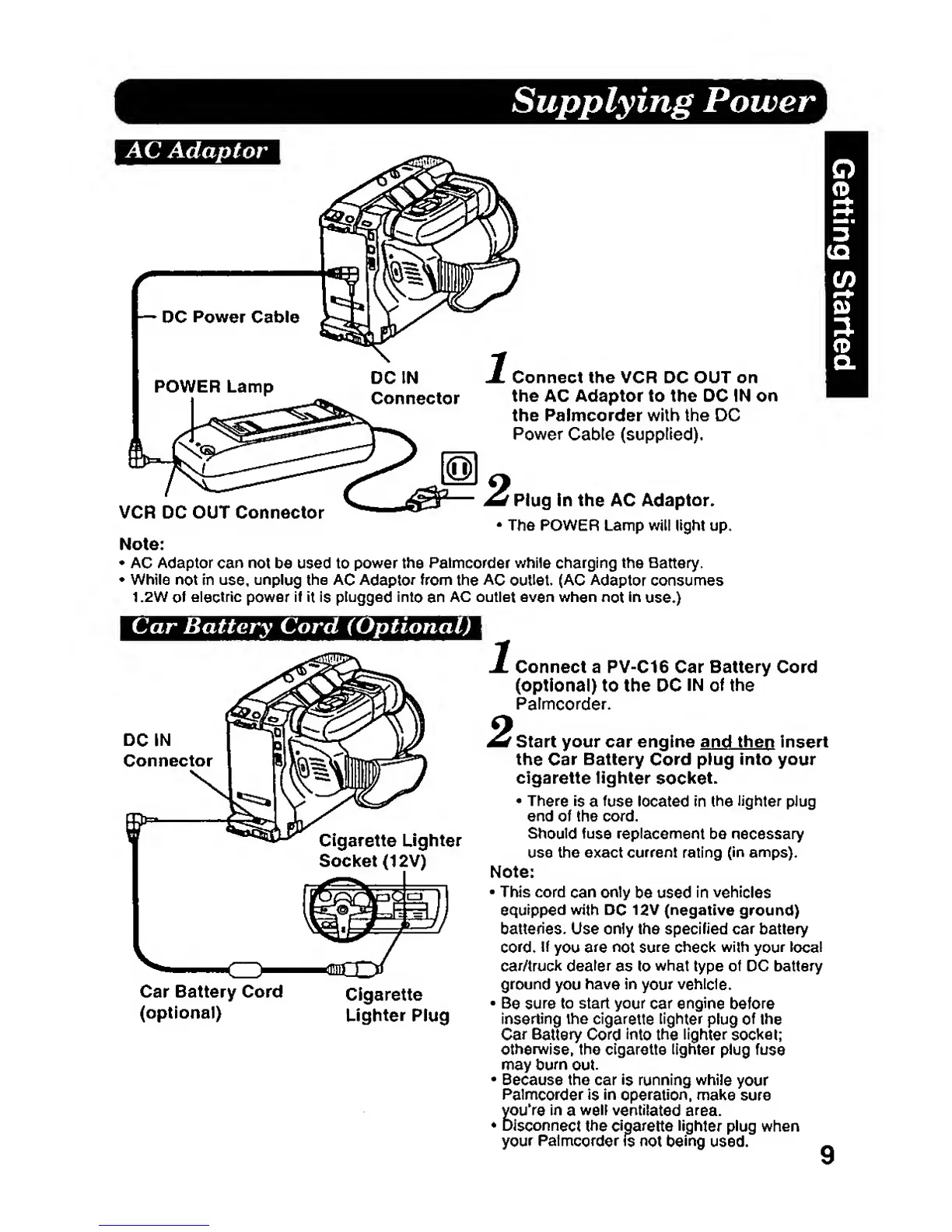
1Conned the VCR DC OUT on
the AC Adaptor to the DC IN on
the Palmcorder with the DC
Power
Cable
(supplied).
r
Plug
in
the
AC Adaptor.
•
The POWER Lamp will light up.
Note:
•
AC
Adaptor can not
be used to
power the
Palmcorder
while
charging the
Battery.
While
not
in
use,
unplug the AC
Adaptor
from
the
AC
outlet,
(AC
Adaptor
consumes
1.2W
of
electric power if it is
plugged into
an
AC
outlet even wtien
not
in
use.)
VCR DC
OUT Connector
Car Battery Cord (Optional)
DC IN
Connector
Cigarette Lighter
Socket
(12V)
Car Battery Cord
(optional)
Cigarette
Lighter
Plug
X Connect a PV-C16 Car Battery Cord
(optional) to the DC
IN
of
the
Palmcorder.
^Start your car engine
and thep
Insert
the
Car
Battery
Cord
plug
into
your
cigarette
lighter
socket.
•
There is
a
fuse
located in
the lighter
plug
end of the cord.
Should fuse
replacement
be
necessary
use the exact
current
rating
(in
amps).
Note:
•
This cord
can
only
be used
in vehicles
equipped
with
DC
12V
(negative
ground)
batteries.
Use only the specified car battery
cord.
!f
you are not sure
check
with
your
local
car/truck dealer
as
to
what
type of DC battery
ground
you
have in
your
vehicle.
•
Be
sure
to start
your
car
engine
before
inserting
the
cigarette
lighter
plug
of
the
Car Battery
Cord
into
the
lighter
socket;
otherwise,
the cigarette lighter plug
fuse
may
burn
out.
•
Because
the car
is
running while
your
Palmcorder
is
in
operation,
make sure
youVe
in
a
well
ventilated area.
•
Disconnect the cigarette lighter
plug when
your
Palmcorder Is
not
being
used.
9








 To Next Page