EasyManua.ls Logo

Panasonic PV-A206 - Set the Date and Time

Panasonic PV-A206
40 pages
Print Icon
To Next Page IconTo Next Page
To Previous Page IconTo Previous Page
Loading...
Setting
the
Clock
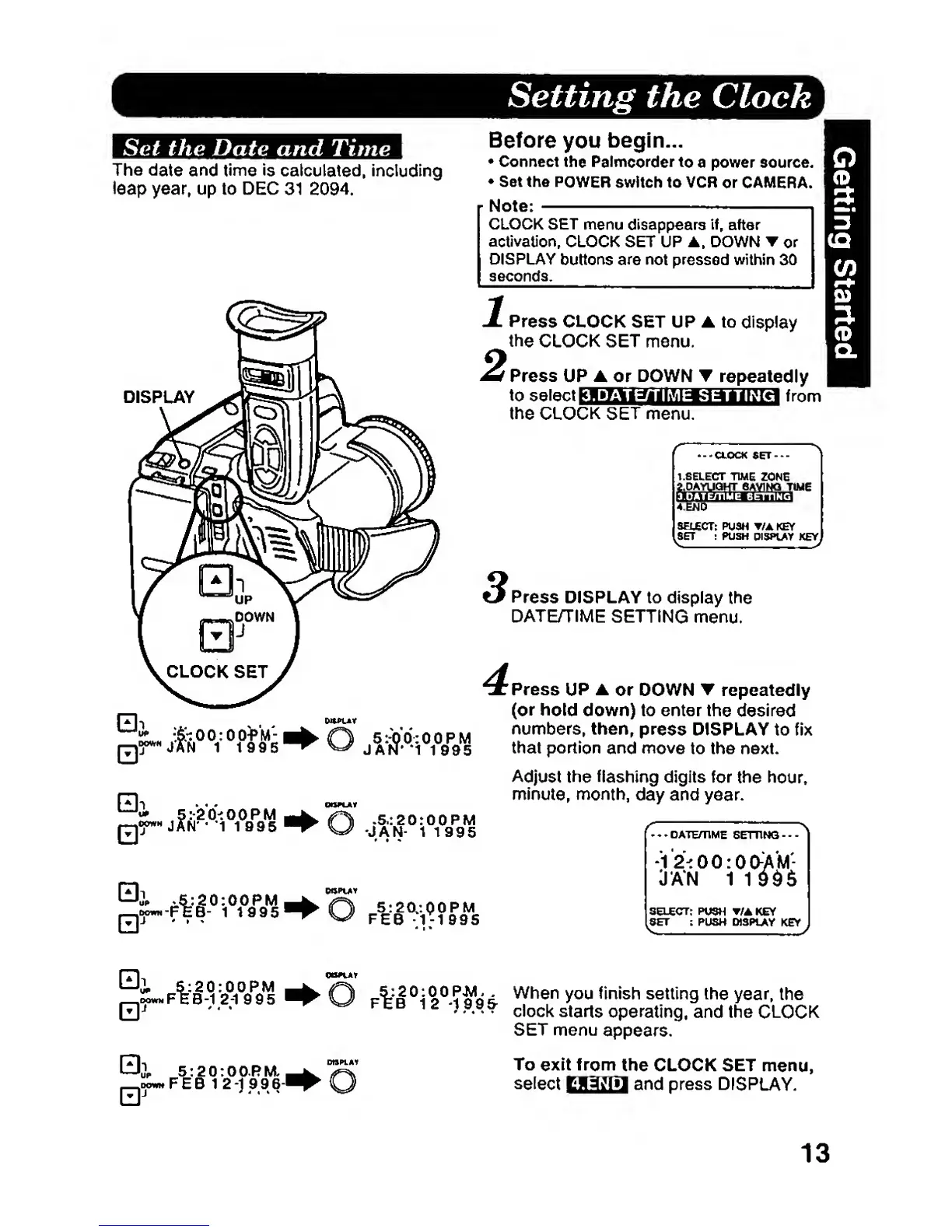
Set
the Date and Time
The
date and
time is
calculated,
including
leap
year, up to DEC
31 2094.
DISPLAY
o
Before
you
begin...
Connect
the Palmeorderto
a power source.
Set the
POWER
swftch to VCR
or
CAMERA.
Note:
CLOCK SET
menu
disappears
if,
after
activation,
CLOCK SET UP DOWN or
DISPLAY
buttons are not pressed within 30
seconds.
Press
CLOCK SET UP
to
display
the
CLOCK SET menu.
f
Press UP A or DOWN T
repeate
dly
to
sbIbtJ
KWiMiJii
wisaaa
iKti
from
the CLOCK SET menu.
'CLOCK
SET---
t.SELECT
TIME
ZONE
CAVINQ TIME
SELECT:
PU3H
T/A
KEY
SET
:
POSH
DISPLAY
KEY
.5.:20:00PM
JAlT- 1
1995
5:20/.QOPM
FEB
-1-1
995
^
Press
DISPLAY
to display
the
DATE>TIME
SETTING
menu.
^
Press
UP
or DOWN repeatedly
(or
hold
down) to enter
the
desired
numbers, then,
press DISPLAY
to fix
that portion
and
move
to the next.
Adjust
the
flashing
digits
for
the hour,
minute,
nrK>nth,
day and
year.
-12-:00:00-A'M-
JAN 1
1
SELECT:
PUSH T/AKEY
SET :
PUSH DISPIAY
KEY
S:20:00PM
EB-1
2-1995
'
O
AS
9fi
£
W^®"
setting
the
year,
the
f
t
B
12}
99
s-
clock
starts
operating,
and the
CLOCK
5:20:00.RM.,
o
SET
menu
appears.
To
exi
t trom
the CLOCK SET
menu,
select
Baail!]
and press
DISPLAY.
13