Notes
Regarding
Operations
Attaching
Optical
Filters and
Lenses
Remove
the Lens Hood by
turning
it counterclockwise.
Then
attach an
optical
filter
or
lens.
•
Be careful not to
touch
the lens
itself.
•
Replace the Lens
Hood
after removing the
accessory.
Cleaning
the EVF
(Electronic View Finder)
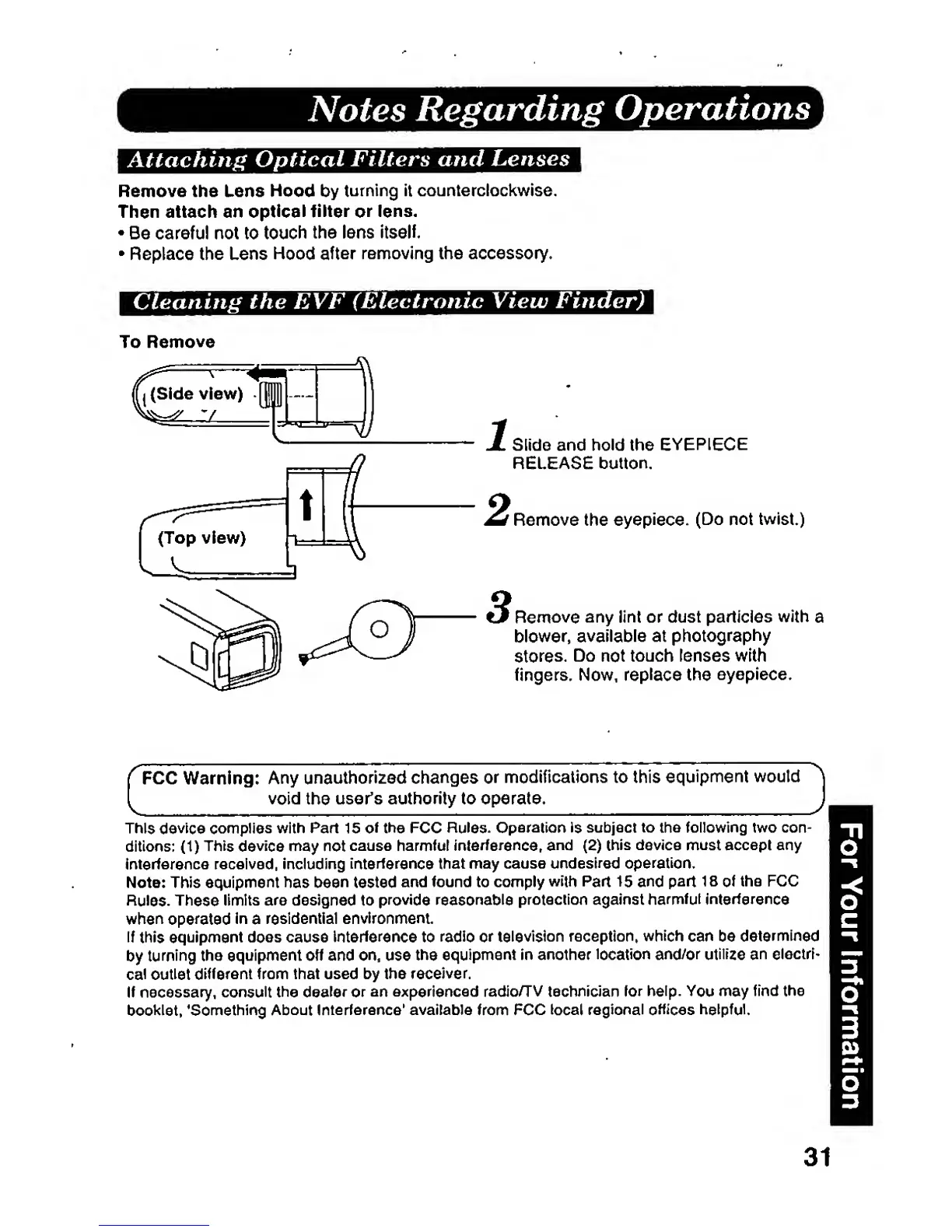
To
Remove
Slide and hold
the
EYEPIECE
RELEASE button.
Remove the
eyepiece.
(Do not twist.)
Remove
any lint or dust particles with
\
blower,
available
at
photography
stores.
Do
not
touch lenses with
fingers. Now,
replace the
eyepiece.
C
FCC Warning:
Any
unauthorized
changes
or
modifications
to this
equipment
woutd
void
the
user's
authority to operate.
This
device
complies with Part 15
of
the FCC
Rules.
Operaiion
is
subject to the following two con-
ditions:
(1)
This
device
may
not
cause
harmful
interference,
and
(2)
this device must accept
any
interference received, including
interference
that may
cause
undesired operation.
Note: This equipment
has
been
tested
and found
to comply
with Part
15 and
part 18 ol
the FCC
Rules. These
limits are
designed to
provide
reasonable
protection against
harmful interference
when opefatad
in
a
residential
environment
if
this
equipment does cause Interference
to
radio or television
reception,
which can be
determined
by
turning the
equipment off and on.
use
the
equipment
in another
location and/or utilize an
electri-
cal outlet
different
from that used by the
receiver.
If necessary,
consult the dealer
or
an experienced radio/TV technician
lor
help.
You
may
find
the
booklet,
'Somothing
About Interference'
available from
FCC
local regional
offices helpful.
31







 To Next Page