EasyManua.ls Logo

Panasonic PV-A206 - Quick Operation Guide

Panasonic PV-A206
40 pages
Print Icon
To Next Page IconTo Next Page
To Previous Page IconTo Previous Page
Loading...
Quick
Operation
Guide
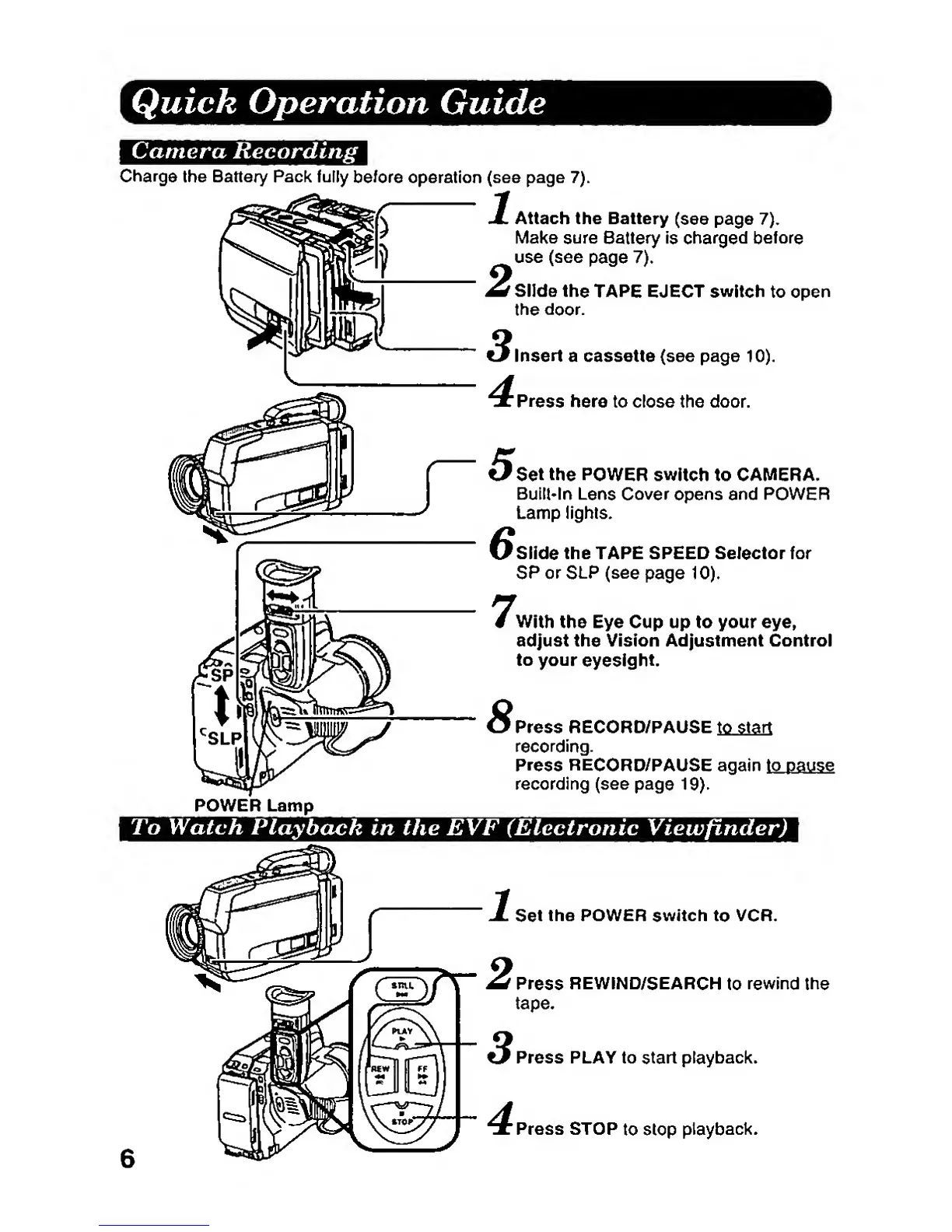
Charge
the Battery Pack fully
before
operation (see page
7).
Attach the Battery
(see page
7).
Make sure 6attery
is charged before
use (see
page
7).
Slide
the
TAPE
EJECT
switch
to open
the door.
Insert
a cassette (see page
10).
Press
here to close the door.
Set the POWER
switch to
CAMERA.
Buill*ln
Lens Cover
opens and
POWER
Lamp lights.
Slide the
TAPE SPEED
Selector for
SP
or
SLP (see
page
10).
With the Eye Cup up to your eye,
adjust
the
Vision Adjustment Control
to your
eyesight.
Press
RECORD/PAUSE
to
start
recording.
Press RECORD/PAUSE
again
to pause
recording (see
page
19).
POWER Lamp
To Watch
Playback
m the EVF (Electronic Viewfincler)
Set
the POWER switch
to VCR.
6
Press REWIND/SEARCH
to
rewind
the
tape.
Press PLiKY to
start
playback.
Press STOP
to stop
playback.

Related product manuals