EasyManua.ls Logo

Panasonic PV-A206 - Focus

Panasonic PV-A206
40 pages
Print Icon
To Next Page IconTo Next Page
To Previous Page IconTo Previous Page
Loading...
Special Features
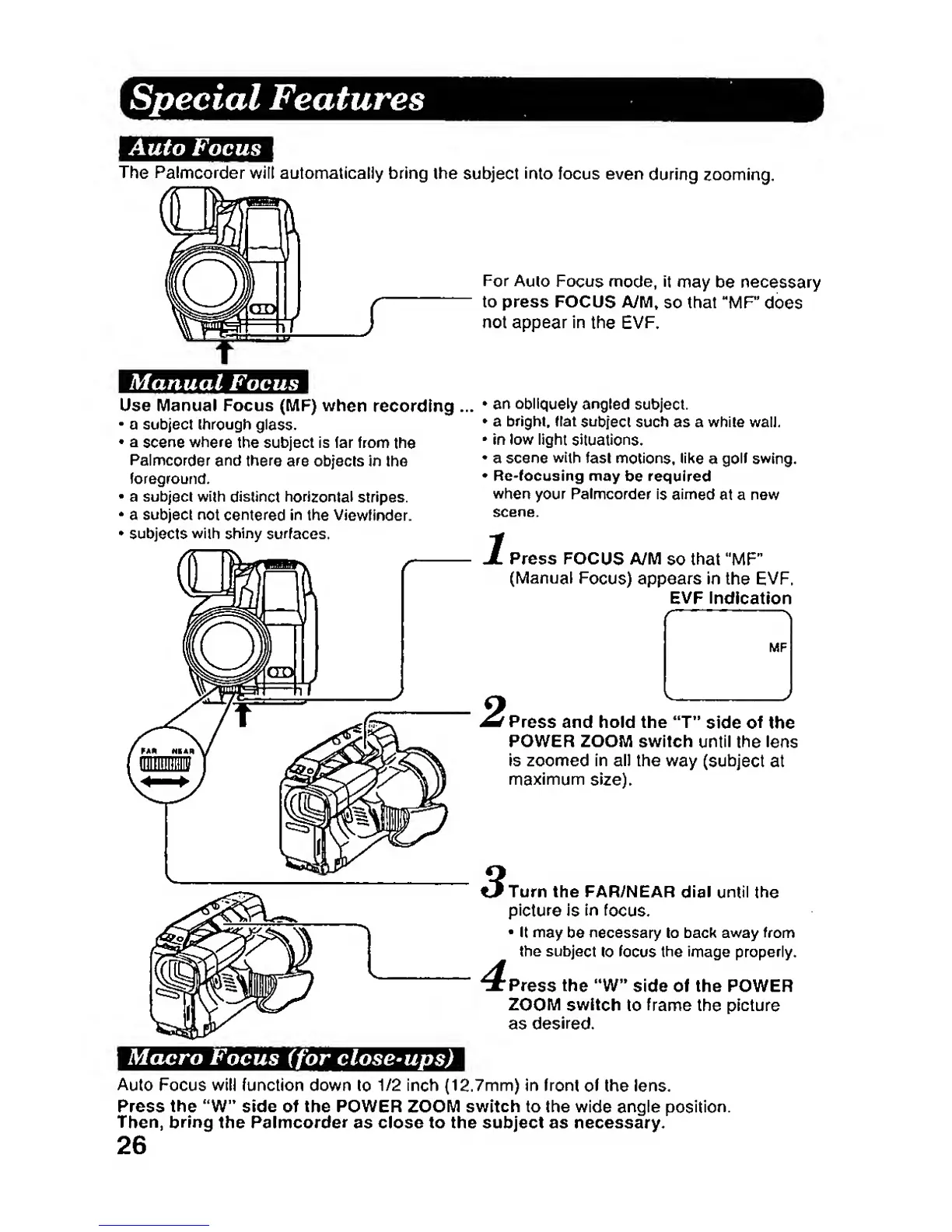
Auto Focus
The Palmcorder
wilt automaticaliy bring
the
subject
into
focus even
during
zooming.
For
Auto
Focus
mode,
it
may
be necessary
to press FOCUS
AyM»
so that "MP
does
not appear in
the EVP.
an obliquely
angled
subject.
a bright. Hat
subject such as a while walJ,
in
low
light
situations.
a scene
with
fast
motions,
like
a
golf swing,
Re-focusing may
be
required
when
your Palmcorder
is aimed
at a new
scene.
Press
FOCUS
A/M
so
that
"MF"
{Manual
Focus)
appears in
the EVF.
EVP Indication
Manual
Focus
Use Manual
Focus (lUIP)
when
recording
.
a subject through
glass.
a
scene
where
the subject is tar from
the
Palmcorder
and
there
are
objecls in
the
foreground.
a
subject with
distinct
horizontal
stripes.
a
subject
not
centered
in
the
Viewfinder.
subjects
with shiny
surfaces.
Press
and hold the
"T"
side
of
the
POWER ZOOM switch until
the
lens
Is zoomed in all
the
way
(subject
at
maximum
size).
Turn the PAR/NEAR
dial until
the
picture
Is
in
focus.
It may
be
necessary
to
back away
from
the
subject
to
focus the image properly.
Press
the
"W"
side of the POWER
ZOOM switch
to
frame
the
picture
as
desired.
Macro
Focus
(for
close-ups)
Auto
Focus will function down
to
1/2 inch (12.7mm) in
front of
the lens.
Press the "W" side of the POWER ZOOIM switch to the wide
angle
position.
Then,
bring
the
Palmcorder
as close to the subject as necessary.
26