EasyManua.ls Logo

Panasonic PV-A206 - Camera Recording; Simple Recording

Panasonic PV-A206
40 pages
Print Icon
To Next Page IconTo Next Page
To Previous Page IconTo Previous Page
Loading...
Camera Recording
Simple Recording
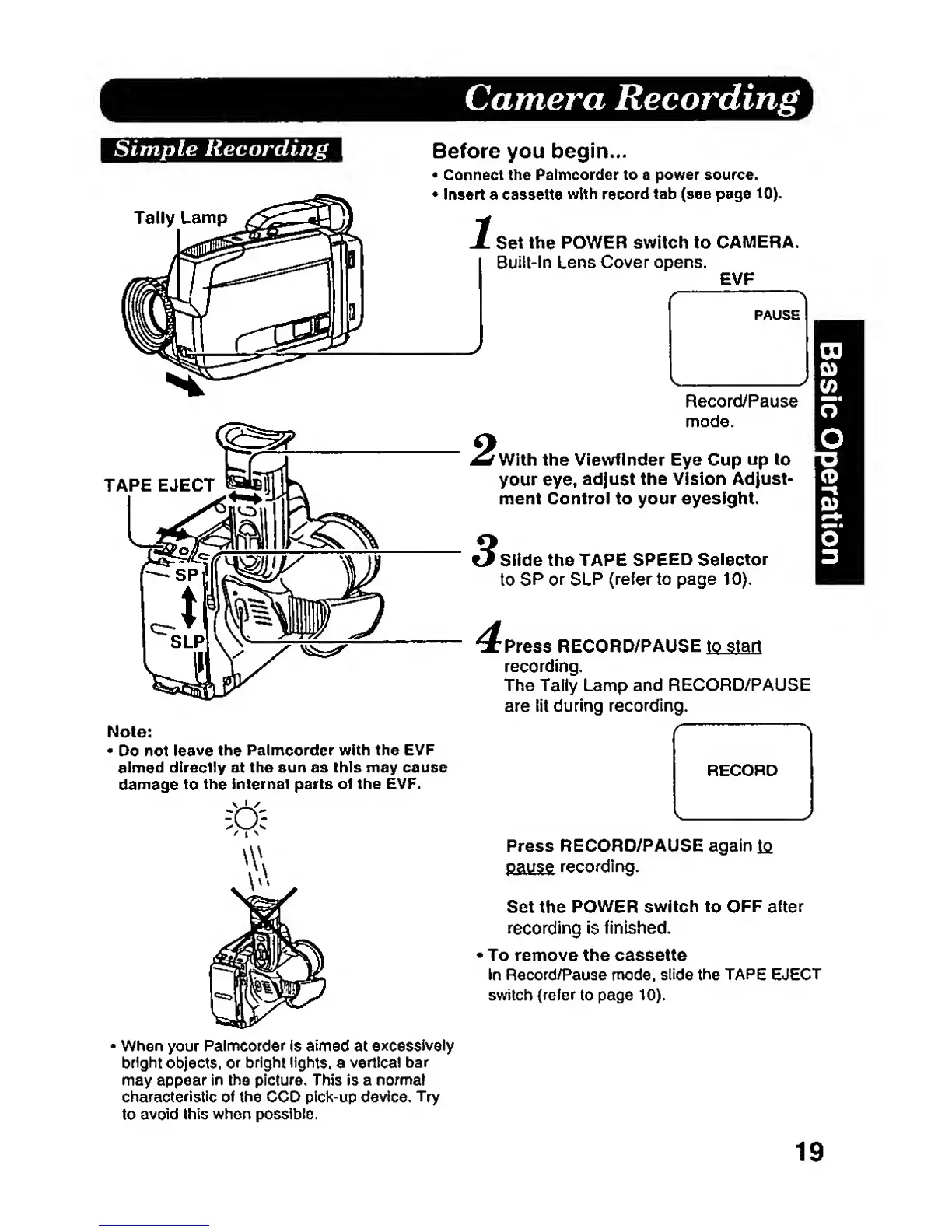
Tally
Lamp
Before you begin...
Connect the
Palmcorder
to
a
power
source.
Insert
a
cassette
with
record
tab (see page
10).
Set
the
POWER switch to
CAMERA.
Built-in
Lens Cover
opens.
EVF
Note:
«
Do not
leave the
Palmcorder with the EVF
aimed
directly at the sun as this may cause
damage to
the
Internal parts of the EVF.
Record/Pause
mode,
With
the Viewfinder Eye Cup
up
to
your eye,
adjust
the Vision Adjust-
ment Control to your eyesight.
Slide
the TAPE
SPEED Selector
to
SP or
SLP
(refer to page
10).
Press
RECORD/PAUSE
to start
recording.
The Tally Lamp and RECORD/PAUSE
are lit
during recording.
RECORD
Press
RECORD/PAUSE
again
la
payg^
recording.
Set
the
POWER switch
to OFF after
recording is
finished.
To remove the cassette
In
Record/Pause
mode,
slide
the TAPE EJECT
switch (refer
to page
10).
When your
Palmcorder is aimed
at
excessively
bright
objects,
or
bright lights,
a
vertical
bar
may appear in the
picture. This
is
a
normal
characteristic
of the
CCD pick-up
device.
Try
to
avoid
this when possible.
19