EasyManua.ls Logo

Panasonic PV-A206 - Stand-By Mode; Stand-By Release

Panasonic PV-A206
40 pages
Print Icon
To Next Page IconTo Next Page
To Previous Page IconTo Previous Page
Loading...
Camera Recording
Stand-by
Mode
Whenever
the Palmcorder
has
been In
Record/Pause mode
for 5
minutes,
it will
auto*
maticatly
go mto
Stand-by
mode to conserve
power.
To
resume recording,
it is
necessary
to turn
the Palmcorder POWER
switch
to OFF
and
then
to
CAMERA.
Or,
you may
use
the
following
feature to avoid
having
to turn the
Palmcorder off
and on again.
Stand-by
Release
This
feature
allows you to resume
recording
from
Stand-by
mode
by
simply
pressing
the
RECORD/PAUSE button.
Before
you
begin...
Connect
the
Palmcorder
to
a power source.
Insert a
cassette with
record
tab
(see
page
10).
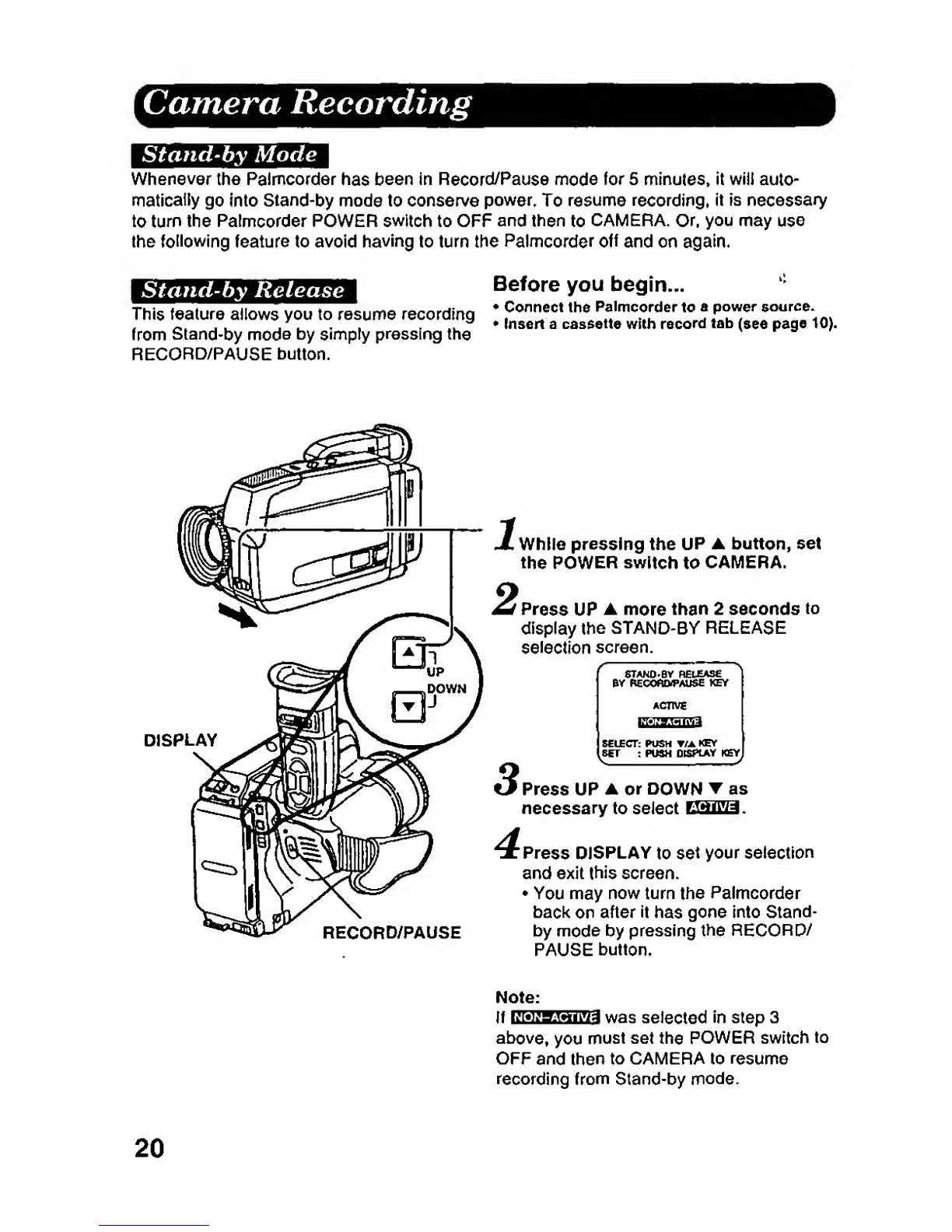
DISPLAY
While pressing the
UP
A
button,
set
the
POWER switch
to
CAMERA.
Press
UP
A
more
than
2 seconds
to
display the STAND-BY
RELEASE
selection
screen.
ACTIVE
SELECT: PUSH T/A
KEY
y
SET
: PUSH
DtSPtAY KgY^
RECORD/PAUSE
Press UP
A or DO
WN
as
necessary
to select CliUlua.
'Press
DISPLAY
to
set
your selection
and exit
this
screen.
You
may
now turn
the
Palmcorder
back
on
after It
has
gone into
Stand-
by
mode
by pressing the RECORO/
PAUSE
button.
Note:
If
Kiwgmura^
was
Selected
In step 3
above,
you
must set
the
POWER switch
to
OFF
and then
to CAMERA to
resume
recording from
Stand-by
mode.
20