EasyManua.ls Logo

Panasonic PV-A206 - Playback Your Recordings

Panasonic PV-A206
40 pages
Print Icon
To Next Page IconTo Next Page
To Previous Page IconTo Previous Page
Loading...
Playback
your Recordings
Playback
using the t VF
Before
you begin...
Connect the Palmcorder
to
a power source.
Insert
a recorded cassette.
Special
Effects
Playback
(Sound is
Muted)
Rapidly Locate a Scene
Press
FAST
FORWARD/SEARCH
or
REWIND/SEARCH
for
rapid
visual
search.
Press again, or
press PLAY to resume
normal speed.
View
a
Still Picture
Press
STILL to freeze the playbacl< picture.
Press
again to resume normal playback.
Note:
During search playback,
horizontal
noise bars
wilt appear
and
there will be no audio.
To protect
the tape
and video
heads,
your
Palmcorder's
operating modes
will revert
as
follows:
STILL
^
STANDBY
atter
5
minutes.
STANDBY
POWER
OFF after
5
minutes
when
using
a
Battery
Pack.
When
the
tape
reaches
its
end during
playback,
or
fast fororard. It will rewind
autonfiatlcally.
22
1
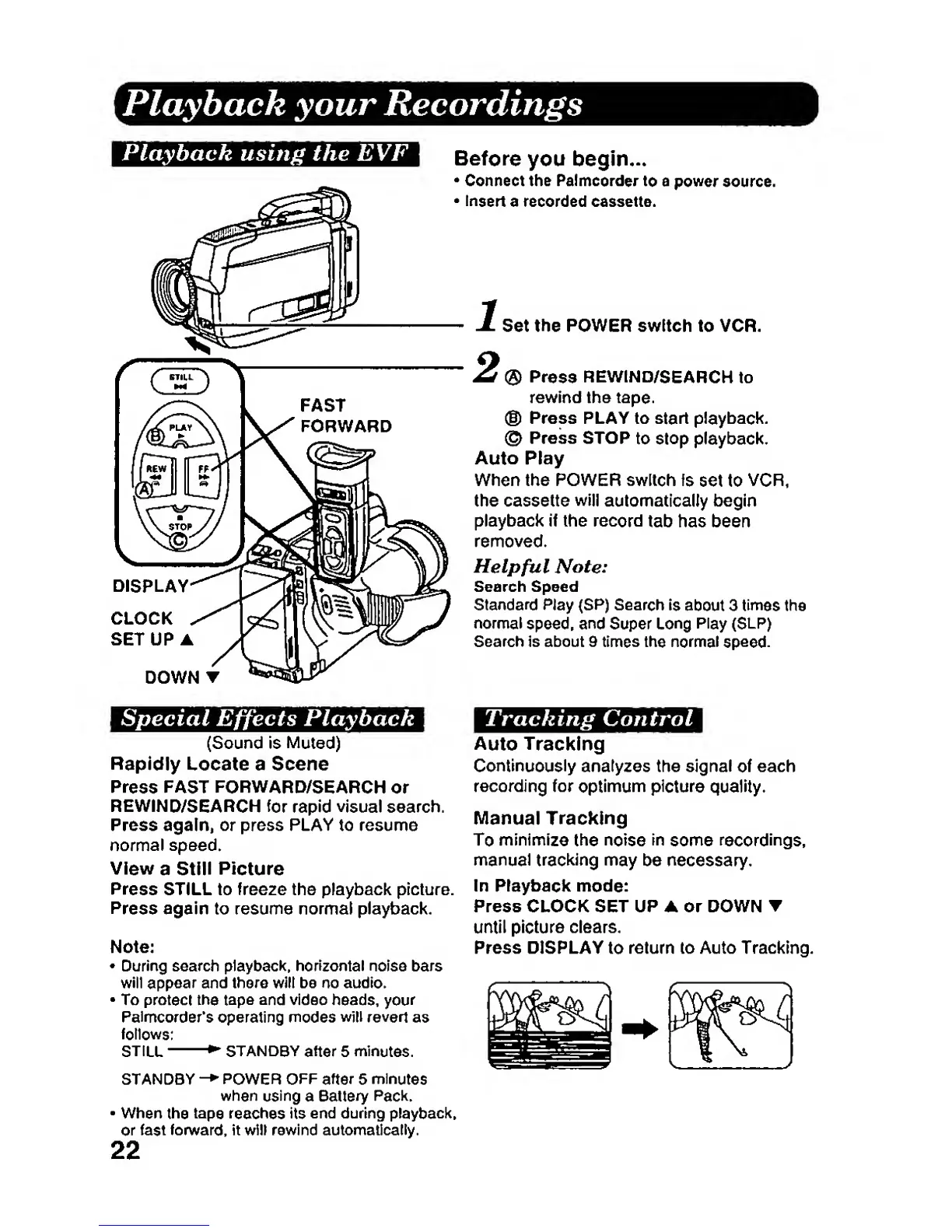
Set the POWER switch to VCR.
2
®
Press REWIND/SEARCH
to
rewind the tape.
®
Press
PLAY to
start
playback.
©
Press
STOP
to Stop playback.
Auto
Play
When the POWER
switch
fs
set to
VCR,
the cassette
will
automatically begin
playback if the
record
tab has been
removed.
Helpful
Note:
Search Speed
Standaid
Play (SP) Search
Is
about 3
times
the
normal
speed,
and
Super
Long
Play (SLR)
Search
Is about 9 times
the normal
speed.
Tracking Control
Auto Tracking
Continuously
analyzes the signal
of
each
recording for
optimum
picture quality.
Manual
Tracking
To
minimize
the
noise
in
some
recordings,
manual tracking may
be
necessary.
In Playback
mode:
Press CLOCK SET
UP A or DOWN
T
until picture
clears.
Press DISPLAY
to
return to Auto Tracking.

Related product manuals