Supplying Power
Battery
Refresh
Feature
This feature completely
discharges
the
Battery
before recharging begins.
To
maintain
your battery's operating
capacity, use thie refresh feature after
at)out every
five
charges.
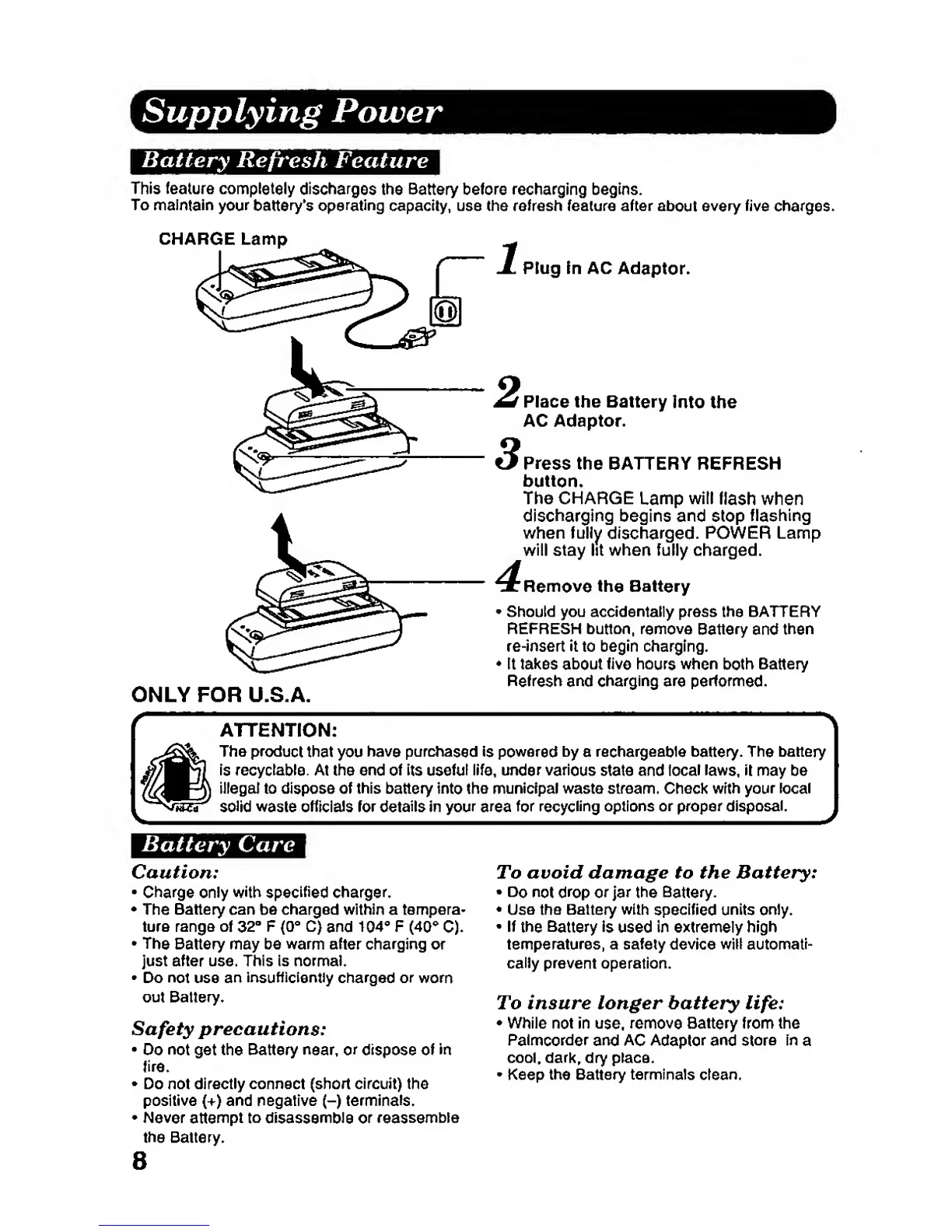
CHARGE Lamp
Plug in AC
Adaptor*
FOR U.S.A
Place the Battery
into the
AC Adaptor
Press
the BATTERY REFRESH
button.
The CHARGE
Lamp
will
flash when
discharging
begins and stop
flashing
when fully
discharged.
POWER Lamp
will stay lit when fully charged.
Remove the
Battery
•
Should you
accidentally press
the BATTERY
REFRESH button, remove
Battery
and
then
re-insert It to
begin charging.
•
It
takes
about
five
hours
when
both
Battery
Refresh
and
charging
are
performed.
ATTENTION:
The
product that
you
have purchased is powered
by
a
rechargeable
battery.
The
battery
is recyclable. At
the end
of
its useful
life,
under various
state and
local
laws, it
may be
illegai to dispose of this battery into
the
municipal waste stream. Check wrth your local
solid waste officials
for
details
in
your area
for recycling
options or proper disposal.
Battery
Care
Caution:
•
Charge
only
with
specified charger.
•
The Battery
can be charged within a tempera-
ture range
of
32-
F
{Q"
C)
and
104*"
F
(40**
C).
•
The
Battery may be
warm
after charging or
just
after
use. This is normal.
•
Do
not
use an insufficiently
charged
or
worn
out
Battery.
Safety
precautions:
Do
not
get the Battery
near,
or
dispose of
in
fire.
•
Do not directly connect
(short circuit) the
positive
(+)
and negative
(-)
terminals.
•
Never
attempt
to
disassemble
or reassemble
the Battery.
To avoid damage to the Battery:
•
Do not drop
or jar
the Battery.
•
Use
the Battery with
specified units only.
•
If
the
Battery
is
used
in extremely high
temperatures, a safety
device will automati-
cally
prevent operation.
To insure longer battery
life:
•
While
not in
use,
remove Battery from the
Palmcorder
and
AC
Adaptor and store
In
a
cool, dark, dry place.
•
Keep the Battery terminals clean.
8







 To Next Page