EasyManua.ls Logo

Panasonic PV-A206 - Page 34

Panasonic PV-A206
40 pages
Print Icon
To Next Page IconTo Next Page
To Previous Page IconTo Previous Page
Loading...
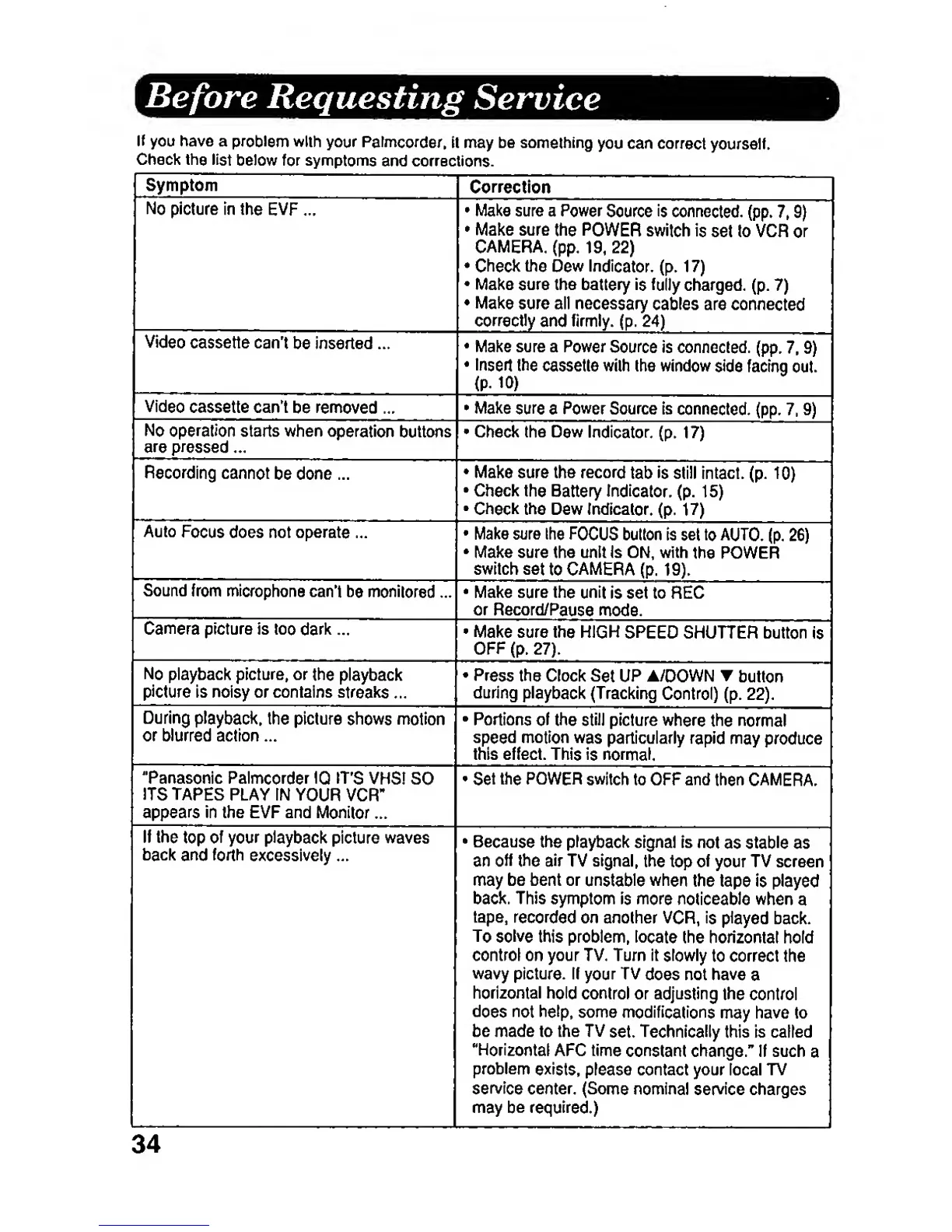
Before Requesting
Service
If
you have a
problem
with
your Palmcorder,
it may be
something
you can
correct
yourself.
Check
the
list
below
for symptoms
and
corrections.
Symptom
Correction
No
picture in
the
EVP
...
Make sure a
Power
Source
is
connected,
(pp.
7,
9)
Make sure
the
POWER
switch is
set
to VCR
or
CAMERA,
(pp.
19, 22)
Check
the
Dew Indicator,
(p.
17)
Make
sure the battery is
fully
charged,
(p.
7)
Make sure all
necessary
cables are
connected
correctly
and firmly,
(p.
24)
Make sure
a
Power
Source
is connected,
(pp.
7,
9)
Insert
the
cassette with
the
window
side
facing
out.
(p.
10)
Video
cassette can't
be
removed
...
*
Make
sure
a
Power
Source Is
connected,
(pp.
7,
9)
No
operation
starts when
operation
buttons
are pressed
...
«
Check the
Dew Indicator,
(p.
17)
Recording
cannot
be
done
...
Make
sure the
record
tab
is
still
intact,
(p.
10)
Check
the
Battery Indicator,
(p.
15)
Check
the
Dew indicator,
(p.
17)
Auto
Focus
does not operate ...
Make
sure Ihe
FOCUS
button is
set to AUTO,
(p.
26)
Make
sure the unit Is ON, with
the POWER
switch
set
to CAMERA
(p.
19).
Sound from
microphone
can't
be monllored ...
Make sure
the unit
is set
to REC
or
Record/Pause
mode.
Camera
picture is
too daric ...
Make
sure
the HIGH
SPEED
SHUTTER button
is
No
playback picture, or
the
playback
picture
is noisy or contains
streaks
...
Press
the Clock
Set
UP A/DOWN T
button
during
playback
(Tracking
Control)
(p.
22).
During
playback,
the picture
shows motion
or blurred action ...
Portions
of
the
stiJl
picture
where
the normal
speed motion
was
particularly
rapid may
produce
this effect. This
is normal.
"Panasonic
Palmcorder
IQ
IT'S
VHS!
SO
ITS TAPES
PLAY IN
YOUR
VCR-
appears
in the EVF and
IWonilor
...
Set
the
POWER
switch
to OFF and
then
CAMERA.
If
the
top
of
your playback
picture waves
back
and
forth
excessively ...
Because the
playback signal
is
not
as
stable
as
an
off
the air
TV
signal,
the
top
of
your TV screen
may
be bent or
unstable
when
the
tape
is
played
back. This
symptom is more
noticeable when
a
tape,
recorded
on another
VCR,
is
played
back.
To solve
this problem,
locate
the horizontal hold
control on
your TV,
Turn it
slowly
to correct the
wavy
picture. If
your
TV
does not have
a
horizontal
hold
control or adjusting
the
control
does not
help,
some
modifications
may have to
be made to the TV
set.
Technically
this is called
"Horizontal
AFC time
constant
change." If such
a
problem
exists,
please
contact your local TV
service
center.
(Some
nominal service
charges
may be required.)
34