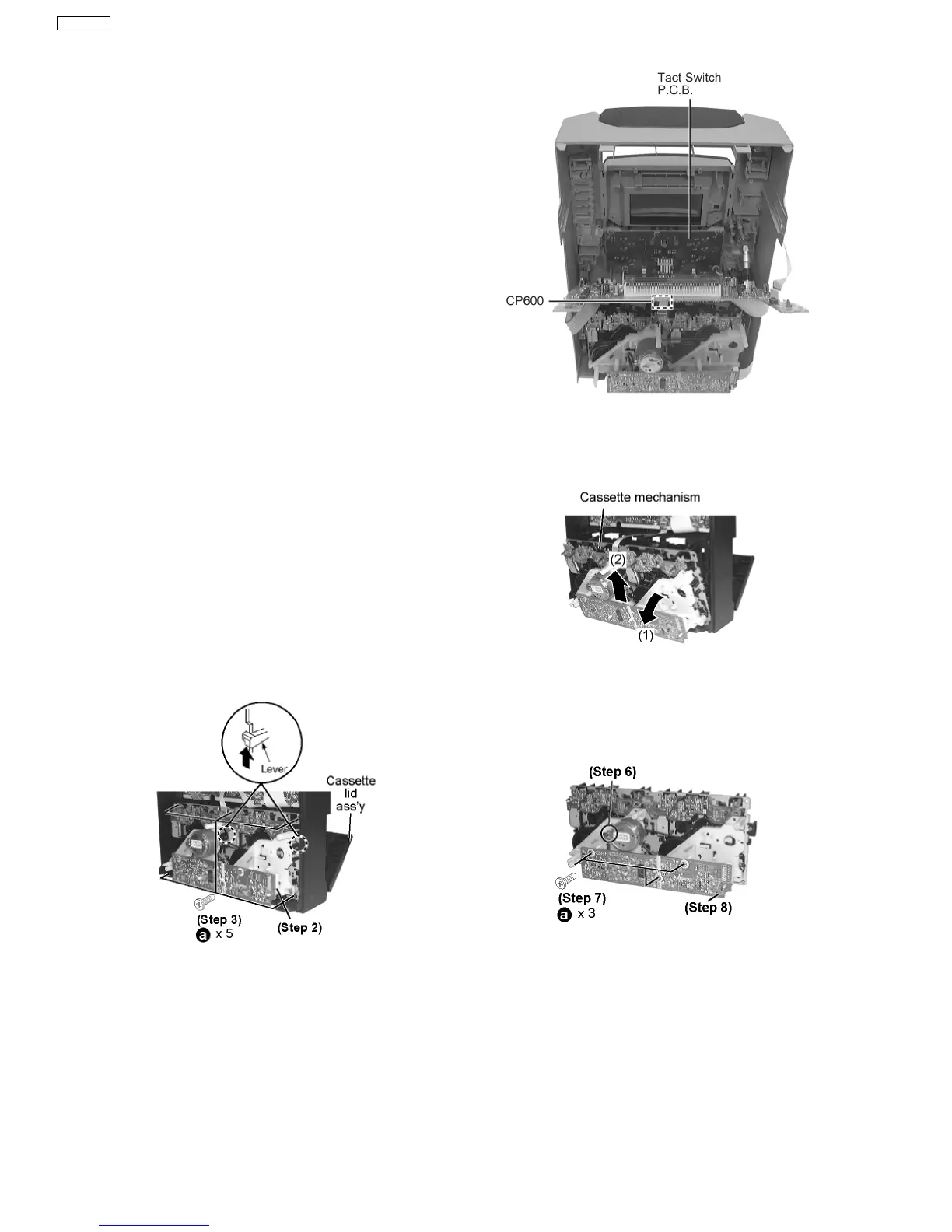
Step 4 Disconnect FFC Boards (CN951, CN2903, CN2902 &
CN2904).
·
Disassembly of Tact Switch P.C.B.
Step 5 Disconnect connector CP600.
·
Follow the (Step 1) - (Step 3) of Item 9.1 - Disassembly of
Top Cabinet and Rear Panel
·
Follow the (Step 1) - (Step 6) of Item 9.1.1 - Disassembly
for CD Lid
·
Follow the (Step 1) - (Step 5) of Item 9.2 - Disassembly for
the CD Mechanism Unit
Step 1 Detach FFC board. (CN951, CN2902, CN2903 &
CN2904)
Step 2 Disconnect FFC flat cable from the connector
(CN2903).
Step 3 Remove the 5 screws.
·
Follow the (Step 1) - (Step 3) of Item 9.1 - Disassembly of
Top Cabinet and Rear Panel
·
Follow the (Step 1) - (Step 6) of Item 9.1.1 - Disassembly
for CD Lid
·
Follow the (Step 1) - (Step 5) of Item 9.2 - Disassembly for
the CD Mechanism Unit
Step 6 Pull out the volume knob.
Step 7 Pull Panel P.C.B. forward.
Step 4 Push the lever upward, and then open the cassette lid
ass’y (For DECK1 and DECK2).
Step 5 Tilt the cassette mechanism unit in the direction of
arrow (1), and then remove it in the direction of arrow (2).
·
For replacement of Deck P.C.B.
Step 6 Unsolder the motor terminals.
Step 7 Remove 4 screws.
Step 8 Remove Deck P.C.B.
9.6.1. Replacement of the Traverse Deck
Step 1 Remove the CD changer unit.
9.5. Disassembly of Deck Mechanism Unit & Deck P.C.B.
9.6. CD Mechanism Main Component Replacement Procedures
16
SA-VK31EE








 To Next Page