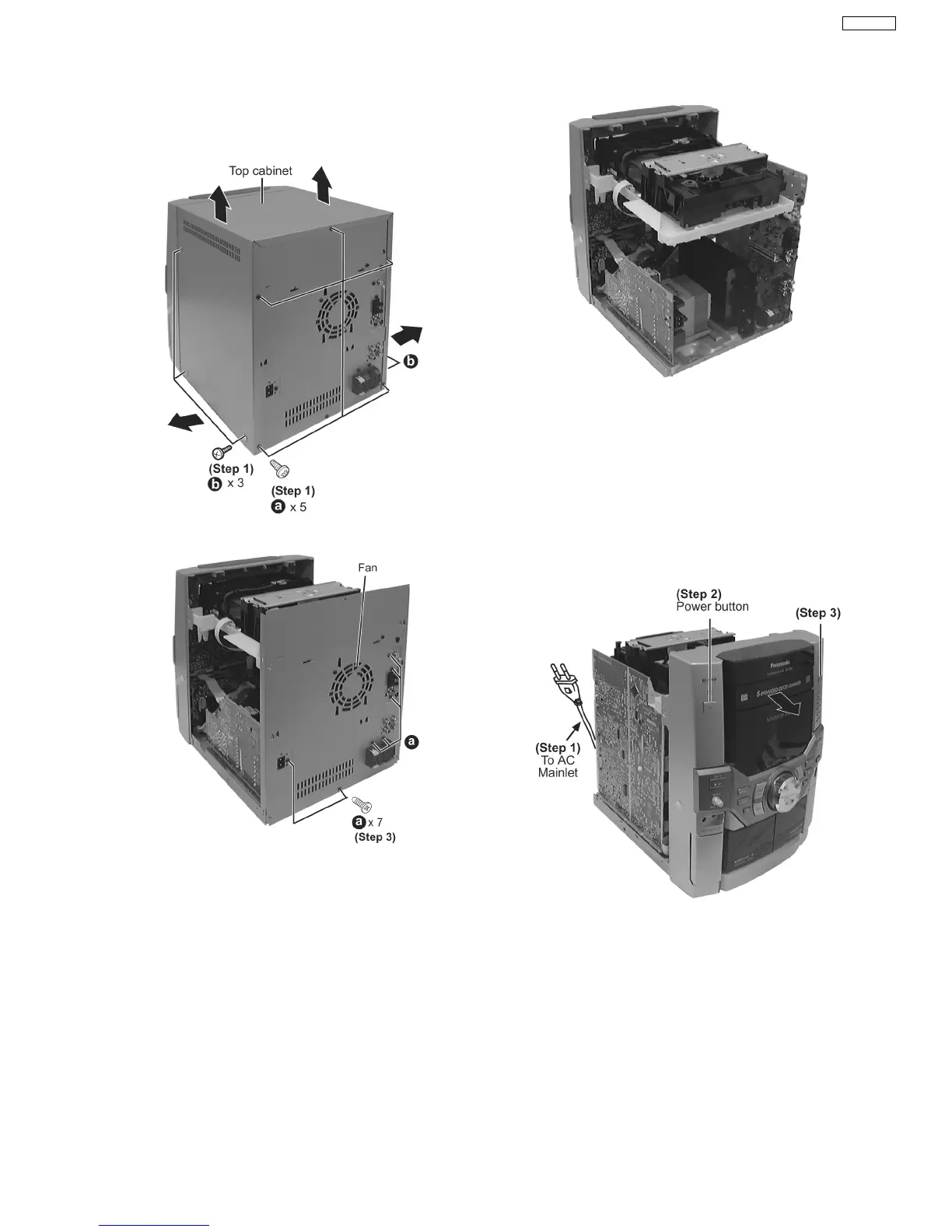
Step 1 Remove 3 screws each side and 5 screws at rear panel.
Step 2 Lift up both sides of cabinet ass’y, push the cabinet
ass’y toward the rear and remove the cabinet ass’y.
·
Disassembly of Rear Panel
Step 3 Remove 7 screws and disconnect wire at CN305 (Fan)
at rear cabinet as shown.
9.1.1. Disasembly for CD Lid
(The CD changer unit can be removed after the CD Lid is
removed)
·
Follow the (Step 1) - (Step 2) of Item 9.1 - Disassembly of
Top Cabinet and Rear Panel
When opening the disc tray automatically (Using Power
Supply)
Step 1 Connect the AC power cord.
Step 2 Press the POWER button to power up the main unit.
Step 3 Press the OPEN/CLOSE button, the disc tray will be
open automatically.
9.1. Disassembly of Top Cabinet and Rear Panel
11
SA-VK31EE








 To Next Page