12 Self-Diagnostic Function
12.1. Self-diagnostic display
This unit is equipped with a self-diagnostic display function which, if a problem occurs, will display an error code corresponding to
the problem.
Use this function when performing maintenance on the unit.
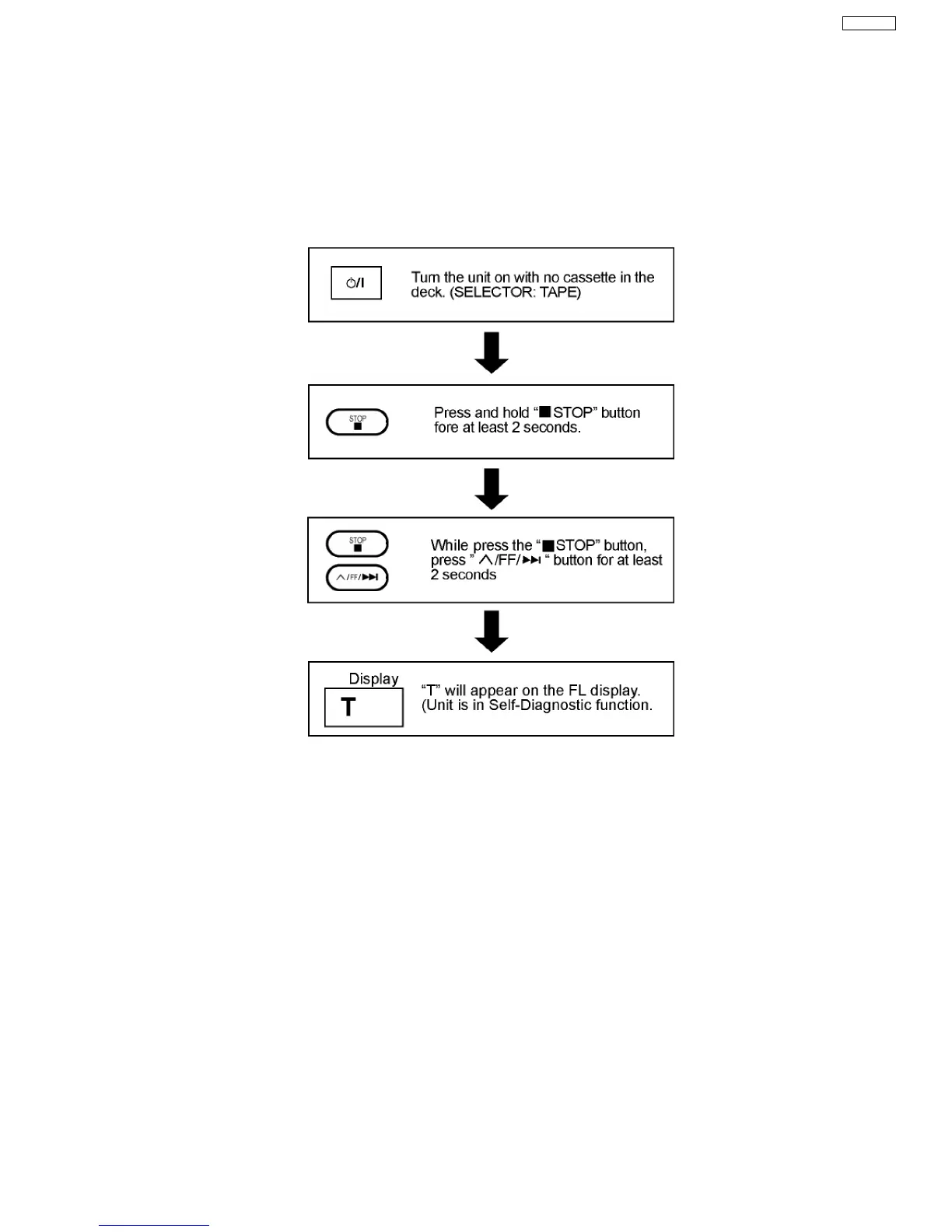
12.2. How to enter the Self-Diagnostic Function
12.3. Cassette Mechanism Test (For error code H01, H02, H03, F01)
1. Press “TAPE, DECK 1/2” to select Deck 2.
2. Load a cassette tape with the erasure prevention tab, remove from left side only and close the cassette holder.
3. Press “FAST FORWARD” (Tape will be stop after 2 seconds)
4. Load a cassette tape with the erasure prevention tab, remove from right side only and close the cassette holder.
5. Press “REVERSE” (Tape will be stop after 2 seconds)
6. Load a pre-recorded tape with both side record tabs intact and close the cassette holder.
7. Press “PLAY” (After TPS function, tape will stop automatically)
8. Press “REC” (Tape will not move)
9. Press “STOP” to indicate Error code.
·
If several problem exist, error code will change each time when “n /STOP” is pressed.
(e.g. H01 → H03 → F01 .....etc.)
10. Press “TAPE, DECK 1/2” to select Deck 1.
11. Repeat step 2 to 9 to test Deck 1. (Tape Deck 1 will not check H02 because of no recording function)
37
SA-VK31EE








 To Next Page