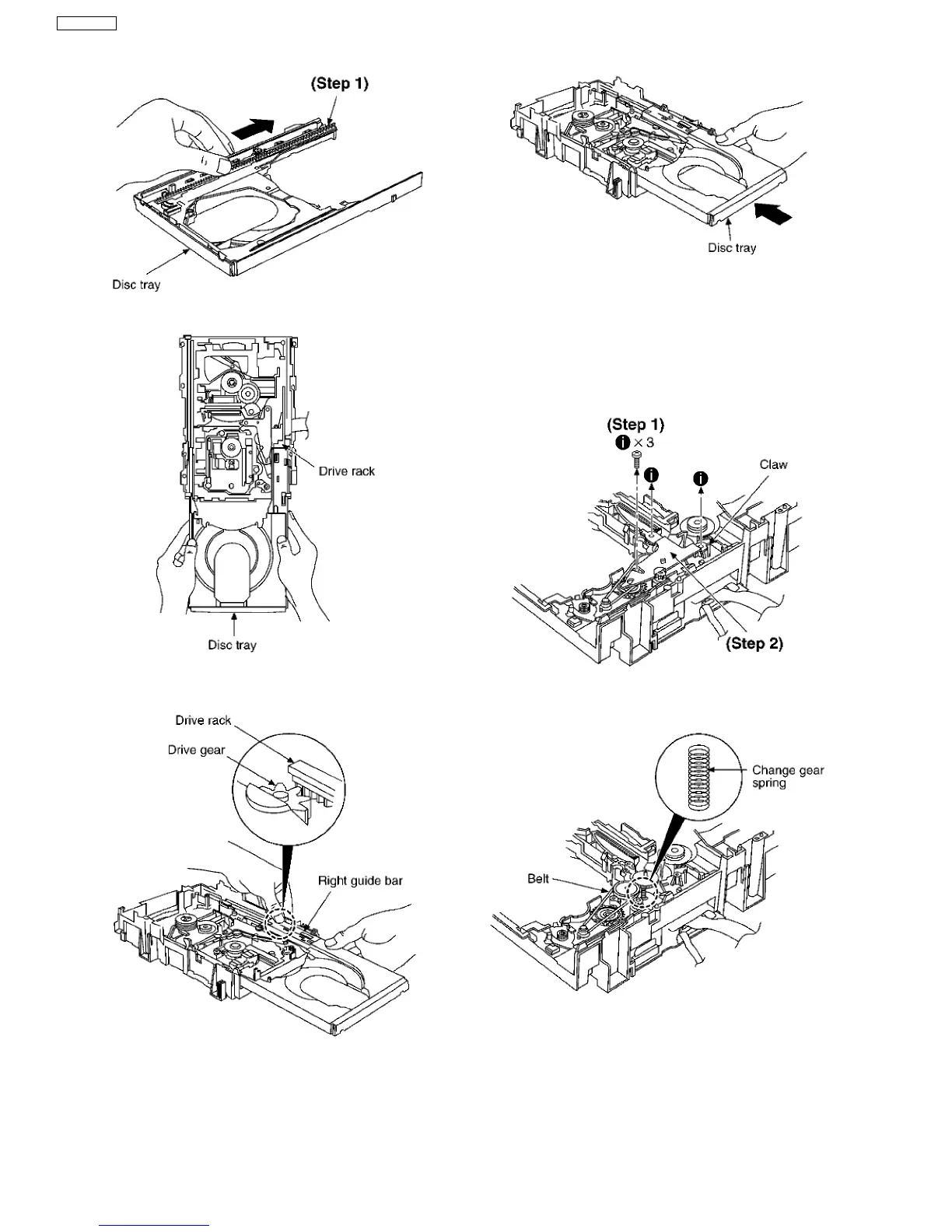
Step 1 Slide the drive rack fully in the direction of arrow.
Step 2 Holding the drive rack not to move, install the disc tray.
Step 3 Align the drive rack with the drive gear.
NOTE:
Force the right guide bar of tray base manually not to move
upwards.
Step 4 Holding the disc tray manually, push the disc tray in the
direction of the arrow.
16.8.3. Disassembly and reassembly for
mechanism base drive unit
·
Follow the (Step 1) - (Step 9) of Item 16.8.2.
Step 1 Remove 3 screws.
Step 2 Release the claw, and then remove the gear holder.
Step 3 Remove the belt and change gear spring.
NOTE:
Take care not to lose the change gear spring.
Step 4 Remove the pulley gear, change gear and UP/DOWN
gear.
42
SA-VK61DEE








 To Next Page