17
English
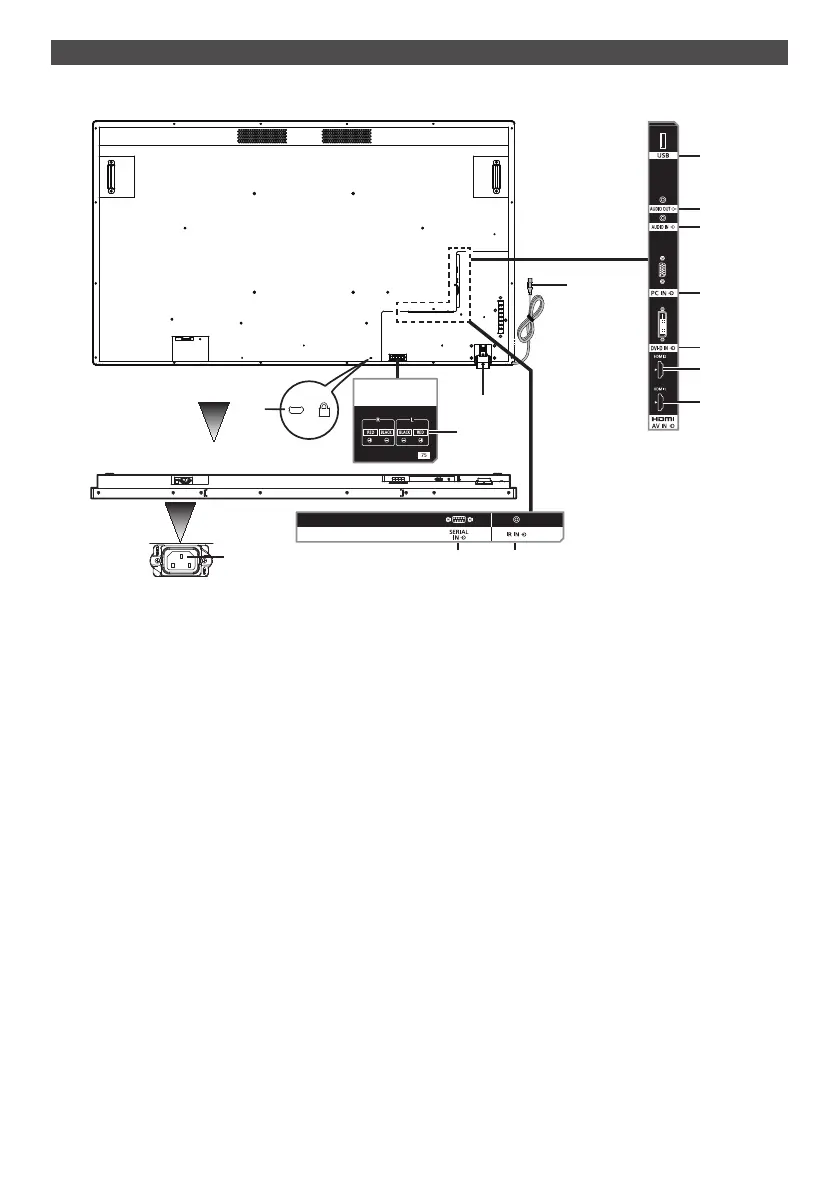
Cable and terminal
Refer to page 21 for the details of types of cables and how to connect them.
Back side
EXT SP
(8Ω,20W [10W+10W])
2
1
5
13
3 4
6
7
9
10
11
12
14
8
Base
1
Hole for installing
theft prevention
lock
It is used for security and theft prevention.
2
AC IN (3-pin, with
earthing terminal)
It is connected with the power supply cord provided in accessories. For Class I products, it
is mandatory to connect the main power supply having earthing.
3
SERIAL IN It is used for connecting to a PC for controlling the main unit.
4
IR IN It is an IR input terminal that is connected with an IR cable. Please contact your distributor
for purchasing an IR cable.
5
Remote control
sensor /
Power indicator
Remote control sensor: It receives signals from the remote control.
Power indicator: It shows the status of LCD display.
See page 27 for more details.
6
USB It is a USB input terminal for USB flash drives.
7
AUDIO OUT This terminal is for connecting a speaker having amplifier. It will output audio when [AUDIO
OUT] is specified in [Sound] - [Output Select]. Output can be adjusted with the [VOL] button
(+/−)oftheremotecontrol.
8
AUDIO IN It is used for connecting audio output cables of external devices such as PC, VCR, and
DVD player. For HDMI input, you can select [AUDIO IN] in [Sound] - [Audio Source]. (see
page 43)
[AUDIO IN] is default in DVI-D/PC input.
9
PC IN It is used for connecting with the analogue video signal output terminal of a PC.
10
DVI-D IN It is connected with a digital video signal output terminal such as a PC.
11
HDMI 2
It is used for connecting with a device compatible with audio / video signal of HDMI interface.
12
HDMI 1
It is used for connecting with a device compatible with audio / video signal of HDMI interface.
13
EXT SP ItisconnectedwithL/Rand+/−terminalofthespeakerprovidedasaccessory.
It will output audio when [EXT SP] is specified in [Sound] - [Output Select]. Output can be
adjusted with the [VOL]button(+/−)oftheremotecontrol.
14
USB cable for
touch panel
It is connected to a PC's USB terminal for using the touch panel.





 To Next Page