30
English
Playback the contents of USB flash drive
1
Insert the USB flash drive in the USB input terminal.
2
Select USB as the input source by using the [INPUT] button of the remote control or the LCD display.
Note
●
You can also directly select [USB] by using the [USB] button of the remote control.
3
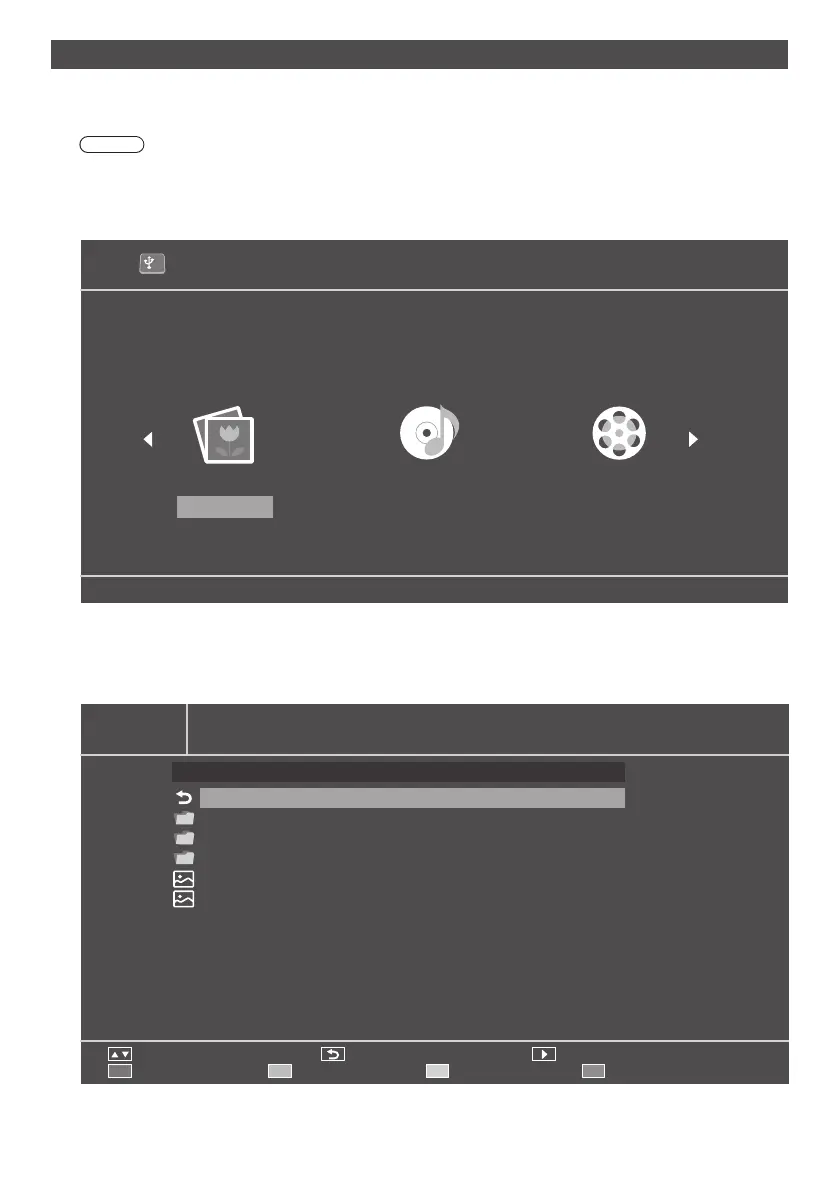
3 options of [PHOTO], [MUSIC], and [MOVIE] will appear in the OSD main menu (media root page). Use the left
(◄)andtheright(►)buttonsoftheremotecontrolandselectthetypeofthecontentsyouwanttoplay.Pressthe
[OK] button to confirm the selection.
1
USB 2.0
PHOTO MUSIC MOVIE
4
The USB flash drive will appear as “C” depending on the situation. Press the [OK] button of the remote control and
open this C drive (media list page).
5
Usetheup(▲)andthedown(▼)buttonsoftheremotecontroltosearchcontentsintheUSBflashdrive.
Press the [OK] button to open the contents you want to play.
PHOTO
C:\ 1 / 1
Move Back Play
Playlist Option Play all
FileName
Back
Movie
Picture
Music
image01.jpg
image02.bmp





 To Next Page