29
English
Select the input source
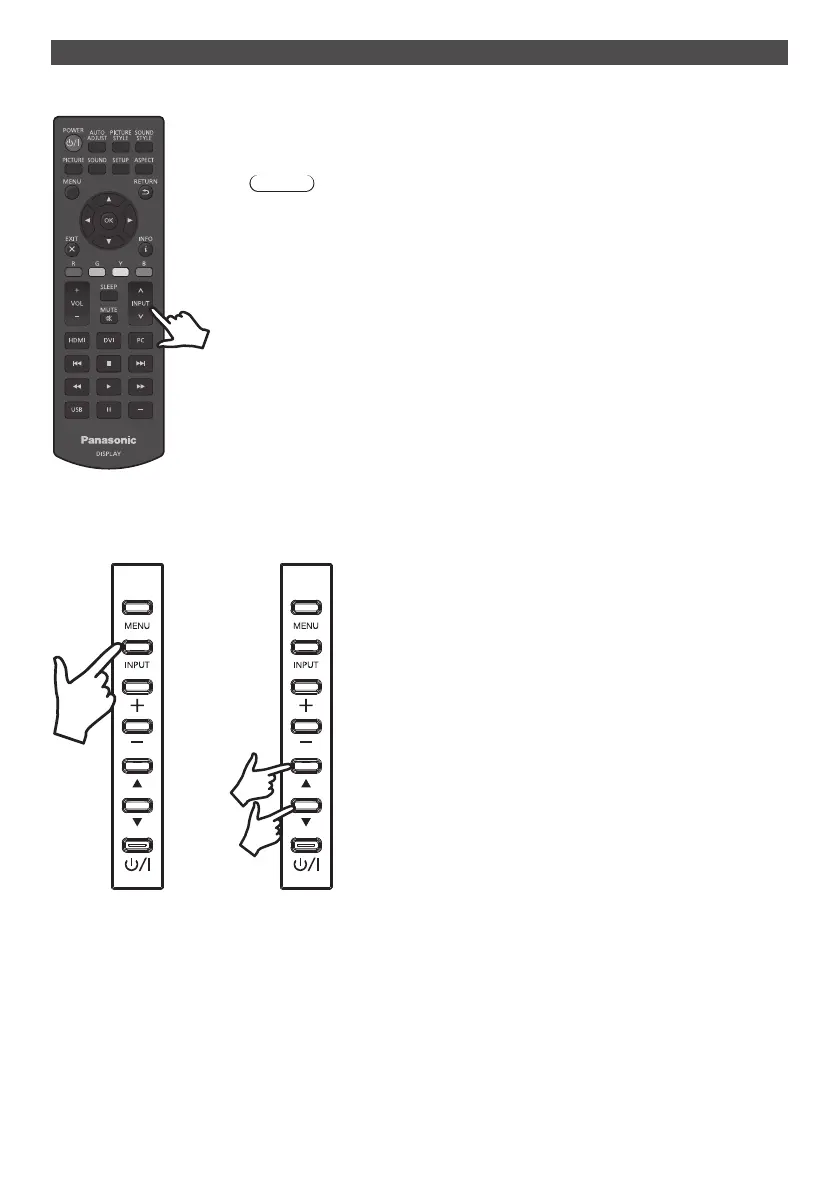
■ Select with the [INPUT] button of the remote control
Youcanselectyourtargetinputsourcebyusingthe[˄/˅]buttonoftheremotecontrol
where [INPUT] is indicated.
Options of the input source are [HDMI1], [HDMI2], [DVI-D], [PC], and [USB].
Note
●
You can also directly select [HDMI1] / [HDMI2] / [DVI-D] / [PC] / [USB] by using the
[HDMI] / [DVI] / [PC] / [USB] buttons of the remote control.
■ Select with the [INPUT] button of the unit
Pressing the [INPUT] button of the unit will show the OSD menu of the input source. You can select your target input
sourcebyusingtheup(▲)/down(▼)buttons.
Options of the input source are [HDMI1], [HDMI2], [DVI-D], [PC], and [USB]. Pressing the [INPUT] button once again
will show the selected input source.
The selected input source will be automatically entered after few seconds.






 To Next Page