35
English
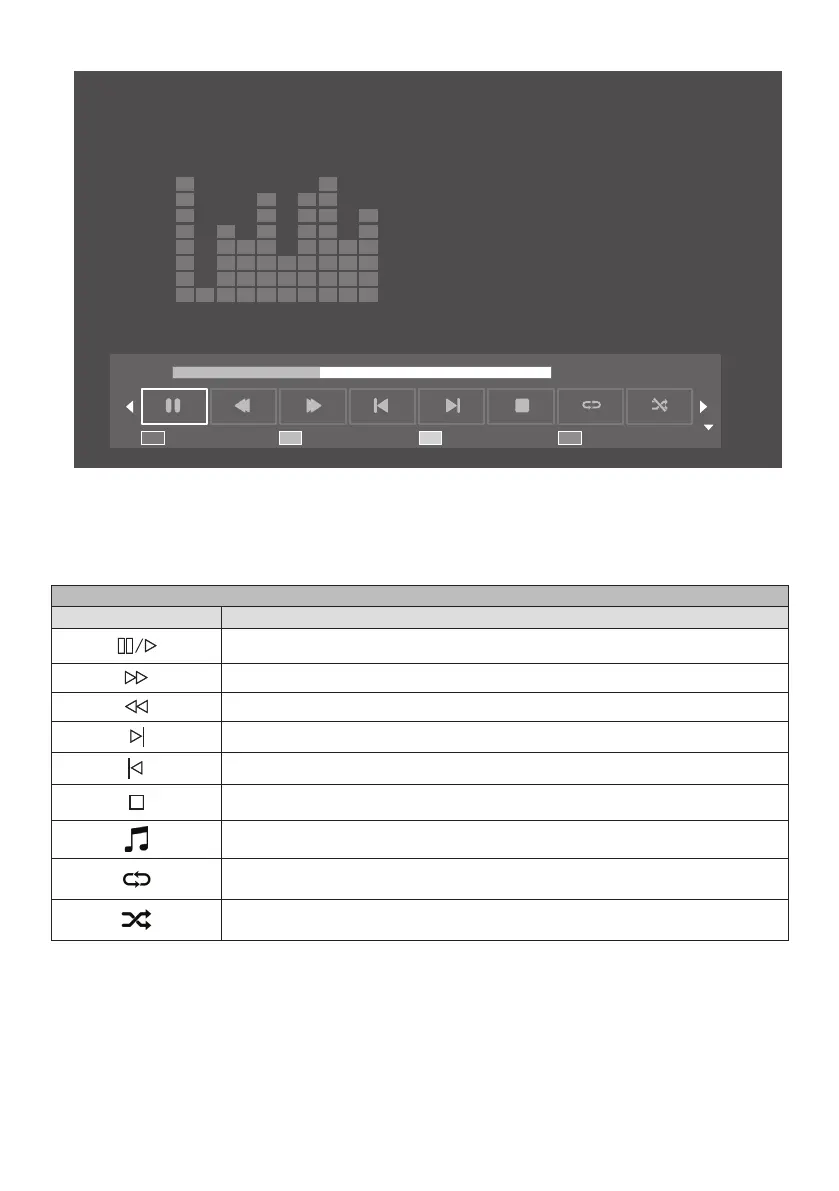
■ Play the playlist
Playlist Info.
00:01:13 / 00:03:07
Close
Whentheplaylistisplaying,youcanusetheplayguidethatoffersadditionalfunctions.Usetheup(▲)buttonto
display the functions.
Usetheleft(◄)andtheright(►)buttonstoselectthefunctions.
Use the [OK] button to confirm the selection. Use the [Info.] button to hide the play guide.
Functions of play guide
Remote key Function
Pause / Play
Forward (Cannot be used in the [PHOTO] mode)
Rewind (Cannot be used in the [PHOTO] mode)
Next picture / track / file
Previous picture / track / file
Stop the playback
Play / stop the music in the background (Can be used only in the [PHOTO] mode. When
this function cannot be used, the button will not work even if you press it.)
Repeat: All files will be repeatedly and continuously played.
Shuffle: All files will be randomly played.








 To Next Page