23
English
Mounting sequence of the speaker
Mount the speaker (supplied).
A cross slot screw driver is required for assembling. Therefore, arrange it in advance.
1
Preparing the display
Work in a team of 4 persons when installing.
Spreading out a soft cloth, etc., place the display with the screen facing down.
●
Be careful not to damage the display screen, for example, by dragging it.
●
When placing the display with the screen facing down, or lifting it up, never hold or put pressure on the front
panel. Inside of the front panel may be damaged.
2
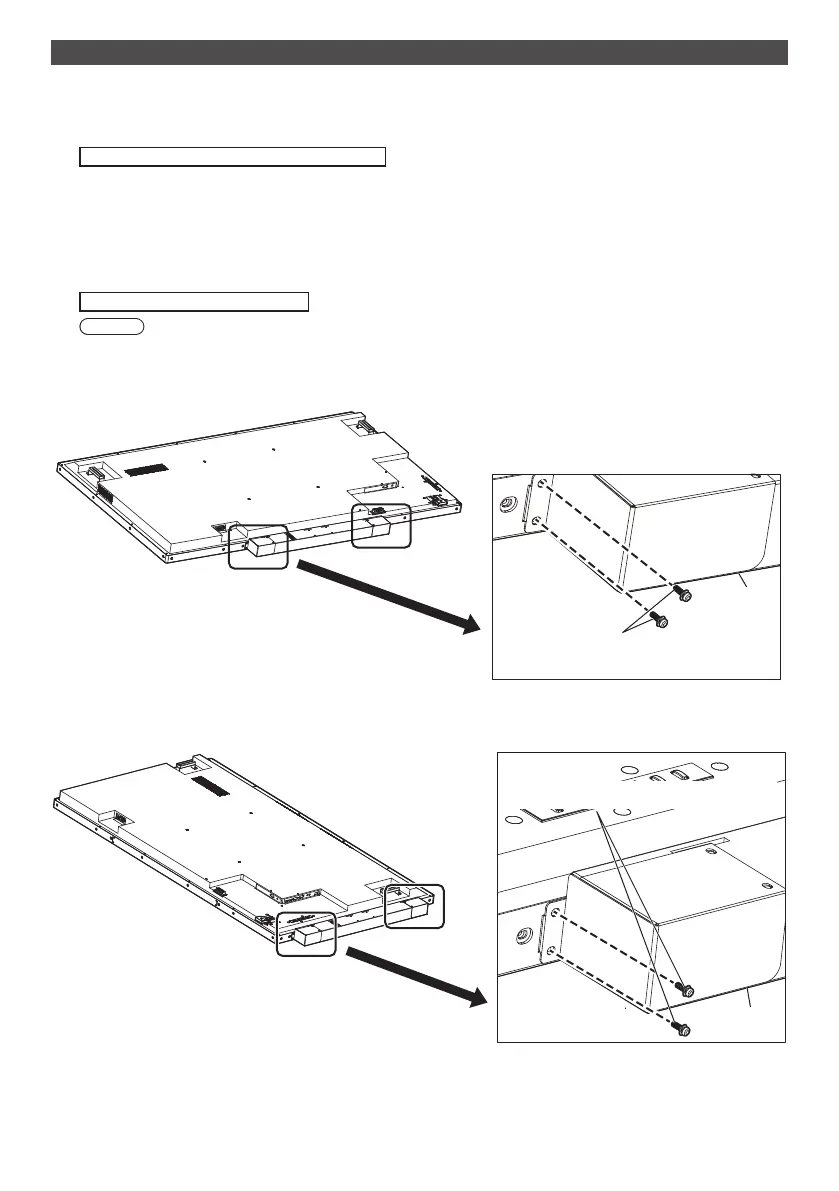
As shown in the figure below, mount the speaker on the display.
Fix the speaker with 2 speaker mounting clasps and 4 speaker mounting screws (supplied).
Tightening torque: 0.5 to 0.8 N•m
Note
●
Speaker mounting clasps are assembled with the speaker and supplied with it.
■ In the case of lateral placement
Speaker
Screws for mounting the speaker
(M3)
*
Fix the opposite side in the symmetric position.
■ In the case of vertical placement
Speaker
*
This side is the top side
of the unit.
Screws for mounting the speaker (M3)
*
Fix the opposite side in the symmetric position.





 To Next Page