33
English
4
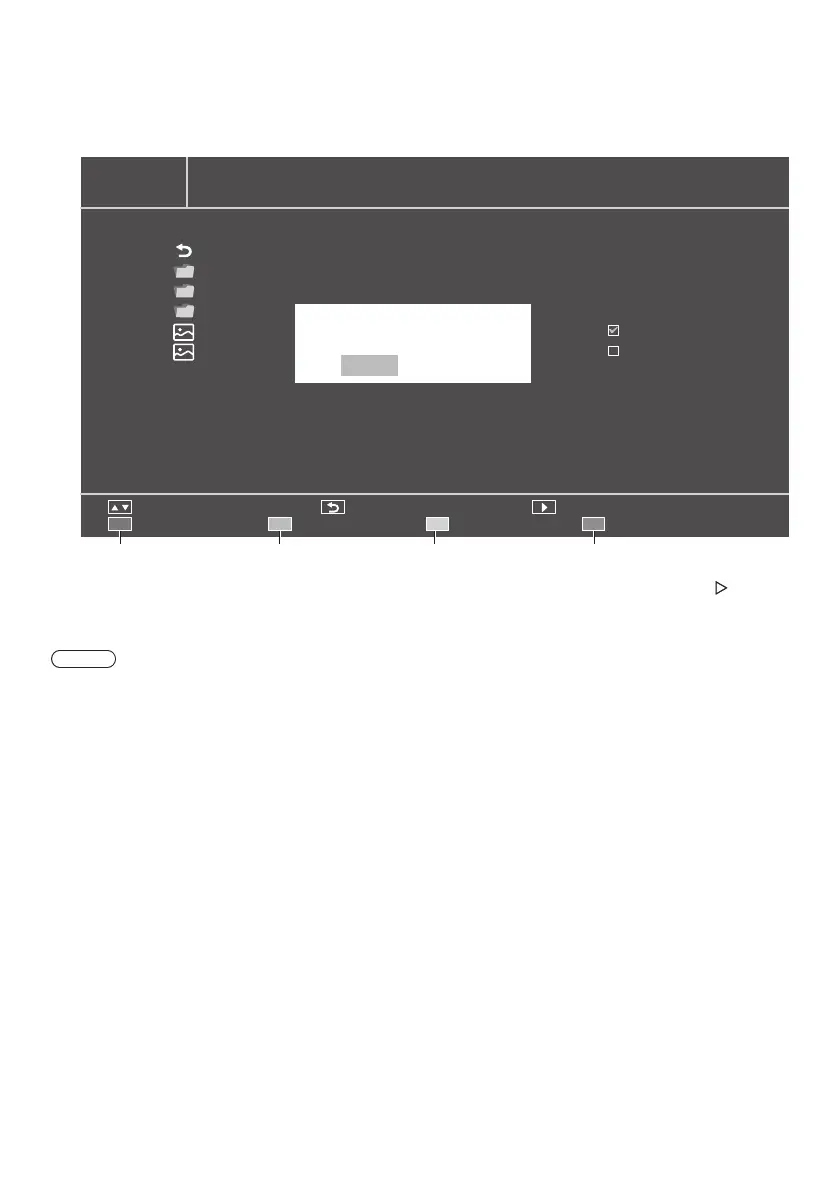
Use the media operation buttons and select an option of the playlist menu.
•
Red: Cancel and return to the previous menu.
•
Green: Load the existing playlist.
•
Yellow: Clear all files selected in the current playlist.
•
Blue: Save the selected files in the playlist.
PHOTO
C:\ 1 / 1
Move Back Play
Cancel Load Clear Save
FileName
Back
Movie
Picture
Music
image01.jpg
image02.bmp
Save the playlist?
Yes No
Red Green Yellow Blue
5
When the playlist is not defined, pressing either the red button (Play all), [OK] button, and Play button ( ) will play
all files in the current folder.
Note
●
Changing to another input source without saving the playlist will delete the playlist being prepared.






 To Next Page