EasyManua.ls Logo

Pandora Mini v3 - User Manual

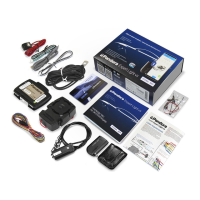
Pandora Mini v3
25 pages
Print Icon
To Next Page IconTo Next Page
Loading...
Pandora would like to thank you for choosing our
service-security system
Pandora Mini v3 is a car service-security system, built for cars with on-
board voltage of 12V.
It is a complex engineering product, which includes unique and modern
software and hardware solutions. When building the Pandora Mini v3 we were
using the most up-to-date electronics from world’s best manufacturers. The
device is built using high-precision mounting and control machinery, thus we
guarantee highest possible quality, reliability and stable technical characteris-
tics for the whole operation period.
Elegant and advanced technical design and unique ergonomic interaction
algorithms that are used in the Pandora Mini v3 allow enhancing your car with
fantastic set of intuitive and useful functions.
This device has limited external factors resistance. It should not be subjected to water beyond occasional splatter, or operated in
temperatures outside -40° to +80° C range.
Our web site: www.pandorainfo.com
Customer support: support@pandorainfo.com
WARNING! It Is stRoNGly AdvIsed to hAve pRofessIoNAl cAR mechANIc IN-
stAllING the system. ANy cAR electRoNIcs INstAlleR should be Able to INstAll
the pANdoRA mINI v3 usING INstAllAtIoN scheme IN thIs mANuAl ANd AlARm
studIo softWARe. most feAtuRes ARe hIGhly depeNdeNt oN competeNt IN-
stAllAtIoN. ouR systems ARe thoRouGhly tested foR quAlIty, so If A feAtuRe
fAIls to pRoduce expected Result, most lIkely the pRoblem Is IN ImpRopeR
INstAllAtIoN.
Product is in conformity with Electromagnetic Compatibility
Directive EMC 2004/108/EC and R&TTE Directive 1999/5/EC
Question and Answer IconNeed help?

Do you have a question about the Pandora Mini v3 and is the answer not in the manual?

Pandora Mini v3 Specifications

General IconGeneral
BrandPandora
ModelMini v3
CategorySecurity System
LanguageEnglish

Summary

System Set Components

System Features Overview

Base Unit Features

Details the base unit's capabilities, connectivity, and integrated sensors.

Control and Monitoring Systems

Explains vehicle zone control via analog and digital connections.

Mobile Application Guide

App Installation and Setup

Instructions for downloading and installing the Pandora BT mobile application.

Mobile Device Pairing

Steps to pair a mobile device with the security system via Bluetooth.

Using the Mobile Application

How to operate the system using the Pandora BT mobile application.

System Control Operations

Arming and Disarming Procedures

Explains the process and confirmation signals for arming and disarming the system.

VALET Button Operations

How to arm the system using the VALET button.

Radio Tag Control

How to control the system using the radio tag.

Hands-Free Mode Usage

Using Hands-Free mode with a remote tag or mobile phone.

Service (VALET) Mode

Service Mode Control Methods

Switching service mode on/off via radio tag or immobilizer button.

Emergency System Control

Emergency Disarming with VALET Button

Steps to disarm the system using the VALET button and PIN-code.

Anti-theft Function Control

Emergency Deactivation;Activation

Temporarily deactivating/activating immobilizer and anti-hi-jack functions.

Wiring Diagram

System Installation Guide

General Installation Requirements

Guidelines for securely installing system components inside the vehicle.

Wiring Description Details

Detailed explanation of each wire's function and connection.

System Configuration and Programming

Entering and Exiting Programming Mode

Instructions for entering and exiting the system's programming mode.

Pandora Alarm Studio and Programming Menu

Navigating the Programming Menu

Overview of the programming menu and its structure.

Programming Levels Table

Specific Programming Levels

Device Pairing and Settings

Pairing devices, changing PIN, factory reset, idle speed recording.

Level №10 - Bluetooth Device Management and Firmware Updates

Manage Bluetooth Devices

How to pair/remove/update Bluetooth devices.

Update Bluetooth Firmware

Instructions for updating firmware of built-in Bluetooth modem or additional devices.

Level №11 - Immobilizer PIN-code Programming

Selecting Programming Buttons

How to select buttons for programming the immobilizer PIN-code.

Entering and Confirming PIN-code

Procedure to enter and confirm the immobilizer PIN-code.

Level №13;№15 - Emergency Function Control

Level №50 - Mobile Phone Pairing

Level №100 - Exit Programming Menu

Additional Devices Overview

System Modules Layout

Warranty Obligations and Certificates

Installation Certificate Details

Document for installer to certify system installation.

Acceptance Certificate

Warranty Card Information

Related product manuals