16
SIM card and battery
About your SIM card
Whenyousubscribetoyournetworkoperator,youreceiveaSIM(SubscriberIdentityModule)
cardcontainingyourregistrationinformation,PINcode,etc.
Likeacreditcard,itshouldbekeptsecureandhandledcarefully.Donotbend,scratchorexpose
it to moisture. Avoid static electricity.
To avoid corrupting your SIM card’s memory, always turn off your phone before removing or
inserting your SIM card.
About your battery
YourphoneusesaLi-Ionbattery.Makesuretouseanauthorizedbatteryandchargeronly.For
more details, please inquire at your nearest dealer.
note:YourphoneispoweredbyaLithiumIon(Li-Ion)battery.Unlikeotherformsofbatterytechnology,youcan
recharge your battery while some charge remains without reducing your phone’s autonomy due to the “battery
memoryeffect”inherentinthosetechnologies.
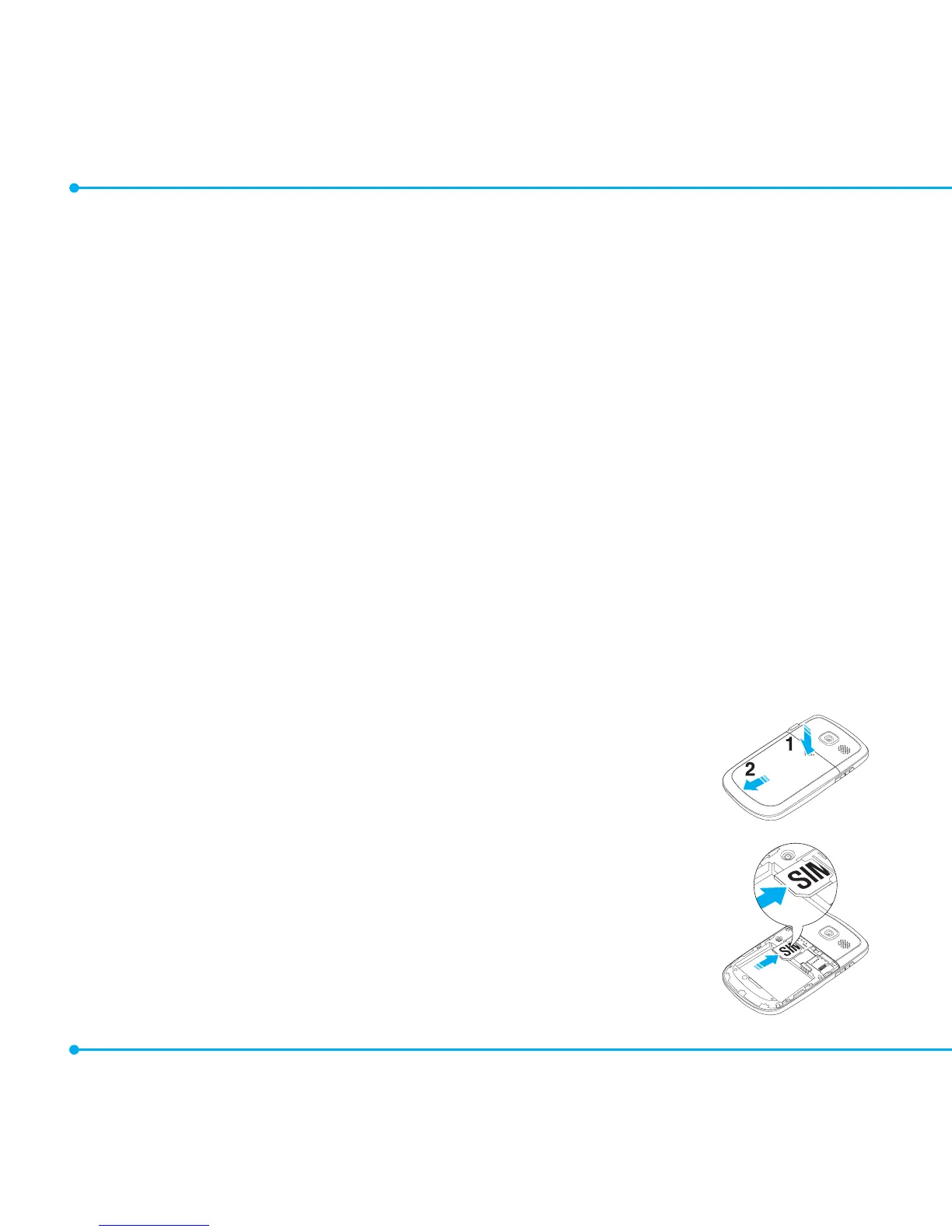
Installing/removing SIM card and battery
1. Remove the battery cover from the unit.
Toremovethebatterycover,pushthebatterycoverdownward(1)and
slideit(2)asshownright.
2. Insert the SIM card into the slot. The gold contacts of the SIM card
should go against the metal contacts of the phone.



 To Next Page