56
Camera
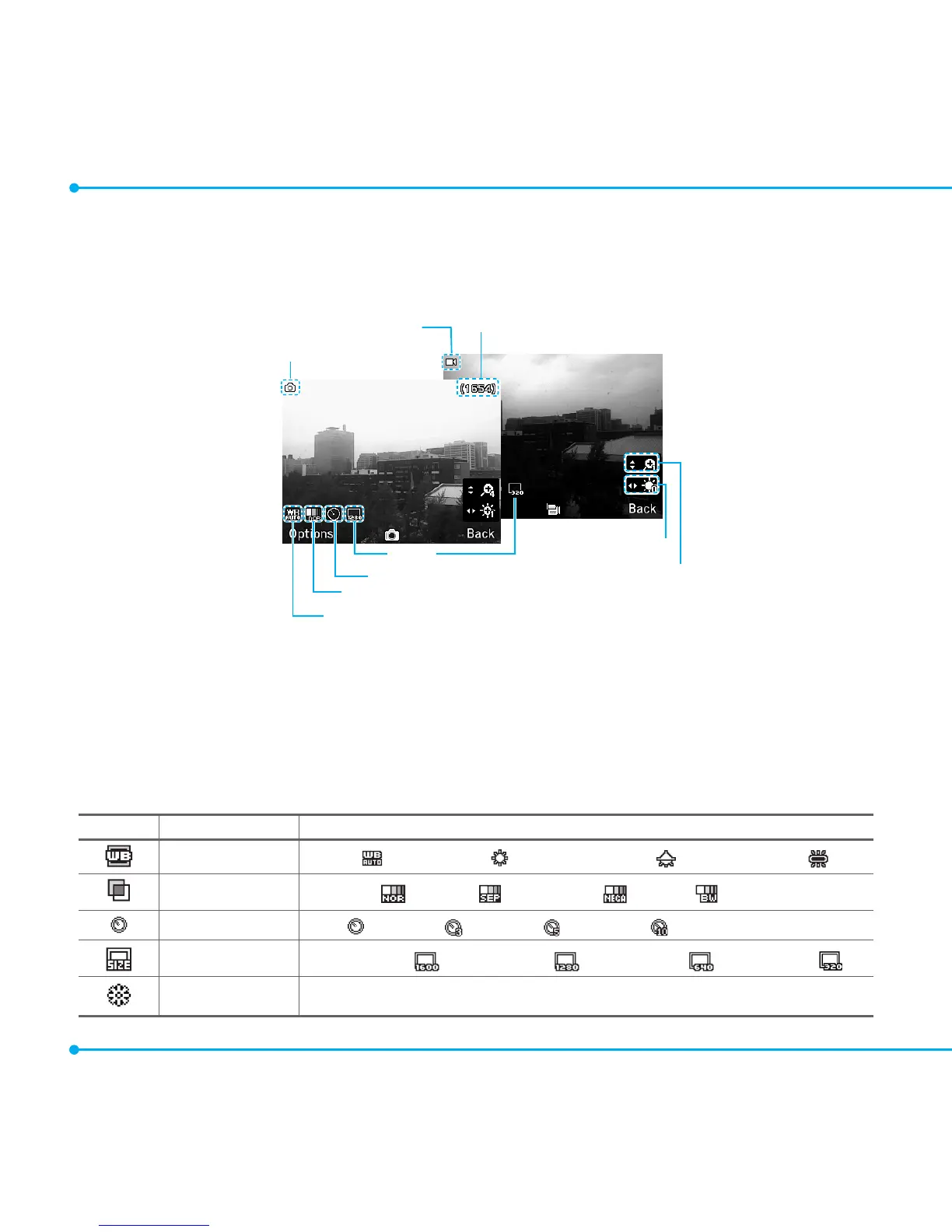
You can take pictures and record movies using the built-in camera. The photos and video clips
canbesavedandsentviamultimediamessages,Bluetooth,andOnlineLocker.
Camera mode
Pictures Remaining
Zoom
Brightness
Self Timer
Effect
White Balance
Size
Videomode
Changing camera options
1. Select Menu > Tools or Menu > My Stuff > Tools.
2. Select Camera.
3.SelectOptions > Settings to change settings before taking a picture.
Camera menu options
Icons Name Description
White Balance
Auto( ),DayLight( ),Incandescent( ),Fluorescent( )
Effect
Normal( ),Sepia( ),Negative( ),B&W( )
Self Timer
Off( ),3secs( ),5secs( ),10secs( )
PictureSize
1600x1200( ),1280x960( ),640x480( ),320x240( )
Advanced PictureQuality,SaveLocation,ShutterSound,TimerSound



 To Next Page