44
<Checking the battery status>
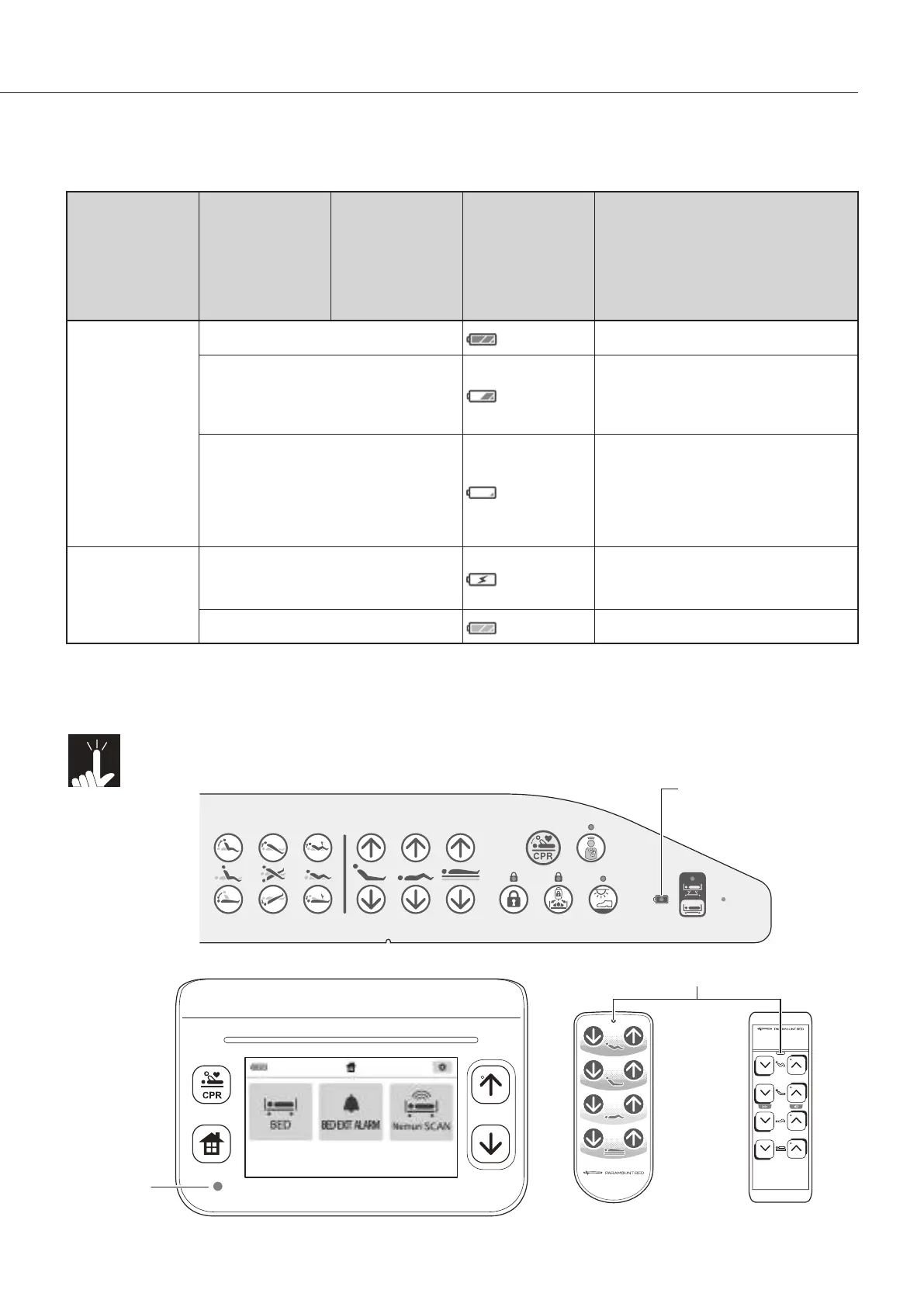
g The battery status is displayed as shown in the table below.
Power status
Battery status
indicator lamp on
the side-rail
integrated panel
Power lamp
*2)
on
the BED Navi
(accessory) /
handheld
controller
*1)
/
handheld controller
(accessory)
Battery status
indication on the
BED Navi
(accessory)
Battery status
The power plug is
not inserted into
the outlet or power
failure is occurring
Lights in green
(blue)
Remainingbatterypowerissucient.
Flashes green
(onfor2seconds→ofor2seconds)
(blue)
Remaining battery power is low. Since
bed operation may become impossible,
stop using and recharge the battery
immediately.
Flashes green
(onfor0.1seconds→ofor3.9sec-
onds)
(blue)
Remainingbatterypowerisinsucient.
Buttons on the side-rail integrated
panel, BED Navi (accessory), handheld
controller
*1)
, and handheld controller
(accessory) do not work. Recharge the
battery immediately.
The power plug is
inserted into the
outlet
Flashes green
(onfor3.9seconds→ofor0.1sec-
onds)
Battery is being recharged.
Lights in green
(yellow)
Battery recharging is completed.
*1) Type with handheld controller only.
*2) If an error occurs, the error status is displayed (flashes orange) preferentially. (Excluding type with
handheld controller)
Note!
To extend the battery life, recharge the battery as frequently as possible before the indicator
showsthattheremainingpowerisloworinsucient(seethetableabove).
Side-rail integrated panel
Battery status indicator lamp
Power lamp
Handheld controller
(accessory)
Handheld controller
Power lamp
BED Navi (accessory)



 To Next Page