6
7
73
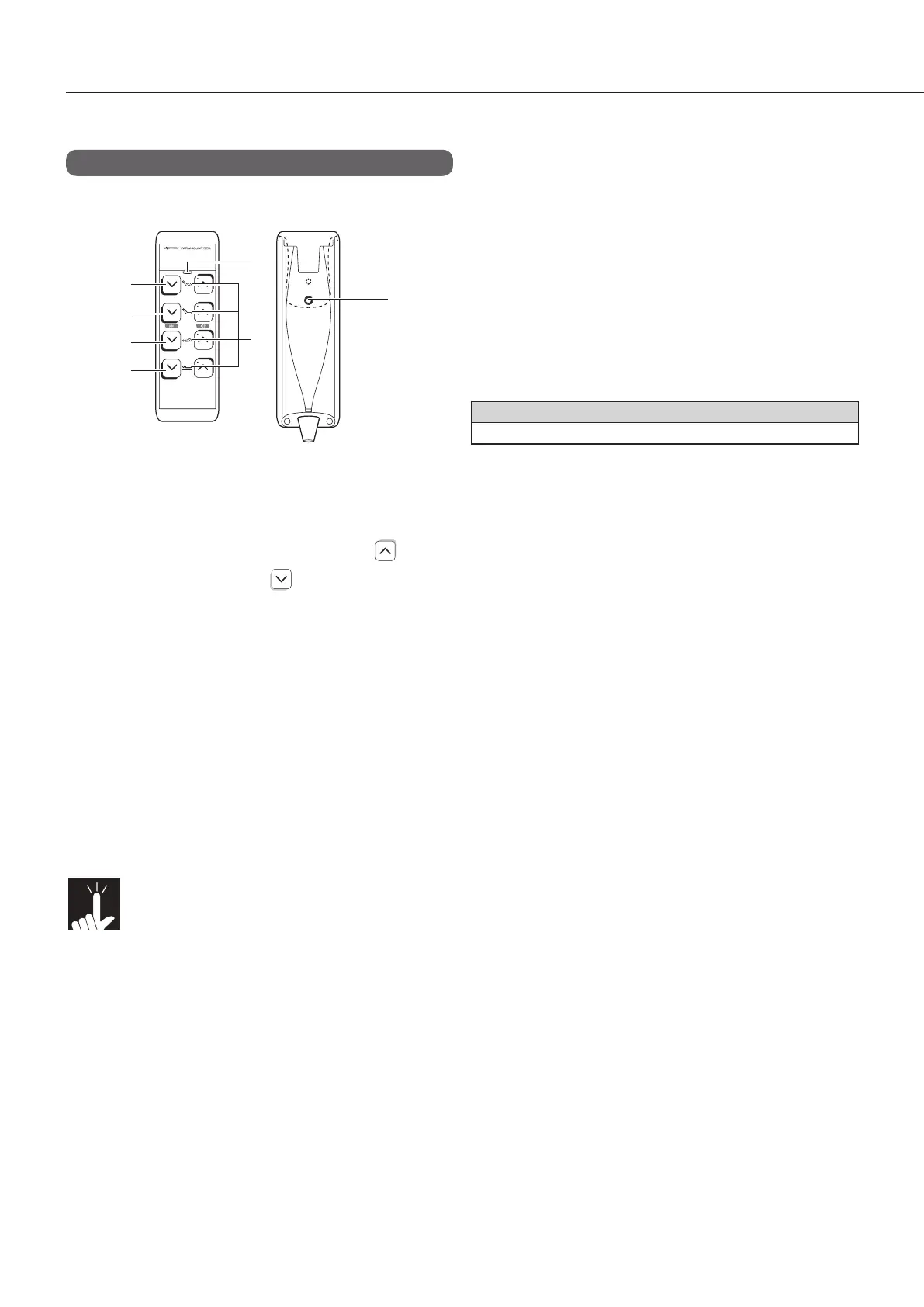
Handheld controller
<Part names and functions>
You can adjust the angle of the head and knee
sections and the bed height with no increments with
the handheld controller.
The handheld controller is intended to be operated
by patients.
However, the function selection buttons (see p. 75
to 77) are not intended to be used by patients.
* For detaching and attaching, see p. 46 and
47.
Model No.
RC-1850E
g Operation buttons
n To raise the part to operate, press the button,
and to lower it, press the button.
1 Head and knee coordination buttons
............................................. Adjust the angle of
the head/knee
sections.
2 Head buttons ....................... Adjust the angle of
the head section.
3 Knee buttons ....................... Adjust the angle of
the knee section.
4 Height adjustment buttons ... Adjust the bed
height.
Note!
n Press the operation button to operate
the bed and release the button to stop
the operation at its position.
n Press two or more operation and set-
tings buttons simultaneously to stop
the operation.
n If you stopped the operation by press-
ing two or more buttons simultaneous-
ly, remove your hands from all buttons
to perform the operation again.
g Settings button
5 Settings button
.....Enables you to change the various settings
with the operation button.
g Indicator lamps
6 Power lamp
.....Indicates the power supply status for the bed.
On (green) : Normal power on status.
Off : The power plug or
handheld controller plug is
disconnected, or there is a
power failure or
disconnection.
Flashing (orange) : Indicates a problem such
as disconnection or
contact with an object.
Take action in reference to
“1. Troubleshooting” (see
p. 95 to 98).
* The lamp also flashes green depending on
the remaining power of the battery (for
details, see p. 44).
7 Operation selection lamp
.....Indicates whether the operation button is
enabled or disabled.
On (white) : Operation is enabled.
Off : The power is off or the operation is
disabled.
3 SUITABLE PRODUCTS



 To Next Page